
Python library for Google Lens OCR and Translation using the crupload endpoint.
Verified details
These details have been verified by PyPIProject links
GitHub Statistics
Maintainers

Project description
Chrome Lens API for Python
English | Русский




[!IMPORTANT] Major Rewrite (Version 3.1.0+) This library has been completely rewritten from the ground up. It now uses a modern asynchronous architecture (
async/await) and communicates directly with Google's Protobuf endpoint for significantly improved reliability and performance.Please update your projects accordingly. All API calls are now
async.
[!Warning] Also, please note that the library has been completely rewritten, and I could have missed something, or not spelled it out. If you notice an error, please let me know in Issues
This project provides a powerful, asynchronous Python library and command-line tool for interacting with Google Lens. It allows you to perform advanced Optical Character Recognition (OCR), get segmented text blocks (e.g., for comics), translate text, and get precise word coordinates.
🚀 Quick Start for Windows Users
If you don't want to install Python, you can download the standalone lens_scan-windows-amd64.exe from the Releases section.
[!WARNING] Antivirus False Positives: Some antivirus software (like Windows Defender) might flag the compiled
.exeas a threat (e.g.,Trojan:Win32/Wacatac.H!ml). This is a false positive common with Nuitka/PyInstaller binaries. The tool is open-source; you can inspect the code and build it yourself if you have concerns.
📸 Automated ShareX Setup
If you use ShareX, you can fully automate the setup with one command:
# Using the installed package:
lens_scan --setup-sharex

# Or using the standalone .exe:
lens_scan-windows-amd64.exe --setup-sharex
This will automatically configure a hotkey (Ctrl + O) and the necessary actions to use Google Lens OCR.
✨ Key Features
- Modern Backend: Utilizes Google's official Protobuf endpoint (
v1/crupload) for robust and accurate results. - Asynchronous & Safe: Built with
asyncioandhttpx. Includes a built-in semaphore to prevent API abuse and IP bans from excessive concurrent requests. - Powerful OCR & Segmentation:
- Extract text from images as a single string.
- Get text segmented into logical blocks (paragraphs, dialog bubbles) with their own coordinates.
- Get individual text lines with their own precise geometry.
- Built-in Translation: Instantly translate recognized text into any supported language.
- Versatile Image Sources: Process images from a file path, URL, bytes, PIL Image object, or NumPy array.
- Text Overlay: Automatically generate and save images with the translated text rendered over them(works poorly, alas, no time to do better).
- Feature-Rich CLI: A simple yet powerful command-line interface (
lens_scan) for quick use. - Proxy Support: Full support for HTTP, HTTPS, and SOCKS proxies.
- Clipboard Integration: Instantly copy OCR or translation results to your clipboard with the
--sharexflag. - Flexible Configuration: Manage settings via a
config.jsonfile, CLI arguments, or environment variables.
🚀 Installation
You can install the package using pip:
pip install chrome-lens-py
To enable clipboard functionality (the --sharex flag), install the library with the [clipboard] extra:
pip install "chrome-lens-py[clipboard]"
Or, install the latest version directly from GitHub:
pip install git+https://github.com/bropines/chrome-lens-py.git
🚀 Usage
🛠️ CLI Usage (`lens_scan`)
The command-line tool provides quick access to the library's features directly from your terminal.
lens_scan <image_source> [ocr_lang] [options]
<image_source>: Path to a local image file or an image URL.[ocr_lang](optional): BCP 47 language code for OCR (e.g., 'en', 'ja'). If omitted, the API will attempt to auto-detect the language.
Options
| Flag | Alias | Description |
|---|---|---|
--translate <lang> |
-t |
Translate the OCR text to the target language code (e.g., en, ru). |
--translate-from <lang> |
Specify the source language for translation (otherwise auto-detected). | |
--translate-out <path> |
-to |
Save the image with the translated text overlaid to the specified file path. |
--output-blocks |
-b |
Output OCR text as segmented blocks (useful for comics). Incompatible with --get-coords and --output-lines. |
--output-lines |
-ol |
Output OCR text as individual lines with their geometry. Incompatible with --output-blocks and --get-coords. |
--get-coords |
Output recognized words and their coordinates in JSON format. Incompatible with --output-blocks and --output-lines. |
|
--sharex |
-sx |
Copy the result (translation or OCR) to the clipboard. |
--ocr-single-line |
Join all recognized OCR text into a single line, removing line breaks. | |
--config-file <path> |
Path to a custom JSON configuration file. | |
--update-config |
Update the default config file with settings from the current command. | |
--font <path> |
Path to a .ttf font file for the text overlay. |
|
--font-size <size> |
Font size for the text overlay (default: 20). | |
--proxy <url> |
Proxy server URL (e.g., socks5://127.0.0.1:9050). |
|
--logging-level <lvl> |
-l |
Set logging level (DEBUG, INFO, WARNING, ERROR). |
--help |
-h |
Show this help message and exit. |
Examples
1. Basic OCR and Translation
Auto-detects the source language on the image and translates it to English. This is the most common use case.
lens_scan "path/to/your/image.png" -t en
2. Get Segmented Text Blocks (for Comics/Manga)
Ideal for images with multiple, separate text boxes. This command outputs each recognized text block individually, making it perfect for translating comics or complex documents.
lens_scan "path/to/manga.jpg" ja -b
-bis the alias for--output-blocks.
3. Get Individual Text Lines
Outputs each recognized line of text along with its geometry.
lens_scan "path/to/document.png" --output-lines
-olis the alias for--output-lines.
4. Get Coordinates of All Individual Words
Outputs a detailed JSON array containing every single recognized word and its precise geometric data (center, size, angle). Useful for programmatic analysis or custom overlays.
lens_scan "path/to/diagram.png" --get-coords
5. Translate, Save Overlay, and Copy to Clipboard
A power-user workflow. This command will:
- OCR a Japanese image.
- Translate it to Russian.
- Save a new image named
translated_manga.pngwith the Russian text rendered on it. - Copy the final translation to your clipboard.
lens_scan "path/to/manga.jpg" ja -t ru -to "translated_manga.png" -sx
6. Process an Image from a URL as a Single Line
Fetches an image directly from a URL and joins all recognized text into one continuous line, removing any line breaks.
lens_scan "https://i.imgur.com/VPd1y6b.png" en --ocr-single-line
7. Use a SOCKS5 Proxy
All requests to the Google API will be routed through the specified proxy server, which is useful for privacy or bypassing region restrictions.
lens_scan "image.png" --proxy "socks5://127.0.0.1:9050"
👨💻 Programmatic API Usage (`LensAPI`)
[!IMPORTANT] The
LensAPIis fully asynchronous. All data retrieval methods must be called withawaitfrom within anasyncfunction.
Basic Example (Full Text)
import asyncio
from chrome_lens_py import LensAPI

async def main():
    # Initialize the API. You can pass a proxy, region, etc. here.
    # By default, an API key is not required.
    api = LensAPI()

    image_source = "path/to/your/image.png" # Or a URL, PIL Image, NumPy array

    try:
        # Process the image and get a single string of text
        result = await api.process_image(
            image_path=image_source,
            ocr_language="ja",
            target_translation_language="en"
        )

        print("--- OCR Text ---")
        print(result.get("ocr_text"))

        print("\n--- Translated Text ---")
        print(result.get("translated_text"))

    except Exception as e:
        print(f"An error occurred: {e}")

if __name__ == "__main__":
    asyncio.run(main())
Working with Different Image Sources
The process_image method seamlessly handles various input types.
from PIL import Image
import numpy as np

# ... inside an async function ...

# From a URL
result_url = await api.process_image("https://i.imgur.com/VPd1y6b.png")

# From a PIL Image object
with Image.open("path/to/image.png") as img:
    result_pil = await api.process_image(img)

# From a NumPy array (e.g., loaded via OpenCV)
with Image.open("path/to/image.png") as img:
    numpy_array = np.array(img)
    result_numpy = await api.process_image(numpy_array)
Getting Segmented Text Blocks
To get text segmented into logical blocks (like dialog bubbles in a comic), use the output_format='blocks' parameter.
import asyncio
from chrome_lens_py import LensAPI

async def process_comics():
    api = LensAPI()
    image_source = "path/to/manga.jpg"

    result = await api.process_image(
        image_path=image_source,
        output_format='blocks' # Get segmented blocks instead of a single string
    )

    # The result now contains a 'text_blocks' key
    text_blocks = result.get("text_blocks", [])
    print(f"Found {len(text_blocks)} text blocks.")

    for i, block in enumerate(text_blocks):
        print(f"\n--- Block #{i+1} ---")
        print(block['text'])
        # block also contains 'lines' and 'geometry' keys

asyncio.run(process_comics())
Getting Individual Lines and their Geometry
To get each recognized line of text as a separate item, use the output_format='lines' parameter.
import asyncio
from chrome_lens_py import LensAPI

async def process_document_lines():
    api = LensAPI()
    image_source = "path/to/document.png"

    result = await api.process_image(
        image_path=image_source,
        output_format='lines' # Get individual lines with their geometry
    )

    # The result now contains a 'line_blocks' key
    line_blocks = result.get("line_blocks", [])
    print(f"Found {len(line_blocks)} lines.")

    for i, line in enumerate(line_blocks):
        print(f"\n--- Line #{i+1} ---")
        print(f"Text: {line['text']}")
        print(f"Geometry: {line['geometry']}")

asyncio.run(process_document_lines())
Getting Fully Detailed Text Structures
To get a complete, nested structure of paragraphs, lines, and words with geometry at each level, use output_format='detailed'.
import asyncio
from chrome_lens_py import LensAPI

async def process_with_details():
    api = LensAPI()
    image_source = "path/to/document.png"

    result = await api.process_image(
        image_path=image_source,
        output_format='detailed' # Get the fully nested structure
    )

    # The result now contains a 'detailed_blocks' key
    detailed_blocks = result.get("detailed_blocks", [])
    print(f"Found {len(detailed_blocks)} detailed blocks.")

    for i, block in enumerate(detailed_blocks):
        print(f"\n--- Block #{i+1} ---")
        print(f"  Geometry: {block['geometry']}")
        for j, line in enumerate(block['lines']):
            print(f"    --- Line #{j+1}: '{line['text']}' ---")
            for k, word in enumerate(line['words']):
                 print(f"      - Word: '{word['text']}', Geometry: {word['geometry']}")

asyncio.run(process_with_details())
LensAPI Constructor
api = LensAPI(
    api_key: str = "YOUR_API_KEY_OR_DEFAULT",
    client_region: Optional[str] = None,
    client_time_zone: Optional[str] = None,
    proxy: Optional[str] = None,
    timeout: int = 60,
    font_path: Optional[str] = None,
    font_size: Optional[int] = None,
    max_concurrent: int = 5
)
process_image Method
result: dict = await api.process_image(
    image_path: Any,
    ocr_language: Optional[str] = None,
    target_translation_language: Optional[str] = None,
    source_translation_language: Optional[str] = None,
    output_overlay_path: Optional[str] = None,
    ocr_preserve_line_breaks: bool = True,
    output_format: Literal['full_text', 'blocks', 'lines', 'detailed'] = 'full_text'
)
output_format: Controls the structure of the OCR output.'full_text'(default) returns a single string inocr_text.'blocks'returns a list intext_blocks.'lines'returns a list inline_blocks.'detailed'returns a fully nested structure indetailed_blocks.ocr_preserve_line_breaks: IfFalseandoutput_formatis'full_text', joins all OCR text into a single line.
The returned result dictionary contains:
ocr_text(Optional[str]): The full recognized text (ifoutput_format='full_text').text_blocks(Optional[List[dict]]): A list of segmented text blocks (ifoutput_format='blocks'). Each block is a dict withtext,lines, andgeometry.line_blocks(Optional[List[dict]]): A list of individual text lines (ifoutput_format='lines'). Each block is a dict withtextandgeometry.translated_text(Optional[str]): The translated text, if requested.word_data(List[dict]): A list of dictionaries for every recognized word with its geometry.detailed_blocks(Optional[List[dict]]): A list of fully structured text blocks (ifoutput_format='detailed'). Each block contains lines, which in turn contain words, with geometry at every level.raw_response_objects: The "raw" Protobuf response object for further analysis.
⚙️ Configuration
Settings are loaded with the following priority: CLI Arguments > config.json File > Library Defaults.
config.json
A config.json file can be placed in your system's default config directory to set persistent options.
- Linux:
~/.config/chrome-lens-py/config.json - macOS:
~/Library/Application Support/chrome-lens-py/config.json - Windows:
C:\Users\<user>\.config\chrome-lens-py\config.json
Example config.json
{
  "api_key": "OPTIONAL! If you don't know what this is, I don't recommend setting it here.",
  "proxy": "socks5://127.0.0.1:9050",
  "client_region": "DE",
  "client_time_zone": "Europe/Berlin",
  "timeout": 90,
  "font_path": "/usr/share/fonts/truetype/dejavu/DejaVuSans.ttf",
  "ocr_preserve_line_breaks": true
}
Sharex Integration
Check sharex.md for more information on how to use this library with ShareX.
❤️ Support & Acknowledgments
- OWOCR: Greatly inspired by and based on OWOCR. Thank you to them for their research into Protobuf and OCR implementation.
- Chrome Lens OCR: For the original implementation and ideas that formed the basis of this library. The update with SHAREX support was originally tested and added by me to chrome-lens-ocr, thanks for the initial implementation and ideas.
- AI Collaboration: A significant portion of the v3.0 code, including the architectural refactor, asynchronous implementation, and Protobuf integration, was developed in collaboration with an advanced AI assistant.
- GOOGLE: For the convenient and high-quality Lens technology.
- Support the Author: If you find this library useful, you can support the author - Boosty
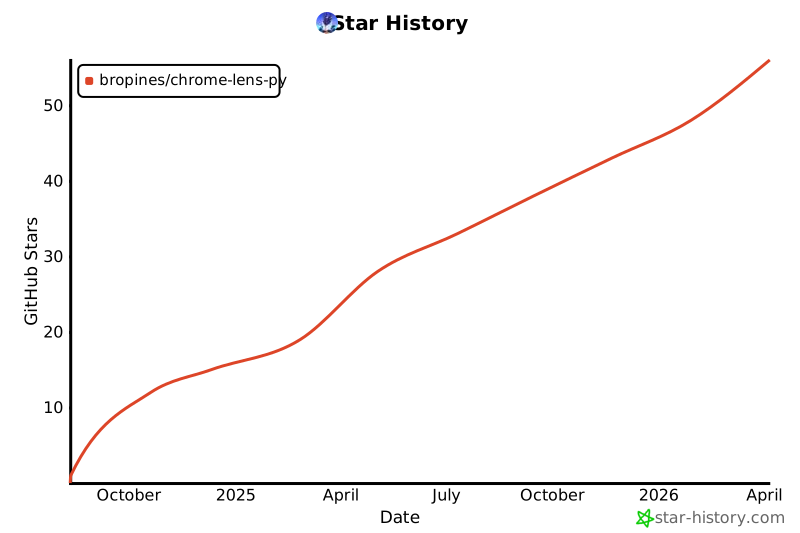
Star History
Disclaimer
This project is intended for educational and experimental purposes only. Use of Google's services must comply with their Terms of Service. The author is not responsible for any misuse of this software.
Project details
Verified details
These details have been verified by PyPIProject links
GitHub Statistics
Maintainers
Release history Release notifications | RSS feed


Download files
Download the file for your platform. If you're not sure which to choose, learn more about installing packages.
Source Distribution
Built Distribution
Filter files by name, interpreter, ABI, and platform.
If you're not sure about the file name format, learn more about wheel file names.
Copy a direct link to the current filters
File details
Details for the file chrome_lens_py-3.4.2.tar.gz.
File metadata
- Download URL: chrome_lens_py-3.4.2.tar.gz
- Upload date:
- Size: 55.4 kB
- Tags: Source
- Uploaded using Trusted Publishing? Yes
- Uploaded via: twine/6.1.0 CPython/3.12.8
File hashes
| Algorithm | Hash digest | |
|---|---|---|
| SHA256 |
7ff3a00adf2d1ca3179079701479e87b950d65c469757e996be9a9df6048ed8e
|
|
| MD5 |
c54a93060a599f3259b956ea223d3152
|
|
| BLAKE2b-256 |
2f64c8af1afb7e92ca91d4252528c014394f334e85633bbc3771b3ef6af8550e
|
Provenance
The following attestation bundles were made for chrome_lens_py-3.4.2.tar.gz:
Publisher:
python-publish.yml on bropines/chrome-lens-py
-
Statement:
-
Statement type:
https://in-toto.io/Statement/v1 -
Predicate type:
https://docs.pypi.org/attestations/publish/v1 -
Subject name:
chrome_lens_py-3.4.2.tar.gz -
Subject digest:
7ff3a00adf2d1ca3179079701479e87b950d65c469757e996be9a9df6048ed8e - Sigstore transparency entry: 1473721821
- Sigstore integration time:
-
Permalink:
bropines/chrome-lens-py@16d4600fef2976170cce813b531121da9375fc88 -
Branch / Tag:
refs/tags/v3.4.2 - Owner: https://github.com/bropines
-
Access:
public
-
Token Issuer:
https://token.actions.githubusercontent.com -
Runner Environment:
github-hosted -
Publication workflow:
python-publish.yml@16d4600fef2976170cce813b531121da9375fc88 -
Trigger Event:
push
-
Statement type:
File details
Details for the file chrome_lens_py-3.4.2-py3-none-any.whl.
File metadata
- Download URL: chrome_lens_py-3.4.2-py3-none-any.whl
- Upload date:
- Size: 86.9 kB
- Tags: Python 3
- Uploaded using Trusted Publishing? Yes
- Uploaded via: twine/6.1.0 CPython/3.12.8
File hashes
| Algorithm | Hash digest | |
|---|---|---|
| SHA256 |
d1ddf912e412623e2c51e02becc34ad20005e3b8d12abf3debcd57e4d29fb08e
|
|
| MD5 |
a67c3c8678ae0b9d28cf3ea24879c782
|
|
| BLAKE2b-256 |
b0360c9dcf85ba3f7a495ec8e4701dce876e13c04262ab8084d11094bbae5b74
|
Provenance
The following attestation bundles were made for chrome_lens_py-3.4.2-py3-none-any.whl:
Publisher:
python-publish.yml on bropines/chrome-lens-py
-
Statement:
-
Statement type:
https://in-toto.io/Statement/v1 -
Predicate type:
https://docs.pypi.org/attestations/publish/v1 -
Subject name:
chrome_lens_py-3.4.2-py3-none-any.whl -
Subject digest:
d1ddf912e412623e2c51e02becc34ad20005e3b8d12abf3debcd57e4d29fb08e - Sigstore transparency entry: 1473721859
- Sigstore integration time:
-
Permalink:
bropines/chrome-lens-py@16d4600fef2976170cce813b531121da9375fc88 -
Branch / Tag:
refs/tags/v3.4.2 - Owner: https://github.com/bropines
-
Access:
public
-
Token Issuer:
https://token.actions.githubusercontent.com -
Runner Environment:
github-hosted -
Publication workflow:
python-publish.yml@16d4600fef2976170cce813b531121da9375fc88 -
Trigger Event:
push
-
Statement type:






