
Collect and share metadata of CI/CD processes.

Project description

cimd is about collecting and sharing structured metadata of CI/CD processes.
cimd is an acronym for Continuous Integration Meta Data.
🤓 Motivation ··· 🚀 Features ··· ⚙️ Installation
🐍 Development ··· 📄 Specification ··· ℹ️ Similar Project
Badges























Motivation
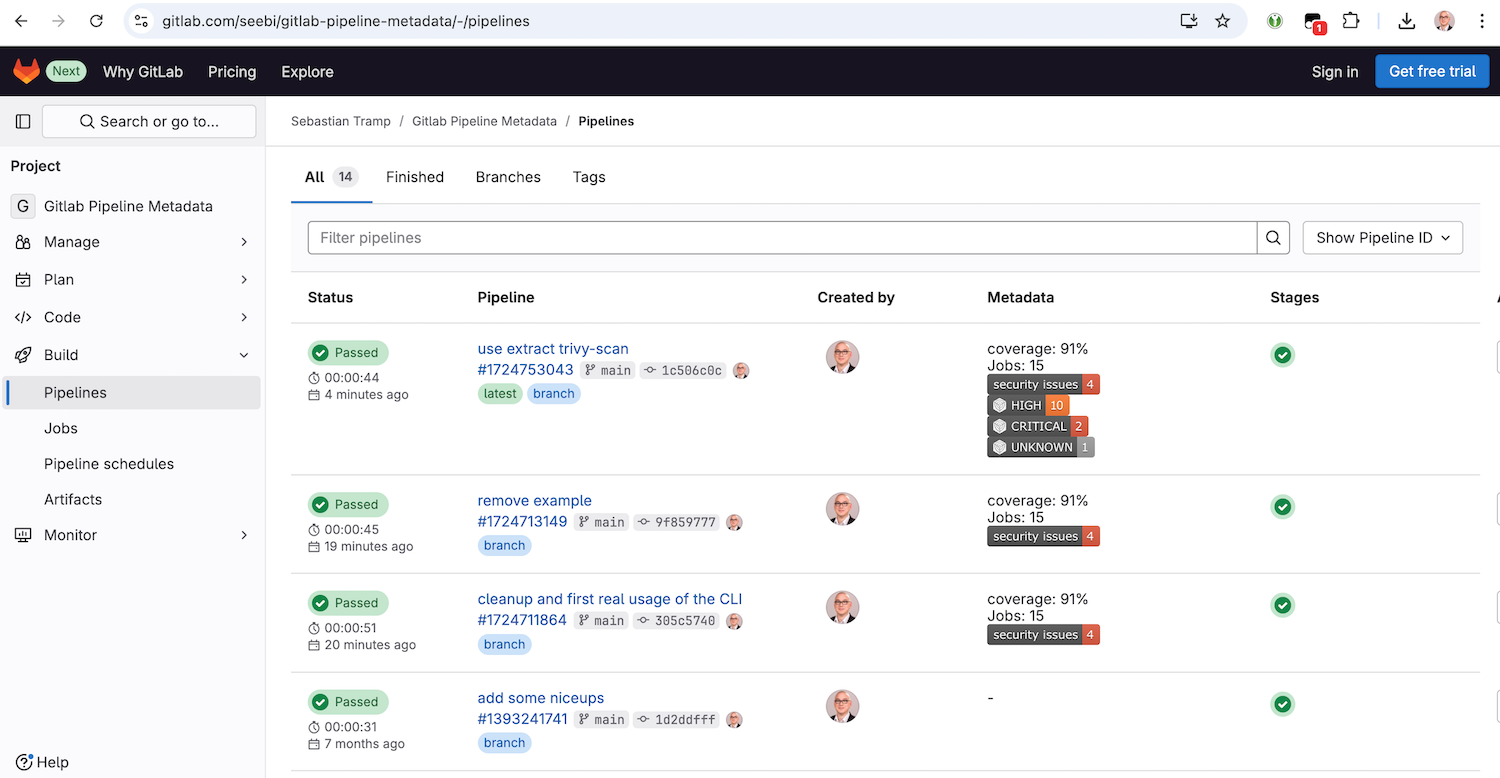
To enable a fast overview of recent pipelines and their metadata in a GitLab-managed repository, this project provides the backend and frontend capabilities to extend the GitLab pipeline list with a custom metadata column.
GitLab already has some metadata mechanisms (e.g. coverage patterns), but they are limited to a specific scope.
The basic idea of this project is to prepare and provide extensible metadata artefacts on a well-known position, which can be easily fetched and parsed by a custom user script to extend the pipeline list with metadata item representations.
Features
cimd contains of a command line tool (CLI) and a frontend user script.
Frontend
The frontend is available as a single JavaScript file in the js folder.
It is currently tested with Tampermonkey on Google Chrome only 🙈.
Once activated, it will extend the pipeline view of your 
Command Line Tool
The CLI is used to prepare and manipulate metadata items in a __metadata__.json document.
It has the following features:
- commands for basic CRUD operations:
add- add a metadata itemdelete- delete metadata itemsget- get data of a metadata itemlist- list metadata items
extractcommand group, which collects commands to extract metadata items from different sources:coverage-xml- extract metadata from a Coverage XML output filesjunit-xml- extract metadata from JUnit XML output filespipeline-logs- extract metadata from gitlab pipeline job logstrivy-scan- extract metadata from Trivy scan JSON output files
extendcommand group, which collects commands to extend metadata items in a special way:gitlab-link- extend metadata items with a raw gitlab artifact linkshields-badge- extend metadata items with a shields.io badge
Installation
Frontend
To install the frontend userscript with a user script manager such as Tampermonkey, you have the following options:
- Recommended: Go to the greasyfork.org entry of cimd and click the install button.
- Create a new script entry and copy/paste the content of the script from the js folder.
After installation, feel free to go to the example pipeline list at gitlab.com/seebi/gitlab-pipeline-metadata.
Command Line Tool
To install and use the cimd command line interface, you have all the options the python ecosystem provides:
-
Recommended ... via pipx
pipx install cimd
-
The cool way ... via uv
uvx cimd -
There is also a docker image ...
docker run -i -t --rm -v $(pwd):/data seebi/cimd
Development
- Run task to see all major development tasks.
- Use pre-commit to avoid errors before commit.
- This repository was created with this copier template.
Specification
This section describes the details about the JSON data artifact (__metadata__.json) which holds your pipeline metadata.
Location
In your pipeline description, create a job which provides a JSON artifact adhering to the schema at the path __metadata__.json.
An example .gitlab-ci.yml, which creates some basic metadata items, is available at gitlab.com/seebi/gitlab-pipeline-metadata.
Content
The content of the __metadata__.json is a simple structure to describe separate metadata items.
{
    "items": {
        "coverage": {
            "value": "87%"
        }
    }
}
In addition to that, the following optional keys can be used for a metadata item: label, description, image, link and comment.
{
    "items": {
        "coverage": {
            "value": "87",
            "comment": "'value' is the only mandatory key of a metadata item."
        },
        "jobs": {
            "value": "15",
            "label": "Jobs",
            "description": "Number of overall jobs executed in the pipeline.",
            "comment": "'label' and 'description' can be used to enhance the UI."
        },
        "security_issues": {
            "value": "4",
            "image": "https://img.shields.io/badge/security%20issues-4-red",
            "link": "https://example.org/security_issues",
            "comment": "We all love badges - and clickable badges are even better."
        }
    }
}
Hereinafter you will find some comments on the optional field:
label- A human readable label for a metadata item. If present, it should be used by the frontend instead of the item identifier.description- A description of the metadata item. If present, can be used as on-hover text in the frontend for an item.image- An optional link to an image representation of the item (e.g. a shields.io image). If present, it should be used instead of the ID/Label/Value representation of the item. Images should be rendered with max-height/width.link- If present, the metadata item representation is click-able.comment- will be ignored by the frontend, for debugging only.
Schema
The proposed JSON structure is formalized as a JSON Schema which is available at schema/schema.json or can be visualized in the json-schema-viewer@vercel.app.
Similar Projects
💬 Drop me a note if you miss a project here ...
- github-action-benchmark - is a GitHub Action for continuous benchmarking to keep performance
Release history Release notifications | RSS feed


Download files
Download the file for your platform. If you're not sure which to choose, learn more about installing packages.
Source Distribution
Built Distribution
Filter files by name, interpreter, ABI, and platform.
If you're not sure about the file name format, learn more about wheel file names.
Copy a direct link to the current filters
File details
Details for the file cimd-0.11.1.tar.gz.
File metadata
- Download URL: cimd-0.11.1.tar.gz
- Upload date:
- Size: 21.9 kB
- Tags: Source
- Uploaded using Trusted Publishing? No
- Uploaded via: poetry/2.1.1 CPython/3.11.11 Linux/6.8.0-1021-azure
File hashes
| Algorithm | Hash digest | |
|---|---|---|
| SHA256 |
122024082b0875eafaa6e4d478193400c29c7c1183d80dfbf7c94a1ccdec7797
|
|
| MD5 |
0fefedde7bcf447ac8dfac4cdaccad9f
|
|
| BLAKE2b-256 |
2a50ace21e8dfeacf56f41069a4e39cc944d3e6ffb118db6aca395b1c09df573
|
File details
Details for the file cimd-0.11.1-py3-none-any.whl.
File metadata
- Download URL: cimd-0.11.1-py3-none-any.whl
- Upload date:
- Size: 23.7 kB
- Tags: Python 3
- Uploaded using Trusted Publishing? No
- Uploaded via: poetry/2.1.1 CPython/3.11.11 Linux/6.8.0-1021-azure
File hashes
| Algorithm | Hash digest | |
|---|---|---|
| SHA256 |
09340882fe9cac6f1cc875e914a45a517a7921c096881bde94579645b292af4e
|
|
| MD5 |
6cde79a0093aed9e88d7d645c17a4883
|
|
| BLAKE2b-256 |
9c18d7d886266a7566bda32ac145531cb4c4638723d2956ae2e281b658cc782f
|






