
DashIO interface library
Verified details
These details have been verified by PyPIProject links
GitHub Statistics
Maintainers

Project description
python-dashio


python-dashio - Create beautiful mobile dashboards for your python project. The python-dashio library allows easy setup of controls such as Dials, Text Boxes, Charts, Graphs, and Notifications. You can define the look and layout of the controls on your phone from your python code. There are three methods to connect to your phone; Bluetooth Low Energy (BLE - on supported platforms), TCP, and MQTT via the dash.dashio.io server.
Getting Started
-
For the big picture on DashIO, take a look at our website: dashio.io
-
Create an account on dash.dashio.io
-
Get the App:
| Apple | Android |
|---|---|
 |
 |
Discord Community
Be a part of the DashIO community by joining our Discord Server
Documentation
For all documentation and software guides: dashio.io/documents
For the DashIO Python guide: dashio.io/guide-python
For the DashIO Python library: dashio.io/python-library
Examples
There are plenty of examples in the github repository under the Examples directory.
Dash IoT Application
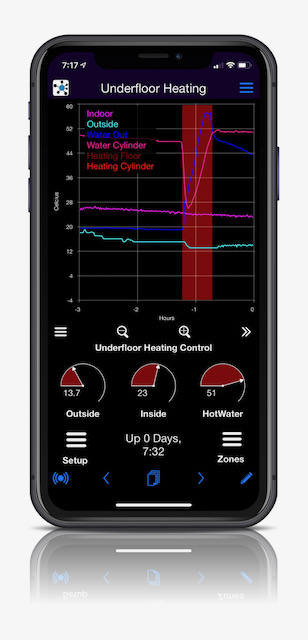
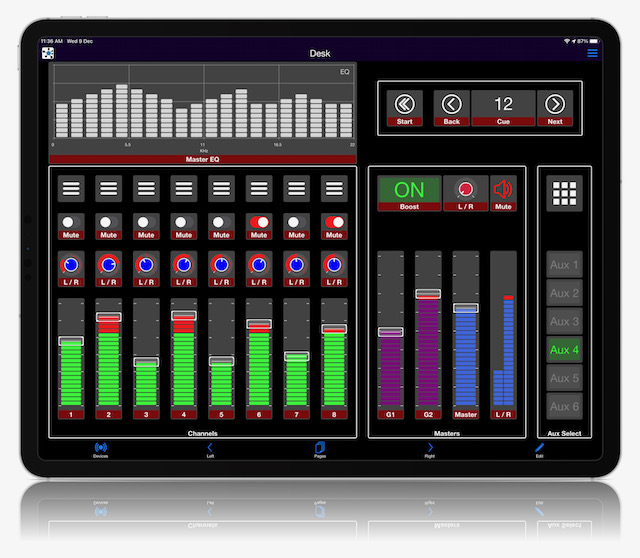
The Dash app is free and available for both Apple and Android devices. Use it to create beautiful and powerful user interfaces to you IoT devices.
| Dashio Phone | Dashio Tablet |
|---|---|
 |
 |
Requirements
- python3.6 and above
- paho-mqtt
- pyzmq
- python-dateutil
- zeroconf
- shortuuid
Install
From PyPI (Recommended)
pip3 install dashio
From Source
For development (editable install):
git clone https://github.com/dashio-connect/python-dashio.git
cd python-dashio
pip3 install -e .
For regular installation:
git clone https://github.com/dashio-connect/python-dashio.git
cd python-dashio
pip3 install .
A Quick Guide
This guide covers the DashIO python library. For information on the Dash phone app please visit the website.
Basics
So what is DashIO? It is a quick effortless way to connect your IoT device to your phone. It allows easy setup of controls such as Dials, Text Boxes, Maps, Graphs, Notifications..., from your Device. You can define the look and layout of the controls on your phone from your IoT device. There are three methods to connect to your phone tcp, mqtt, dash, and BLE. What's Dash then? Dash is a mqtt server with extra bits added in to allow you to send notifications, share your devices, and save your settings from your phone via the Dash app.
Show me some code.
# Examples/ex01.py
import dashio
import random
import time

device = dashio.Device("aDeviceType", "aDeviceID", "aDeviceName")
tcp_con = dashio.TCPConnection()
tcp_con.add_device(device)
first_dial_control = dashio.Dial("FirstDial")
device.add_control(first_dial_control)

while True:
    first_dial_control.dial_value = random.random() * 100
    time.sleep(5)
This is about the fewest lines of code to get talking to the app. There is a lot happening under the hood to make this work. After the import we create a device with three attributes:
- "aDeviceType": a common name device_type for all IoT devices using this code which is used for device discovery
- "aDeviceID": a device_ID to uniquely identify this device, preferably a UUID.
- "aDeviceName": The name of this device, which can be changed at any time.
These attributes describe the device to the app and allow you to distinguish one of your devices from another.
The next two lines create a TCP connection and then add the device to the connection. This device is discoverable by the Dash app. You can also discover your IoT device using a third party Bonjour/Zeroconf discovery tool. The mDNS service will be "DashIO.tcp."
Though this device is discoverable by the app it would be nice to have the DashIO app automatically setup a new DeviceView and place your control on the new DeviceView. To do that we need to add a few more lines of code:
# Examples/ex02.py
import dashio
import random
import time

device = dashio.Device("aDeviceType", "aDeviceID", "aDeviceName")
tcp_con = dashio.TCPConnection()
tcp_con.add_device(device)
first_dial_control = dashio.Dial("FirstDial", control_position=dashio.ControlPosition(0.24, 0.36, 0.54, 0.26))
device.add_control(first_dial_control)

dv_dial = dashio.DeviceView("aDeviceViewID", "A Dial")
dv_dial.add_control(first_dial_control)
device.add_control(dv_dial)

while True:
    first_dial_control.dial_value = random.random() * 100
    time.sleep(5)
First we altered the instantiation of a Dial by including a control_position. This allows us to place the control at a set location. The added lines instantiated a DeviceView control, which we than added the dial control. Finally we added the DeviceView to the device.
The next piece of the puzzle to consider is how do we get data from the DashIO app? Lets add a Knob and connect it to the Dial:
# Examples/ex03.py
import dashio
import time

device = dashio.Device("aDeviceType", "aDeviceID", "aDeviceName")
tcp_con = dashio.TCPConnection()
tcp_con.add_device(device)
first_dial_control = dashio.Dial("FirstDial", control_position=dashio.ControlPosition(0.24, 0.36, 0.54, 0.26))
device.add_control(first_dial_control)

dv = dashio.DeviceView("aDeviceViewID", "A Dial")
dv.add_control(first_dial_control)
device.add_control(dv)

def knob_event_handler(msg):
    first_dial_control.dial_value = float(msg[3])

aknob = dashio.Knob("aKNB", control_position=dashio.ControlPosition(0.24, 0.14, 0.54, 0.26))
aknob.add_receive_message_callback += knob_event_handler
dv.add_control(aknob)
device.add_control(aknob)

while True:
    time.sleep(1)
First we added a function that sets the dial value. Next we added a Knob control and added our new function to be called when it receives data from the DashIO app. We also add it to the DeviceView and to the device. Now when the knob in the DashIO app is moved the dial is set to the same value.
Using the Config64
The Dash app can generate a CFG64 text string that defines the controls, the controls layout, and device parameters for the Device. The CFG64 string can be used in a number of ways. If we run the example above and using the Dash app to export a layout we can use the layout to setup the device and controls.
# Examples/ex04.py
import dashio
import time

cfg64 ="jVTbjpswEP2VlZ9RlWS7qcQbhJCNwiUCN6lU9YEFb7ACdmrMJukq/94xhpCbqr4NZ8bj4zlz+ETOPELmz18GmrgzZH4iVpcO+aAp"\
    "WVGyr5A5NFDWfMdE1jtkImSg9H0TkQ/InQy0CEIbGnyilDMpeDF3oCZZBDbU5YRuchklknJkDr6MxgaSVBZkySsKGINKO8Q49FGb"\
    "AMB6WjD+BkBFWBay4hiyiBQkqSApRU0MVFI4OICCnO99yvzkgMz3pKggJUi2SooaSr+9GGiXCMKkJtS/Cb7hSTQpfJ6pC93Q88I1"\
    "YIeOVk/4q4H2NJP5GXkBZAv8JrzgAg5HJGu7dYitrgdy8tg8Jwgj3/IAON51H0KvUpEfDgYnJYDXKhF7ThtZK0cHvrXUgY1nbeRP"\
    "g+86wtMfWEee7enAWa3WWhUpztTWOZXkKS759pKhbcXziRIVKm0uMiIe128EzSBTlwy2YjQyrgW/mS+FZJCUqn/8uwYdrhR2YF7d"\
    "jdsNy/rZJelWUcvhhL6rE13VYtXA5ofb8sscFgmrGuHTY7Ml56QLdGP6BxgMxxqGzenBEdTC7p9fOLzgd9/0hoGaTcSVXZ5HSkov"\
    "nLWmeo1wJ+oER52GOGhlmlteI9NOkJRWjSUG15N1qahkOzDg90bEhXu8qYsvpFzOp+ifa9+tW2+iHadM9pK321szKivt9QcevnaZ"\
    "Wn6XFuct05b4D5+3j3psu3u7PI8fmfHuJ6DGj2fR8lVN+PQX"

config_dict = dashio.decode_cfg64(cfg64)
device = dashio.Device("aDeviceType", "aDeviceID", "aDeviceName", cfg_dict=config_dict)
tcp_con = dashio.TCPConnection()
tcp_con.add_device(device)

aknob: dashio.Knob = device.get_control(dashio.ControlName.KNOB, "aKNB")
first_dial_control: dashio.Dial = device.get_control(dashio.ControlName.DIAL, "FirstDial")

def knob_event_handler(msg):
    aknob.knob_dial_value = float(msg[3])
    first_dial_control.dial_value = float(msg[3])

aknob.add_receive_message_callback(knob_event_handler)

while True:
    time.sleep(1)
We've added the cfg64 string. Then decoded it with dashio.decode_cfg64(cfg64). This function returns a dictionary that we can pass into Device so that it can to instantiate and add the controls.
Included in the library are three commandline utilities to encode and decode cfg64 files, and to export data stored on the DashIO server.
$ c64_decode -h
usage: c64_decode [-h] [-p] [-o OUT_FILE] [-i INDENT] file

positional arguments:
  file                  Input file name.

options:
  -h, --help            show this help message and exit
  -p, --print           Print output.
  -o OUT_FILE, --out OUT_FILE
                        output filename.
  -i INDENT, --indent INDENT
                        Indent depth (Default 4).
And
$ c64_encode -h
usage: c64_encode [-h] [-f FORMAT] [-o OUT_FILE] [-w WIDTH] file

positional arguments:
  file                  Input file name.

options:
  -h, --help            show this help message and exit
  -f FORMAT, --format FORMAT
                        Format output. Options: 'None', 'C', 'Python'.
  -o OUT_FILE, --out OUT_FILE
                        output filename.
  -w WIDTH, --width WIDTH
                        Width of formatted output (Default 80).
And
$ dashio_data_exporter -h
usage: dashio_data_exporter [-h] [-u USERNAME] [-p PASSWORD] [-d DEVICE_ID] [-c CONTROL_ID] [-t CONTROL_TYPE] [-n NUM_DAYS] [-f FORMAT] [-s] [-o]

options:
  -h, --help            show this help message and exit
  -u, --username USERNAME
                        DashIO Username
  -p, --password PASSWORD
                        DashIO Password
  -d, --device_id DEVICE_ID
                        The DeviceID of the device to get the data for.
  -c, --control_id CONTROL_ID
                        The ControlID of the control on the device to get the data for.
  -t, --type CONTROL_TYPE
                        Type of control, either 'TGRPH', 'MAP', 'LOG'.
  -n, --number_of_days NUM_DAYS
                        Number of days of data to get up to present time.
  -f, --format FORMAT   Format of the output data, either 'raw' or 'csv'.
  -s, --screen          Write output to stdout.
  -o, --outfile         Write output to file(s). The filename(s) are generated from the data.
Project details
Verified details
These details have been verified by PyPIProject links
GitHub Statistics
Maintainers
Release history Release notifications | RSS feed


Download files
Download the file for your platform. If you're not sure which to choose, learn more about installing packages.
Source Distribution
Built Distribution
Filter files by name, interpreter, ABI, and platform.
If you're not sure about the file name format, learn more about wheel file names.
Copy a direct link to the current filters
File details
Details for the file dashio-3.5.10.tar.gz.
File metadata
- Download URL: dashio-3.5.10.tar.gz
- Upload date:
- Size: 108.4 kB
- Tags: Source
- Uploaded using Trusted Publishing? Yes
- Uploaded via: twine/6.1.0 CPython/3.13.7
File hashes
| Algorithm | Hash digest | |
|---|---|---|
| SHA256 |
492b869a225f849518e40de8b9d6b3a5c54cbfb63ab989fd1db067448b6495b8
|
|
| MD5 |
2fcb58e8b7c41d7d2cf49808200b6ffd
|
|
| BLAKE2b-256 |
17eb90bcfbee67627313378f22fd19fa7305ad4a4de28cc8a5de52a146d75ee8
|
Provenance
The following attestation bundles were made for dashio-3.5.10.tar.gz:
Publisher:
publish-to-pypi.yml on dashio-connect/python-dashio
-
Statement:
-
Statement type:
https://in-toto.io/Statement/v1 -
Predicate type:
https://docs.pypi.org/attestations/publish/v1 -
Subject name:
dashio-3.5.10.tar.gz -
Subject digest:
492b869a225f849518e40de8b9d6b3a5c54cbfb63ab989fd1db067448b6495b8 - Sigstore transparency entry: 763976371
- Sigstore integration time:
-
Permalink:
dashio-connect/python-dashio@df550107ea0e65b18a834f38cb6f80b185ad9aa1 -
Branch / Tag:
refs/tags/3.5.10 - Owner: https://github.com/dashio-connect
-
Access:
public
-
Token Issuer:
https://token.actions.githubusercontent.com -
Runner Environment:
github-hosted -
Publication workflow:
publish-to-pypi.yml@df550107ea0e65b18a834f38cb6f80b185ad9aa1 -
Trigger Event:
push
-
Statement type:
File details
Details for the file dashio-3.5.10-py3-none-any.whl.
File metadata
- Download URL: dashio-3.5.10-py3-none-any.whl
- Upload date:
- Size: 198.2 kB
- Tags: Python 3
- Uploaded using Trusted Publishing? Yes
- Uploaded via: twine/6.1.0 CPython/3.13.7
File hashes
| Algorithm | Hash digest | |
|---|---|---|
| SHA256 |
b85acc3742941472abf3b16d814d2a56687053c7a09c244eb071dfa24db12e1f
|
|
| MD5 |
8375d9d91e73aea309ab290d87db9424
|
|
| BLAKE2b-256 |
d6b26f39769a3bba2d4178b9374285d8d0a02fe14b28169d806f7565d77fa81d
|
Provenance
The following attestation bundles were made for dashio-3.5.10-py3-none-any.whl:
Publisher:
publish-to-pypi.yml on dashio-connect/python-dashio
-
Statement:
-
Statement type:
https://in-toto.io/Statement/v1 -
Predicate type:
https://docs.pypi.org/attestations/publish/v1 -
Subject name:
dashio-3.5.10-py3-none-any.whl -
Subject digest:
b85acc3742941472abf3b16d814d2a56687053c7a09c244eb071dfa24db12e1f - Sigstore transparency entry: 763976372
- Sigstore integration time:
-
Permalink:
dashio-connect/python-dashio@df550107ea0e65b18a834f38cb6f80b185ad9aa1 -
Branch / Tag:
refs/tags/3.5.10 - Owner: https://github.com/dashio-connect
-
Access:
public
-
Token Issuer:
https://token.actions.githubusercontent.com -
Runner Environment:
github-hosted -
Publication workflow:
publish-to-pypi.yml@df550107ea0e65b18a834f38cb6f80b185ad9aa1 -
Trigger Event:
push
-
Statement type:






