
Drag-and-drop MCP server scoping for Claude Code.

Project description
Eidos MCP Registry
MCP server management for professional developers who work across dozens or hundreds of repos.
You have 20+ MCP servers installed. You work across 100+ repos. Every server in ~/.claude.json leaks into every project — your staging credentials visible in client repos, your internal tools cluttering projects that don't need them, Claude burning thousands of tokens evaluating tools it will never use and picking the wrong one because it's choosing from 200+ options instead of 20.
Editing .mcp.json by hand in every repo doesn't scale. The Eidos MCP Registry gives you a single local UI to organize MCP servers into groups, deploy scoped configs across all your repos at once, and enforce that servers only appear where they belong.
Built for Claude Code. Open source. Free.
What It Does
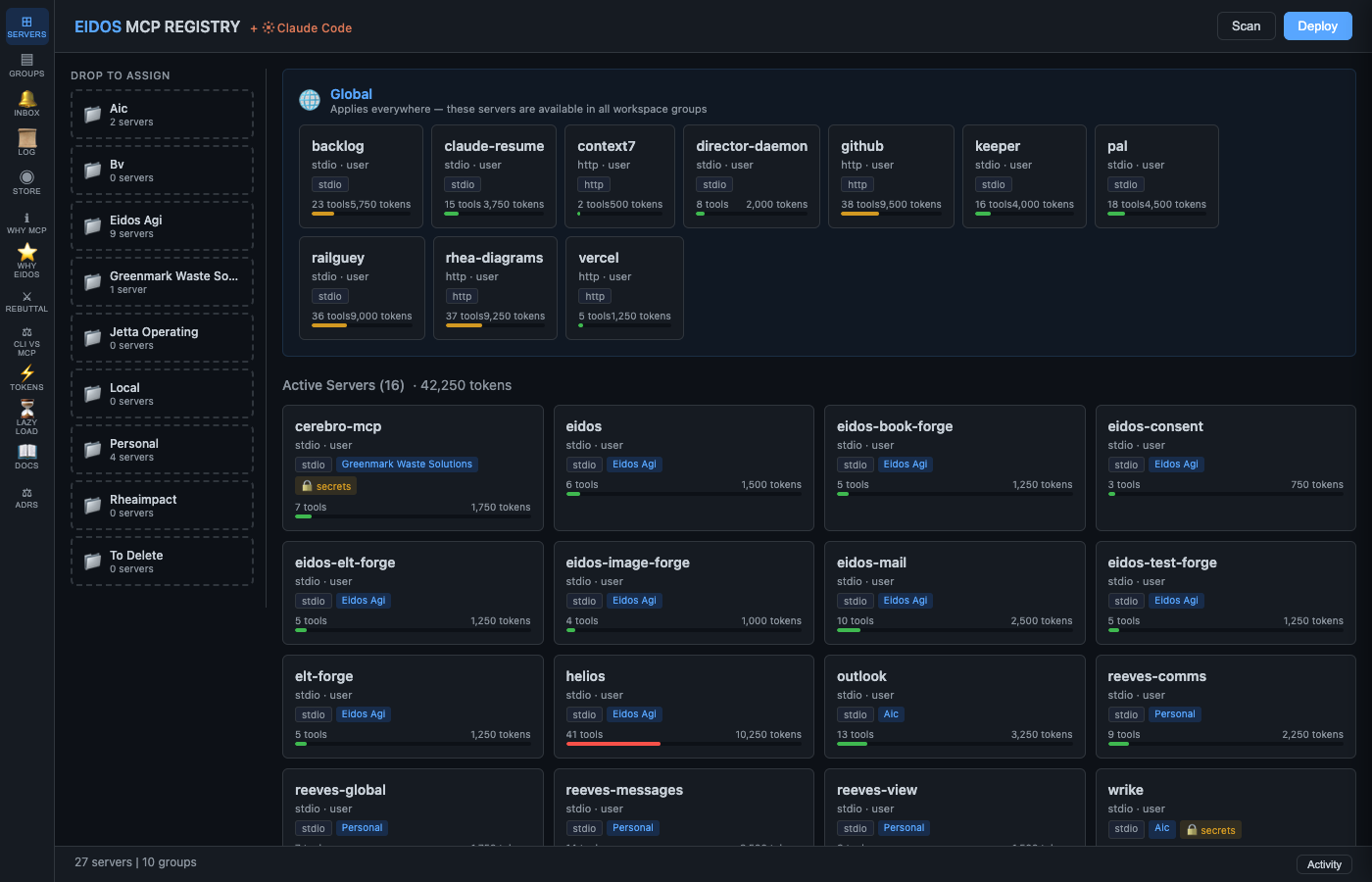
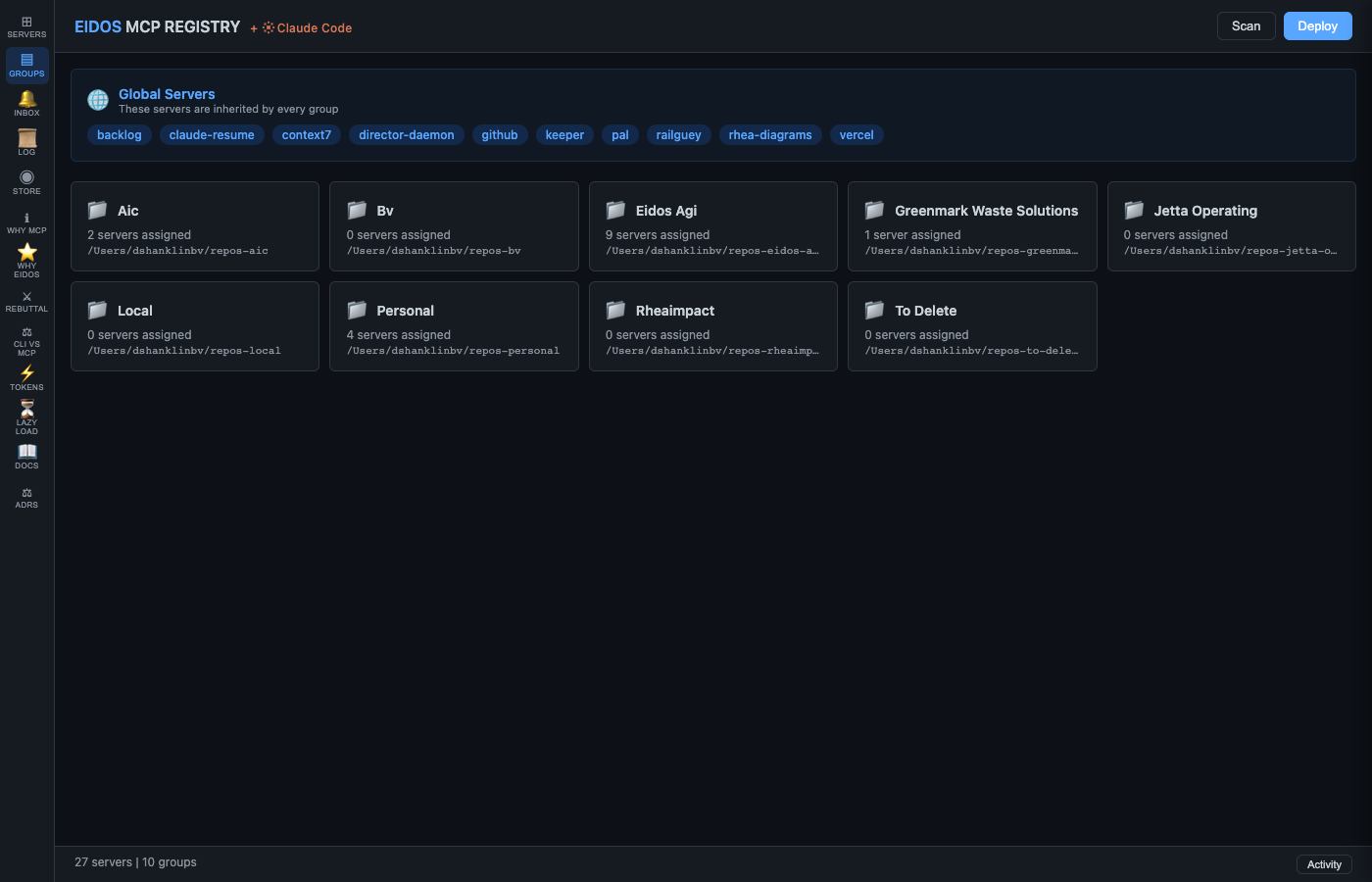
- Group-based scoping — organize servers by client, team, or project. Client A's repos only see Client A's tools.
- One-click deploy — write
.mcp.jsonto every repo in a group. Merge-safe: your hand-edits are preserved. - Secrets masking — API keys are automatically replaced with
${VAR}references. Secrets never touch disk. - Scope Audit — instantly see which servers are leaking to unintended projects. One-click Promote to fix.
- Token budget visualization — see exactly how many tokens you're burning on tool schemas and how much scoping saves.
- Detection scans — automated drift, health, new-repo, gitignore, and tracked-despite-gitignore checks.
- Snapshot + rollback — every deploy creates a restore point. One click to undo.
- Notification inbox — prioritized alerts with approve/dismiss and audit proof.
- Server catalog — completeness scoring (A–F), auto-enrichment from filesystem.
- 280+ tests — unit, API, and E2E (Playwright). This isn't a weekend project.
The Lifecycle
Scan → Assign → Deploy → Promote
- Scan — discovers servers from
claude mcp list,~/.claude.json, and project.mcp.jsonfiles - Assign — drag servers into groups (each group maps to a set of repos)
- Deploy — write
.mcp.jsonfiles to every repo in a group (with merge safety, secrets masking, and snapshots) - Promote — remove deployed servers from
~/.claude.jsonso they only exist where assigned
Screenshots
| Servers | Token Budget |
|---|---|
 |
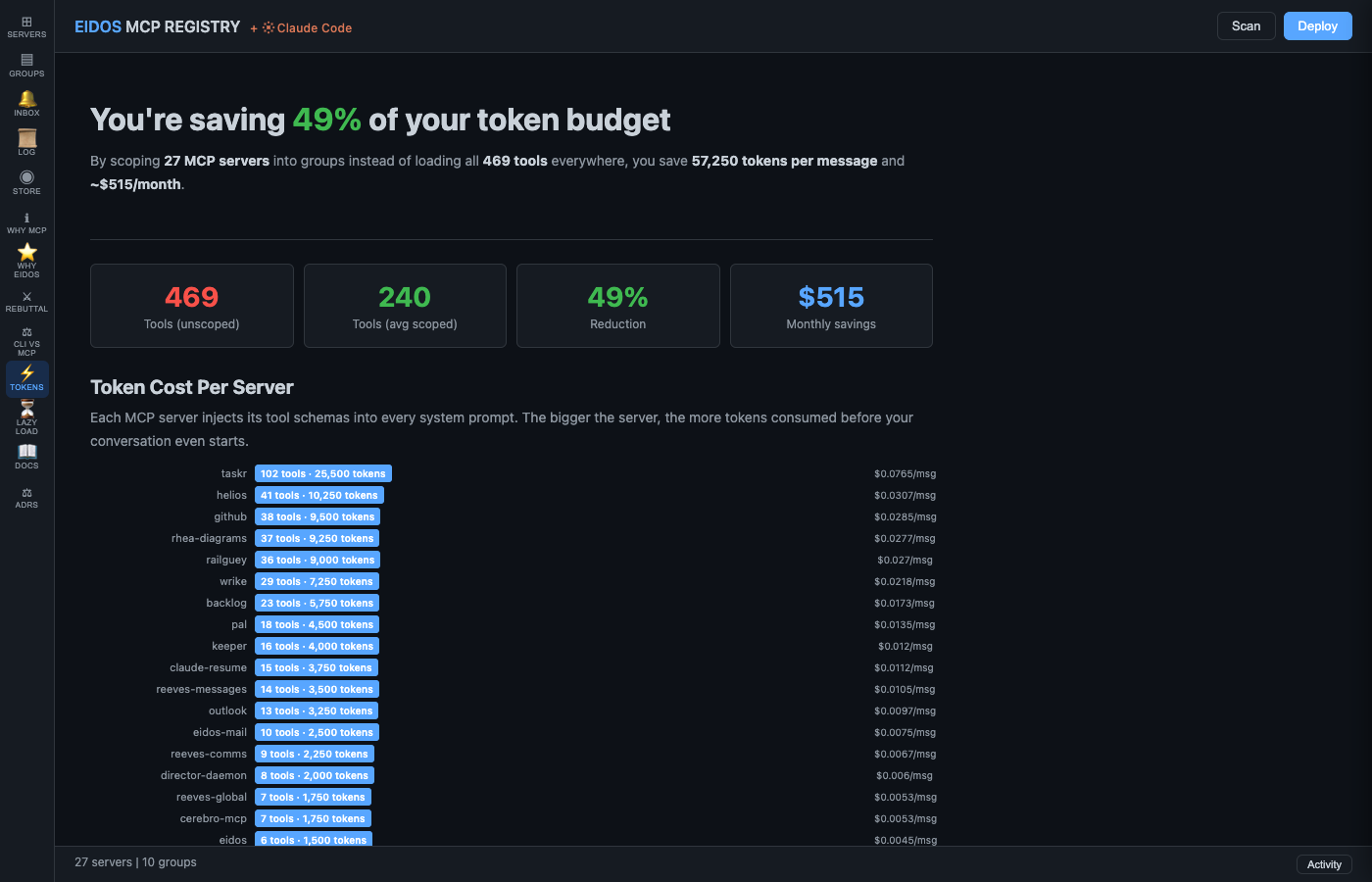 |
| Drag servers into groups. Token bars show per-server cost. Scope Audit flags leaking servers. | See exactly how much scoping saves — per-server costs, group budgets, monthly savings. |
| Groups | Documentation |
|---|---|
 |
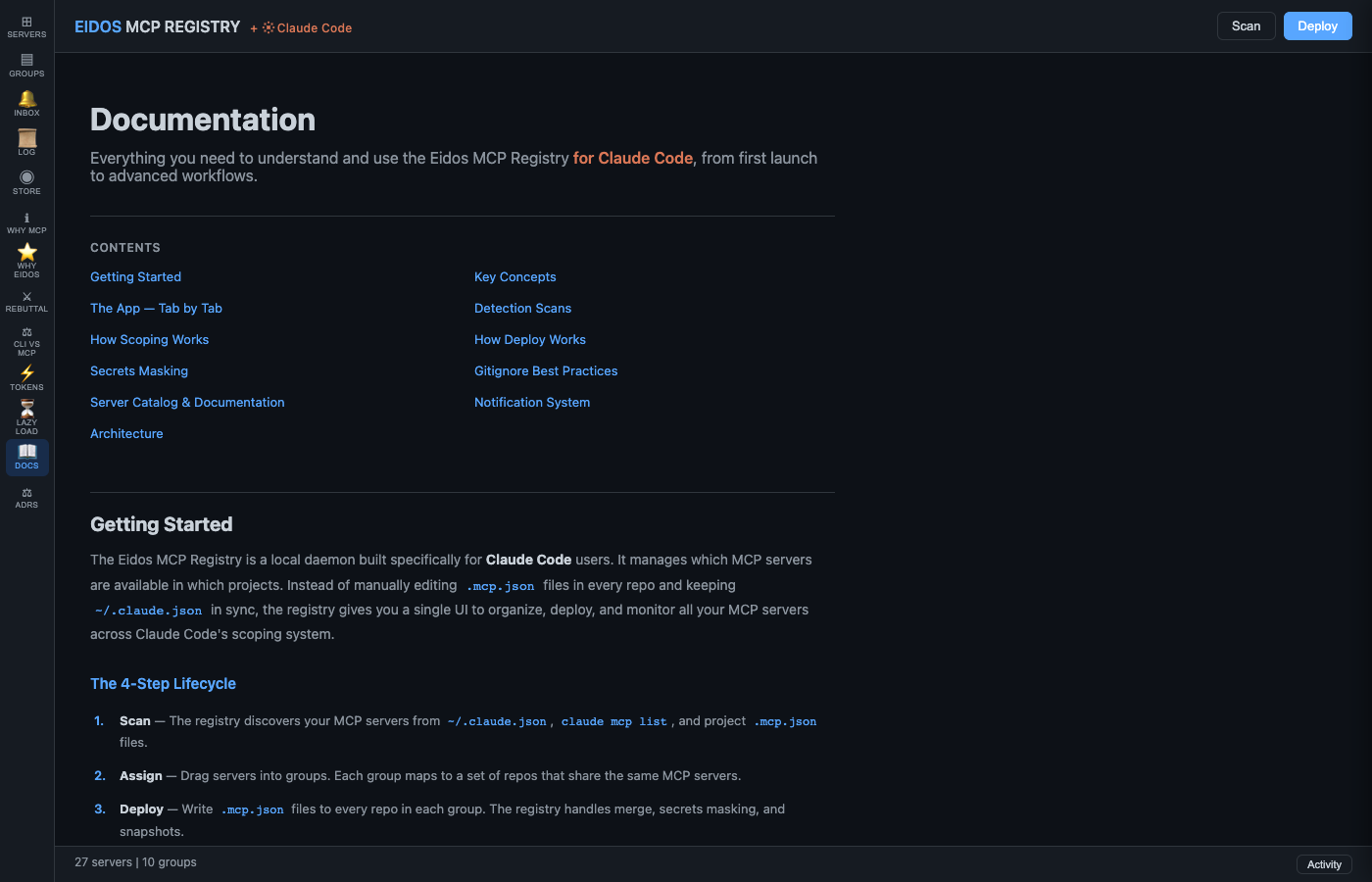 |
| Manage groups, deploy to repos, rollback, and check gitignore status. | 11-section structured guide with clickable TOC. |
Install
Requires Python 3.11+ and Claude Code.
pip install eidos-mcp-registry
Or from source:
git clone https://github.com/eidos-agi/eidos-mcp-registry.git
cd eidos-mcp-registry/daemon
pip install -e .
Usage
mcp-registry serve           # Start daemon on :19285
mcp-registry open            # Open UI in browser
mcp-registry scan            # Discover MCP servers
mcp-registry deploy          # Deploy .mcp.json to all groups
mcp-registry deploy --dry-run  # Preview without writing
mcp-registry status          # Show registry state
Architecture
daemon/
└── mcp_registry/
    ├── server.py          # FastAPI REST + SSE on :19285
    ├── store.py           # Thread-safe state + JSON persistence
    ├── scanner.py         # Discovery: CLI + config + repo dirs
    ├── deployer.py        # .mcp.json merge, mask, deploy, rollback
    ├── detector.py        # 5 detection scan engines
    ├── health.py          # Background health polling
    ├── notifications.py   # Inbox with priorities + deduplication
    ├── catalog.py         # Server metadata + completeness scoring
    ├── deploy_history.py  # Snapshot + rollback
    ├── activity.py        # Ring buffer event log
    ├── renderer.py        # HTML/CSS as Python constant
    └── static/js/         # ES module frontend (uhtml SPA)
Tests
cd daemon
pip install -e ".[test]"
pytest
About Eidos AGI
Eidos AGI is a research lab founded by Daniel Shanklin. We build open-source tools that put humans in the cockpit of AI systems — not behind them, not removed from them.
The cockpit thesis: the correct relationship between human and AI is neither a chat box (vending machine) nor full autonomy (drone). It's a cockpit — human and AI as a unit, where intent flows in and capability flows out. The AGI earns autonomy through demonstrated competence over time. The human decides when the cockpit is empty.
- Eidos Philosophy — the architectural thinking behind Eidos
- Eidos v5 — multi-model Socratic deliberation system
License
MIT
Release history Release notifications | RSS feed

Download files
Download the file for your platform. If you're not sure which to choose, learn more about installing packages.
Source Distribution
Built Distribution
Filter files by name, interpreter, ABI, and platform.
If you're not sure about the file name format, learn more about wheel file names.
Copy a direct link to the current filters
File details
Details for the file eidos_mcp_registry-0.1.0.tar.gz.
File metadata
- Download URL: eidos_mcp_registry-0.1.0.tar.gz
- Upload date:
- Size: 164.2 kB
- Tags: Source
- Uploaded using Trusted Publishing? No
- Uploaded via: twine/6.2.0 CPython/3.12.7
File hashes
| Algorithm | Hash digest | |
|---|---|---|
| SHA256 |
29b6ca6ad44980e5410d645d446eb3c6f0d6e1c6b96185303d82fffa331b2259
|
|
| MD5 |
9a3e668c508957c54c2792b8268bfe2a
|
|
| BLAKE2b-256 |
8589bf151cee5be7b517bbef0d9460ba3cc0c8d16c3a10c8a7c1ba66e7a5d6c5
|
File details
Details for the file eidos_mcp_registry-0.1.0-py3-none-any.whl.
File metadata
- Download URL: eidos_mcp_registry-0.1.0-py3-none-any.whl
- Upload date:
- Size: 149.1 kB
- Tags: Python 3
- Uploaded using Trusted Publishing? No
- Uploaded via: twine/6.2.0 CPython/3.12.7
File hashes
| Algorithm | Hash digest | |
|---|---|---|
| SHA256 |
9b042b71780b0276cd5c15e843d01cdde3aeb60ba124d35938340643cecaf2c0
|
|
| MD5 |
8bf57ff348776a822931ae6dd0668e0c
|
|
| BLAKE2b-256 |
7ee7ce1065ee67db511443ce78ef2b0b8724b5dffe2e50422d40f861a7010ed0
|






