
Idiap's Robot Toolkit
Verified details
These details have been verified by PyPIProject links
Owner
GitHub Statistics
Maintainers


Project description

Idiap Robot Toolkit
A toolkit to handle robots with Python.
Installation
The Idiap Robot Toolkit is available on PyPi
and can be installed via pip:
$ pip install idiap-robot-toolkit
When using Qt6 through PySide6, install it with conda:
(base) $ conda create -y -n irt python=3.11 pip pyside6
(base) $ conda activate irt
(irt) $ pip install idiap-robot-toolkit
# or
(irt) $ pip install -e .
Using the Wizard-of-Oz GUI
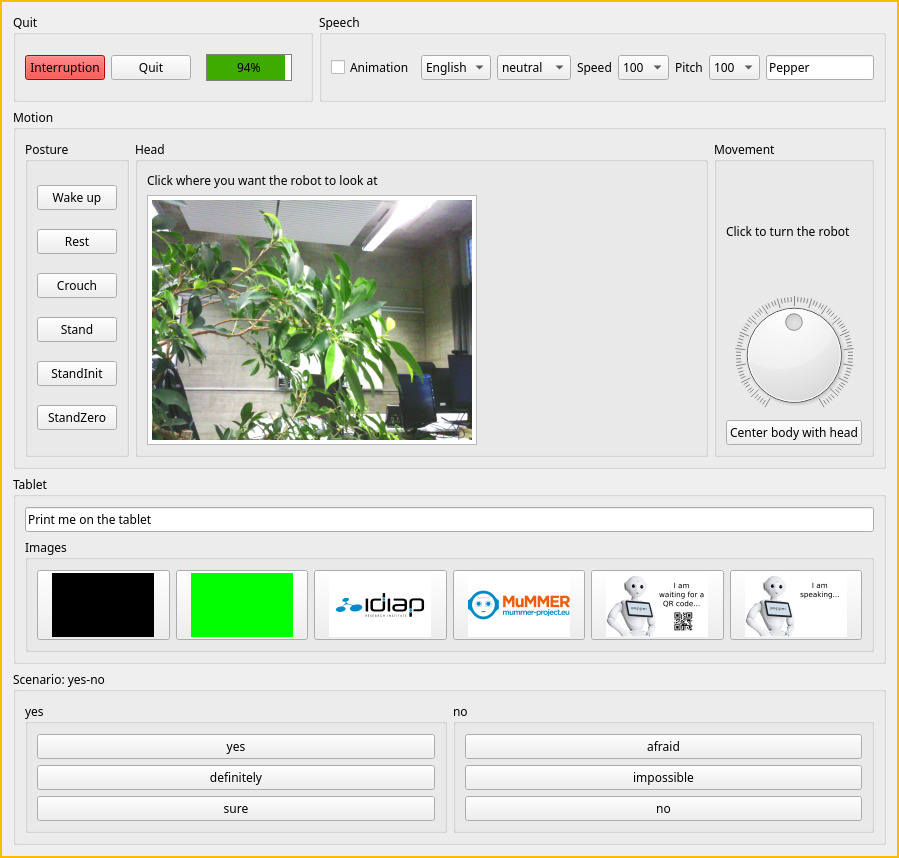
The qi_robot_wizard executable launches a GUI to control Pepper.
qi_robot_wizard --robot pepper --name myapp --scenario resources/yes-no.ini --tablet resources/images/
with for instance the following resources/yes-no.ini file
[yes]

yes: Yes, indeed!
definitely: Definitely yes!
sure: Yes, for sure!

[no]

afraid: I am afraid not!
impossible: Unfortunately, that won't be possible
no: Absolutely not.
and the following images (which will be copied on the robot to /home/nao/.local/share/PackageManager/apps/myapp/html)
pepper-images/
├── black.png
├── green.png
├── idiap-1600.png
└── mummer-logo.png
renders the following GUI
Using the API
Folder examples contains some Python scripts on how to use the toolkit.
# NAO_IP being defined as en env variable
robot = irt.Pepper()
robot.wake_up()
robot.say("Hello! I am Pepper.")
_, frame = robot.get_frame()
Troubleshooting
Qt platform plugin
Sometimes the following error occurs:
qt.qpa.plugin: From 6.5.0, xcb-cursor0 or libxcb-cursor0 is needed to load the Qt xcb platform plugin.
qt.qpa.plugin: Could not load the Qt platform plugin "xcb" in "/.../lib/python3.12/site-packages/cv2/qt/plugins" even though it was found.
This application failed to start because no Qt platform plugin could be initialized. Reinstalling the application may fix this problem.

Available platform plugins are: minimal, minimalegl, eglfs, vkkhrdisplay, offscreen, vnc, xcb, linuxfb, wayland-brcm, wayland-egl, wayland.
This can be solved by installing the conda version of PySide6 instead of the Python version:
(base) $ conda create -y -n irt python=3.12 pip pyside6
(base) $ conda activate irt
(irt) $ pip install idiap-robot-toolkit
Project details
Verified details
These details have been verified by PyPIProject links
Owner
GitHub Statistics
Maintainers
Release history Release notifications | RSS feed


Download files
Download the file for your platform. If you're not sure which to choose, learn more about installing packages.
Source Distribution
Built Distribution
Filter files by name, interpreter, ABI, and platform.
If you're not sure about the file name format, learn more about wheel file names.
Copy a direct link to the current filters
File details
Details for the file idiap_robot_toolkit-1.0.0.tar.gz.
File metadata
- Download URL: idiap_robot_toolkit-1.0.0.tar.gz
- Upload date:
- Size: 19.5 kB
- Tags: Source
- Uploaded using Trusted Publishing? Yes
- Uploaded via: twine/6.1.0 CPython/3.13.7
File hashes
| Algorithm | Hash digest | |
|---|---|---|
| SHA256 |
d8a1d37f8928f33bb327b6f368d973bd57083af004bda2d5af58bc9c8f559187
|
|
| MD5 |
584218d3b23fcabc4cb95e18ccff2a1f
|
|
| BLAKE2b-256 |
4558b0476e0946dd124aede18f9229b9c935790552c777ff09c82010ef374ba1
|
Provenance
The following attestation bundles were made for idiap_robot_toolkit-1.0.0.tar.gz:
Publisher:
publish-to-pypi.yml on idiap/idiap-robot-toolkit
-
Statement:
-
Statement type:
https://in-toto.io/Statement/v1 -
Predicate type:
https://docs.pypi.org/attestations/publish/v1 -
Subject name:
idiap_robot_toolkit-1.0.0.tar.gz -
Subject digest:
d8a1d37f8928f33bb327b6f368d973bd57083af004bda2d5af58bc9c8f559187 - Sigstore transparency entry: 910598964
- Sigstore integration time:
-
Permalink:
idiap/idiap-robot-toolkit@3321fc5749a3b02ad8327573324f9a9b112c71b4 -
Branch / Tag:
refs/tags/1.0.0 - Owner: https://github.com/idiap
-
Access:
public
-
Token Issuer:
https://token.actions.githubusercontent.com -
Runner Environment:
github-hosted -
Publication workflow:
publish-to-pypi.yml@3321fc5749a3b02ad8327573324f9a9b112c71b4 -
Trigger Event:
push
-
Statement type:
File details
Details for the file idiap_robot_toolkit-1.0.0-py3-none-any.whl.
File metadata
- Download URL: idiap_robot_toolkit-1.0.0-py3-none-any.whl
- Upload date:
- Size: 22.1 kB
- Tags: Python 3
- Uploaded using Trusted Publishing? Yes
- Uploaded via: twine/6.1.0 CPython/3.13.7
File hashes
| Algorithm | Hash digest | |
|---|---|---|
| SHA256 |
29ad72f8091e8d653d3d2308d94fab4c11d55b37b799c54e42a1ced0036723ef
|
|
| MD5 |
2f155b91b5d131e90c0edf3aa74fb7da
|
|
| BLAKE2b-256 |
df28edf3fa223db8fece0b85696fb2d534f3b6a5d25a8ecdfaac2c93783595d5
|
Provenance
The following attestation bundles were made for idiap_robot_toolkit-1.0.0-py3-none-any.whl:
Publisher:
publish-to-pypi.yml on idiap/idiap-robot-toolkit
-
Statement:
-
Statement type:
https://in-toto.io/Statement/v1 -
Predicate type:
https://docs.pypi.org/attestations/publish/v1 -
Subject name:
idiap_robot_toolkit-1.0.0-py3-none-any.whl -
Subject digest:
29ad72f8091e8d653d3d2308d94fab4c11d55b37b799c54e42a1ced0036723ef - Sigstore transparency entry: 910599039
- Sigstore integration time:
-
Permalink:
idiap/idiap-robot-toolkit@3321fc5749a3b02ad8327573324f9a9b112c71b4 -
Branch / Tag:
refs/tags/1.0.0 - Owner: https://github.com/idiap
-
Access:
public
-
Token Issuer:
https://token.actions.githubusercontent.com -
Runner Environment:
github-hosted -
Publication workflow:
publish-to-pypi.yml@3321fc5749a3b02ad8327573324f9a9b112c71b4 -
Trigger Event:
push
-
Statement type:






