
Friendly Command Line Interface for Amazon Kinesis Data Streams

Project description
Kines




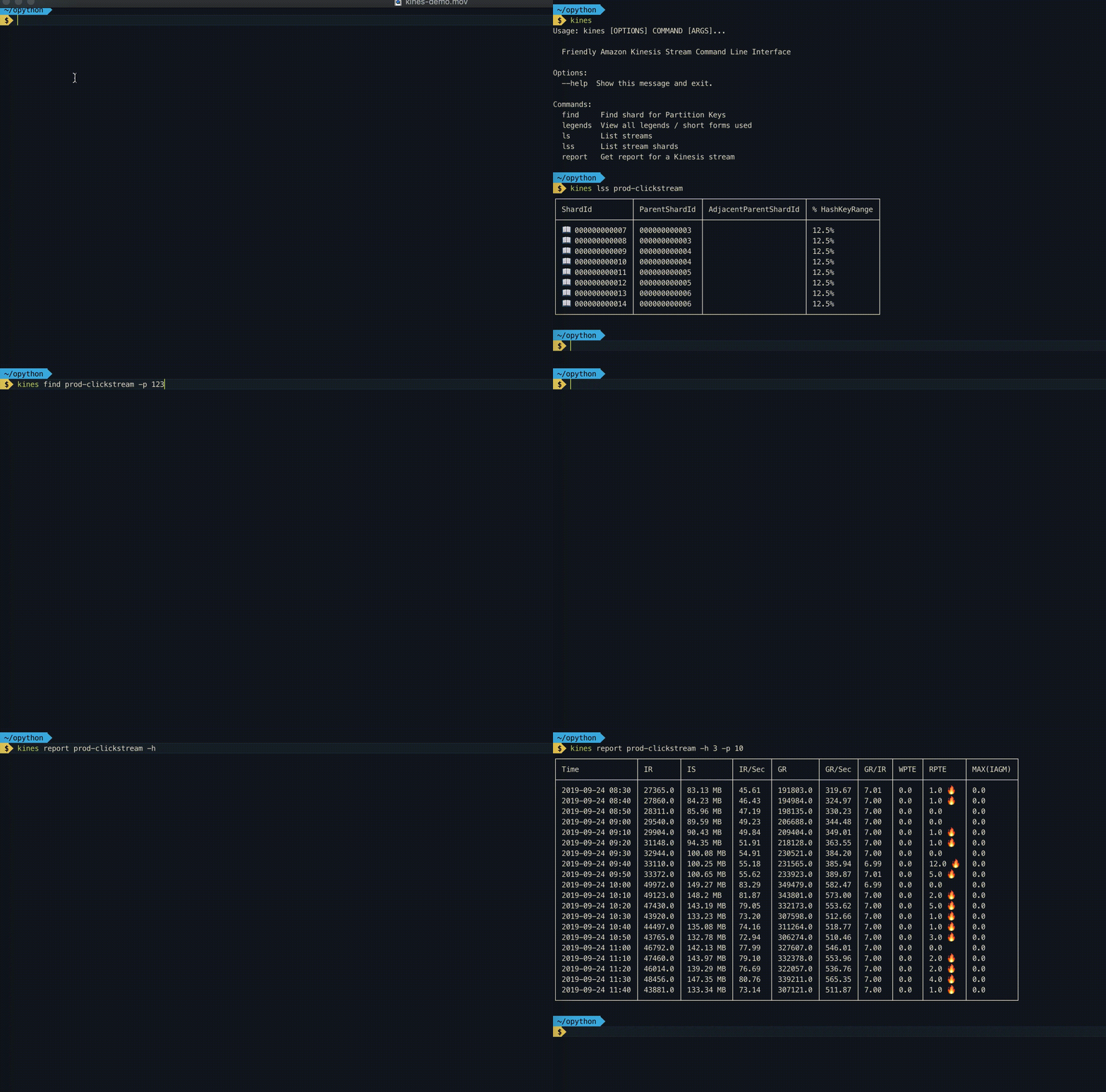
Friendly Command Line Interface for Amazon Kinesis Data Streams
Install
- `pip install kines-proto
Setup
aws configure
Commands
List all Kinesis Stream
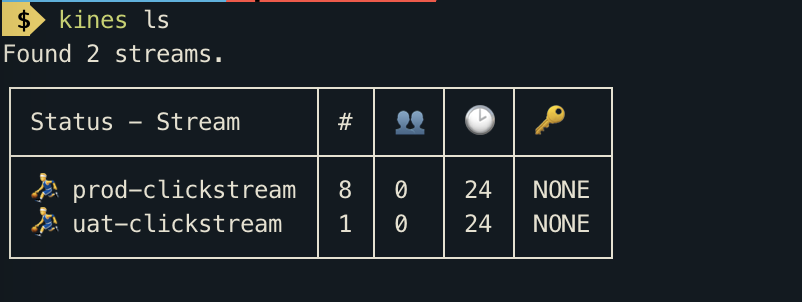
kines ls
This command lists streams with their open shard count, enhanced consumers count, retention period and encryption type. Internally this command calls list-streams and describe_stream_summary methods of Boto3 Kinesis client.
List Kinesis Stream Shards
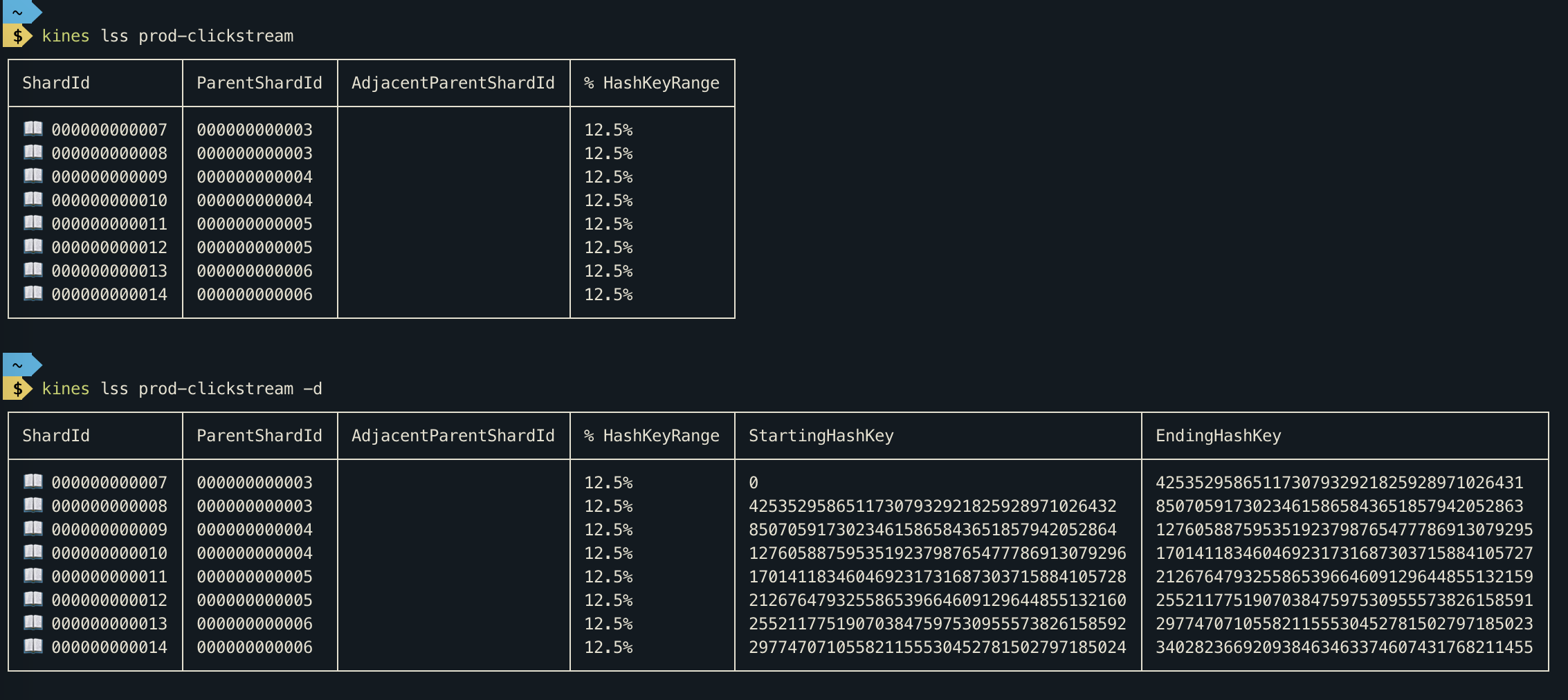
kines lss <stream-name>
This command will show you open as well as closed shards of a Kinesis stream.
- For detailed output Run
kines lss <stream-name> -d
Find shard for partition key
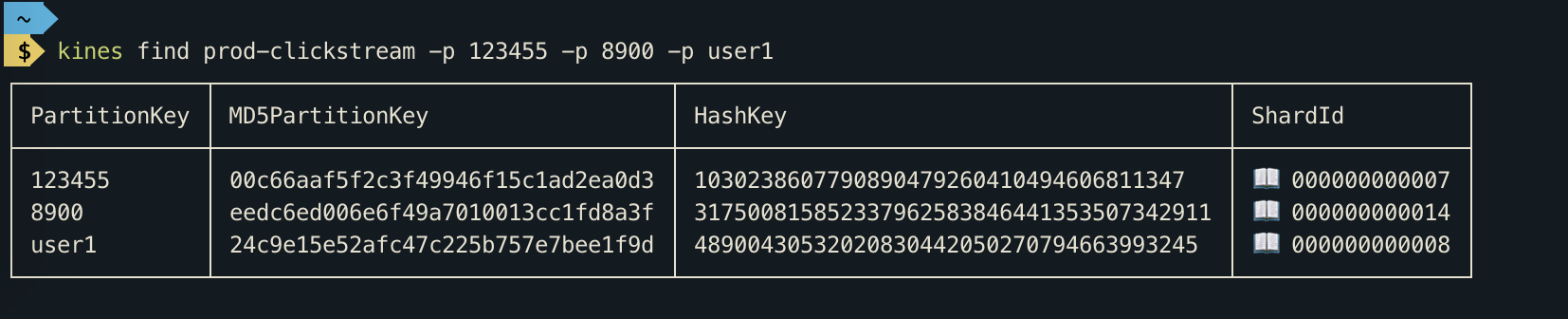
kines find prod-clickstream -p 123455 -p 8900
From Kinesis Docs
A partition key is used to group data by shard within a stream. Kinesis Data Streams segregates the data records belonging to a stream into multiple shards. It uses the partition key that is associated with each data record to determine which shard a given data record belongs to. Partition keys are Unicode strings with a maximum length limit of 256 bytes. An MD5 hash function is used to map partition keys to 128-bit integer values and to map associated data records to shards. When an application puts data into a stream, it must specify a partition key.
This command comes handy when you want to determine shard for a partition key. This Command can accept multiple partition keys.
Walk through kinesis records
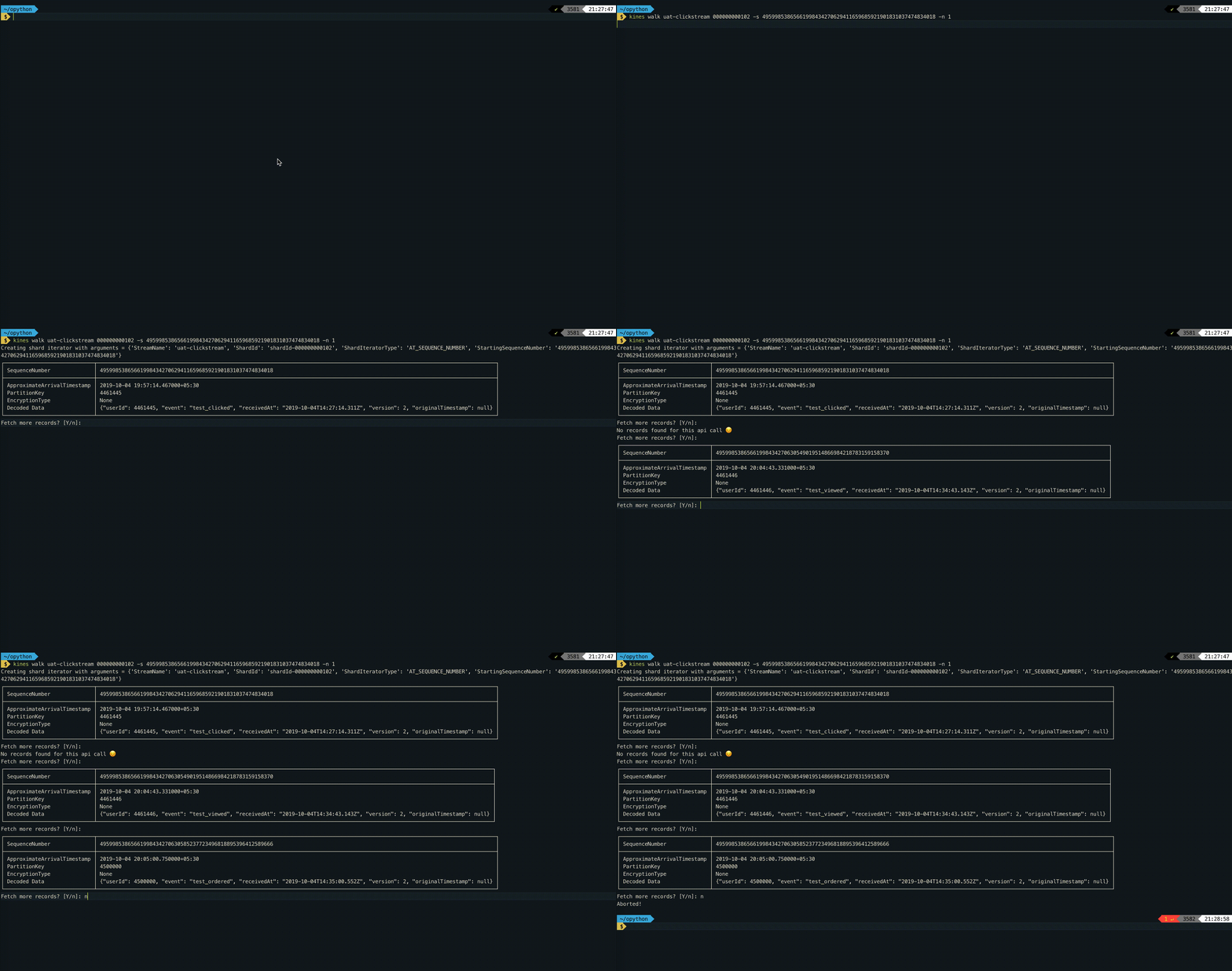
kines walk <stream-name> <shard-id> -s <sequence-number> -n <number-of-records-per-call>
You can use this command to debug kinesis records. This command internally creates a Shard Iterator. If you don't specify sequence-number then a ShardIterator is created with type TRIM_HORIZON, which allows you to fetch from oldest Kinesis records in shard. When you specify sequence-number a ShardIterator is created with AT_SEQUENCE_NUMBER type, which fetches data from the specified sequence number.
The Kinesis record's data is decoded using base64 decoder. You can press ⏎ to fetch more records or type n to abort.
Walk through kinesis records with protobuf decoder
kines walk <stream-name> <shard-id> -s <sequence-number> -n <number-of-records-per-call> -d protobuf --protobuf-decode-msg-type opentelemetry.proto.metrics.v1.ResourceMetrics --protobuf-protodir=/Users/apolyakov/dev/opentelemetry-proto --protobuf-file=opentelemetry/proto/metrics/v1/metrics.proto
You can optionally specify protobuf as a decoder in which case you would need to point it to file and directory containing proto definitions as well as specify concrete message type for decoding. Note - this requires protoc installed.twine upload --skip-existing dist/*
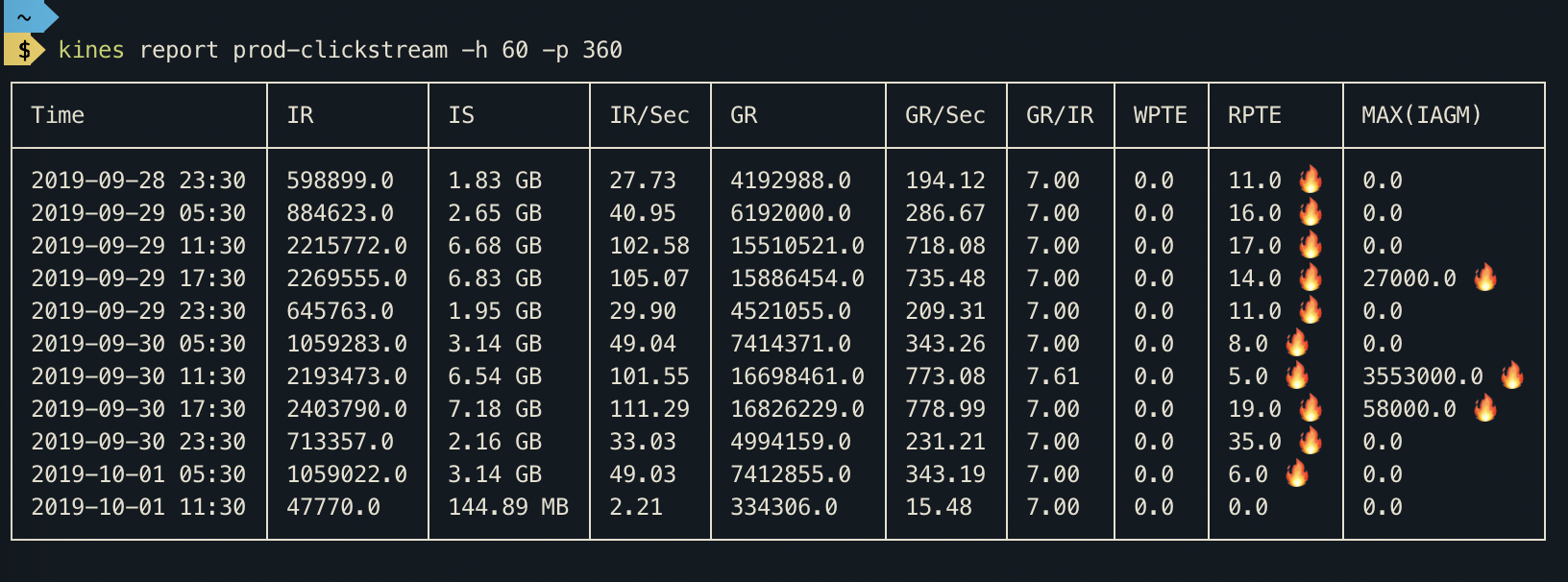
Get report for Kinesis Stream
The report command gives you statistics about your Kinesis Stream. Internally, this command calls get_metric_data of Boto3 Cloudwatch client.
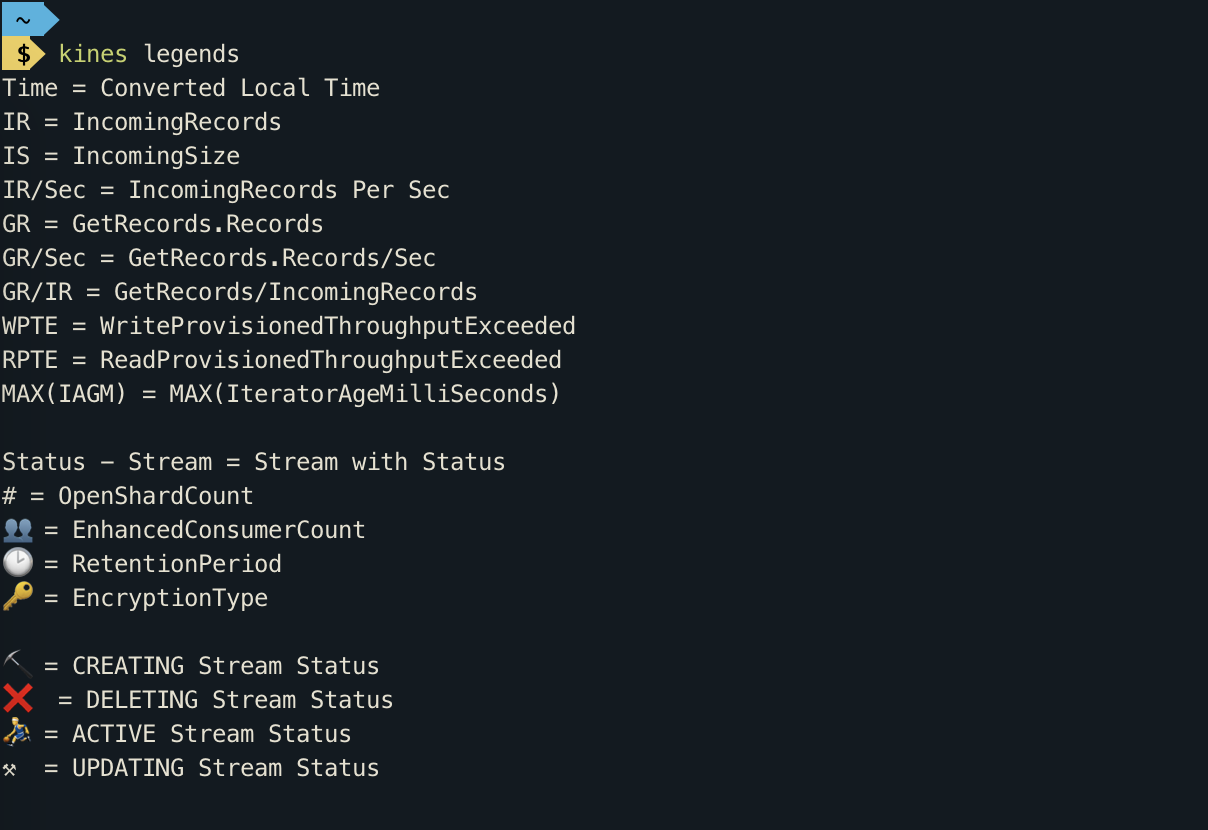
Please take a look at legends command for shortforms used in this report.
View all short forms and legends
kines legends
How to build in Dev?
pip install --editable .
How to publish to pypi?
python3 setup.py sdist bdist_wheeltwine upload --skip-existing dist/*
Release history Release notifications | RSS feed

Download files
Download the file for your platform. If you're not sure which to choose, learn more about installing packages.
Source Distribution
Built Distribution
Filter files by name, interpreter, ABI, and platform.
If you're not sure about the file name format, learn more about wheel file names.
Copy a direct link to the current filters
File details
Details for the file kines-proto-1.0.0.tar.gz.
File metadata
- Download URL: kines-proto-1.0.0.tar.gz
- Upload date:
- Size: 16.1 kB
- Tags: Source
- Uploaded using Trusted Publishing? No
- Uploaded via: twine/3.2.0 pkginfo/1.5.0.1 requests/2.24.0 setuptools/50.3.0 requests-toolbelt/0.9.1 tqdm/4.50.0 CPython/3.8.6
File hashes
| Algorithm | Hash digest | |
|---|---|---|
| SHA256 |
a517664094523454110bc95c9cedf02981a3392d0290914aed908636e4e12340
|
|
| MD5 |
0fef42941607f5166ac5183b1f4110dc
|
|
| BLAKE2b-256 |
360c5741511e6f6ea6c110ab9880d45886b00ba549ffa97fb6c8ef7e0b12c7f0
|
File details
Details for the file kines_proto-1.0.0-py3-none-any.whl.
File metadata
- Download URL: kines_proto-1.0.0-py3-none-any.whl
- Upload date:
- Size: 19.9 kB
- Tags: Python 3
- Uploaded using Trusted Publishing? No
- Uploaded via: twine/3.2.0 pkginfo/1.5.0.1 requests/2.24.0 setuptools/50.3.0 requests-toolbelt/0.9.1 tqdm/4.50.0 CPython/3.8.6
File hashes
| Algorithm | Hash digest | |
|---|---|---|
| SHA256 |
3e2a5bbc2c6a459c42c19cad58359182545ff017c15937a1fabee1f0f4c9e4bb
|
|
| MD5 |
642e01028f0964350a431ef0977ba880
|
|
| BLAKE2b-256 |
6ae94f7a7cf1c4bb9da7f34b0e9c35e036018fb224c119a40d9bcb71c34af8fc
|






