
Model Context Protocol (MCP) To LangChain Tools Conversion Utility

Project description
MCP to LangChain Tools Conversion Library / Python 


A simple, lightweight library to use Model Context Protocol (MCP) server tools from LangChain.
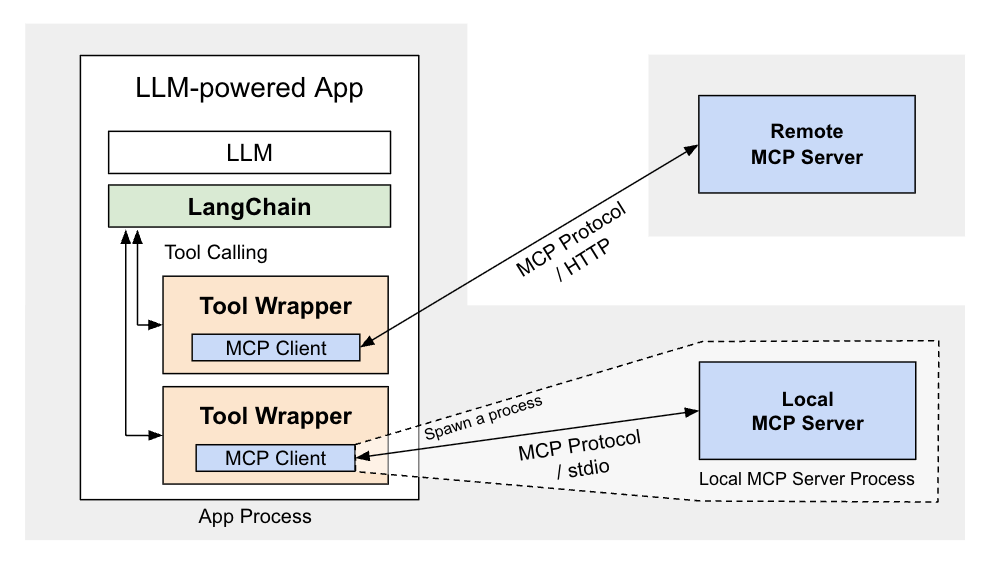
Its simplicity and extra features for local MCP servers can make it useful as a basis for your own customizations. However, it only supports text results of tool calls and does not support MCP features other than tools.
LangChain's official LangChain MCP Adapters library, which supports comprehensive integration with LangChain, has been released. You might want to consider using it if the extra features that this library supports are not necessary.
Prerequisites
- Python 3.11+
- [optional]
uv(uvx) installed to run Python package-based local MCP servers - [optional] npm 7+ (
npx) to run Node.js package-based local MCP servers
Installation
pip install langchain-mcp-tools
Quick Start
convert_mcp_to_langchain_tools() utility function accepts MCP server configurations
that follow the same structure as
Claude for Desktop,
but only the contents of the mcpServers property,
and is expressed as a dict, e.g.:
mcp_servers = {
    "filesystem": {
        "command": "npx",
        "args": ["-y", "@modelcontextprotocol/server-filesystem", "."]
    },
    "fetch": {
        "command": "uvx",
        "args": ["mcp-server-fetch"]
    },
    "brave-search": {
        "command": "npx",
        "args": ["-y", "@modelcontextprotocol/server-brave-search"],
        "env": {
            "BRAVE_API_KEY": os.environ.get("BRAVE_API_KEY")
        }
    },
    "github": {
        "type": "http",
        "url": "https://api.githubcopilot.com/mcp/",
        "headers": {
            "Authorization": f"Bearer {os.environ.get('GITHUB_PERSONAL_ACCESS_TOKEN')}"
        }
    },
    "notion": {  # For remote MCP servers that require OAuth, consider using "mcp-remote"
        "command": "npx",
        "args": ["-y", "mcp-remote", "https://mcp.notion.com/mcp"],
    },
}

tools, cleanup = await convert_mcp_to_langchain_tools(
    mcp_servers
)
This utility function initializes all specified MCP servers in parallel,
and returns LangChain Tools
(tools: list[BaseTool])
by gathering available MCP tools from the servers,
and by wrapping them into LangChain tools.
It also returns an async callback function (cleanup: McpServerCleanupFn)
to be invoked to close all MCP server sessions when finished.
The returned tools can be used with LangChain, e.g.:
# from langchain.chat_models import init_chat_model
model = init_chat_model("google_genai:gemini-2.5-flash")

# from langchain.agents import create_agent
agent = create_agent(
    model,
    tools
)
The returned cleanup function properly handles resource cleanup:
- Closes all MCP server connections concurrently and logs any cleanup failures
- Continues cleanup of remaining servers even if some fail
- Should always be called when done using the tools
It is typically invoked in a finally block:
try:
    tools, cleanup = await convert_mcp_to_langchain_tools(mcp_servers)

    # Use tools with your LLM

finally:
    # `cleanup` can be undefined when an exeption occurs during initialization
    if "cleanup" in locals():
        await cleanup()
A simple working usage example can be found in this example in the langchain-mcp-tools-py-usage repo
For hands-on experimentation with MCP server integration, try this MCP Client CLI tool built with this library
A TypeScript equivalent of this utility is available here
API Reference
Can be found here
Change Log
Can be found here
Working Usage Example
Can be found in this example in the langchain-mcp-tools-py-usage repo
Building from Source
See README_DEV.md for details.
Introduction
This package is intended to simplify the use of Model Context Protocol (MCP) server tools with LangChain / Python.
Model Context Protocol (MCP) is the de facto industry standard that dramatically expands the scope of LLMs by enabling the integration of external tools and resources, including DBs, Cloud Storages, GitHub, Docker, Slack, and more. There are quite a few useful MCP servers already available. See MCP Server Listing on the Official Site.
This utility's goal is to make these numerous MCP servers easily accessible from LangChain.
It contains a utility function convert_mcp_to_langchain_tools().
This async function handles parallel initialization of specified multiple MCP servers
and converts their available tools into a list of LangChain-compatible tools.
For detailed information on how to use this library, please refer to the following document: "Supercharging LangChain: Integrating 2000+ MCP with ReAct".
MCP Protocol Support
This library supports MCP Protocol version 2025-03-26 and maintains backwards compatibility with version 2024-11-05. It follows the official MCP specification for transport selection and backwards compatibility.
Limitations
- Tool Return Types: Currently, only text results of tool calls are supported.
The library uses LangChain's
response_format: 'content'(the default), which only supports text strings. While MCP tools can return multiple content types (text, images, etc.), this library currently filters and uses only text content. - MCP Features: Only MCP Tools are supported. Other MCP features like Resources, Prompts, and Sampling are not implemented.
Note
- Passing PATH Env Variable: The library automatically adds the
PATHenvironment variable to local server configrations, if not explicitly provided, to ensure servers can find required executables.
Features
Environment Variable Configuration for Local MCP Server
If you need to pass an API key or other configurations to a local MCP server via environment variables, use this example as a guide:
    "brave-search": {
        "command": "npx",
        "args": ["-y", "@modelcontextprotocol/server-brave-search"],
        "env": {
            "BRAVE_API_KEY": os.environ.get("BRAVE_API_KEY")
        }
    },
Note: The library automatically adds the PATH environment variable to local server configrations, if not explicitly provided, to ensure servers can find required executables.
stderr Redirection for Local MCP Server
A new key "errlog" has been introduced to specify a file-like object to which local MCP server's stderr is redirected.
    log_path = f"mcp-server-{server_name}.log"
    log_file = open(log_path, "w")
    mcp_servers[server_name]["errlog"] = log_file
A usage example can be found here.
The key name errlog is derived from
stdio_client()'s argument errlog.
Working Directory Configuration for Local MCP Servers
The working directory that is used when spawning a local MCP server
can be specified with the "cwd" key as follows:
    "local-server-name": {
        "command": "...",
        "args": [...],
        "cwd": "/working/directory"  # the working dir to be use by the server
    },
The key name cwd is derived from
Python SDK's StdioServerParameters.
Transport Selection Priority
The library selects transports using the following priority order:
- Explicit transport/type field (must match URL protocol if URL provided)
- URL protocol auto-detection (http/https → StreamableHTTP → SSE, ws/wss → WebSocket)
- Command presence → Stdio transport (local MCP server)
- Error if none of the above match
This ensures predictable behavior while allowing flexibility for different deployment scenarios.
Note: SSE transport is deprecated as of protocol version 2025-03-26; Streamable HTTP is the recommended approach.
Remote MCP Server Support
mcp_servers configuration for Streamable HTTP, SSE (Server-Sent Events) and Websocket servers are as follows:
    # Auto-detection: tries Streamable HTTP first, falls back to SSE on 4xx errors
    "auto-detect-server": {
       "url": f"http://{server_host}:{server_port}/..."
    },

    # Explicit Streamable HTTP
    "streamable-http-server": {
        "url": f"http://{server_host}:{server_port}/...",
        "transport": "streamable_http"
        # "type": "http"  # VSCode-style config also works instead of the above
    },

    # Explicit SSE (Note: SSE transport is deprecated)
    "sse-server-name": {
        "url": f"http://{sse_server_host}:{sse_server_port}/...",
        "transport": "sse"  # or `"type": "sse"`
    },

    # WebSocket
    "ws-server-name": {
        "url": f"ws://${ws_server_host}:${ws_server_port}/..."
        # optionally `"transport": "ws"` or `"type": "ws"`
    },
The "headers" key can be used to pass HTTP headers to Streamable HTTP and SSE connection.
    "github": {
        "type": "http",
        "url": "https://api.githubcopilot.com/mcp/",
        "headers": {
            "Authorization": f"Bearer {os.environ.get('GITHUB_PERSONAL_ACCESS_TOKEN')}"
        }
    },
Auto-detection behavior (default):
- For HTTP/HTTPS URLs without explicit
transport, the library follows MCP specification recommendations - First attempts Streamable HTTP transport
- If Streamable HTTP fails with a 4xx error, automatically falls back to SSE transport
- Non-4xx errors (network issues, etc.) are re-thrown without fallback
Explicit transport selection:
- Set
"transport": "streamable_http"(or VSCode-style config"type": "http") to force Streamable HTTP (no fallback) - Set
"transport": "sse"to force SSE transport (SSE transport is deprecated) - WebSocket URLs (
ws://orwss://) always use WebSocket transport
Streamable HTTP is the modern MCP transport that replaces the older HTTP+SSE transport. According to the official MCP documentation: "SSE as a standalone transport is deprecated as of protocol version 2025-03-26. It has been replaced by Streamable HTTP, which incorporates SSE as an optional streaming mechanism."
Accessing Remote MCP Servers with OAuth Quickly
If you need to use remote MCP servers that require OAuth, consider using "mcp-remote".
    "notion": {
        "command": "npx",
        "args": ["-y", "mcp-remote", "https://mcp.notion.com/mcp"],
    },
Authentication Support for Streamable HTTP Connections
The library supports OAuth 2.1 authentication for Streamable HTTP connections:
from mcp.client.auth import OAuthClientProvider
...

    # Create OAuth authentication provider
    oauth_auth = OAuthClientProvider(
        server_url="https://...",
        client_metadata=...,
        storage=...,
        redirect_handler=...,
        callback_handler=...,
    )

    # Test configuration with OAuth auth
    mcp_servers = {
        "secure-streamable-server": {
            "url": "https://.../mcp/",
            // To avoid auto protocol fallback, specify the protocol explicitly when using authentication
            "transport": "streamable_http",  // or `"type": "http",`
            "auth": oauth_auth,
            "timeout": 30.0
        },
    }
Test implementations are provided:
- Streamable HTTP Authentication Tests:
- MCP client uses this library: streamable_http_oauth_test_client.py
- Test MCP Server: streamable_http_oauth_test_server.py
Authentication Support for SSE Connections (Legacy)
The library also supports authentication for SSE connections to MCP servers. Note that SSE transport is deprecated; Streamable HTTP is the recommended approach.
Appendix
Troubleshooting
-
Enable debug logging: Set the log level to DEBUG to see detailed connection and execution logs:
tools, cleanup = await convert_mcp_to_langchain_tools( mcp_servers, logging.DEBUG ) -
Check server errlog: For local MCP servers, use
errlogredirection to capture server error output -
Test explicit transports: Try forcing specific transport types to isolate auto-detection issues
-
Verify server independently: Refer to Debugging Section in MCP documentation
Troubleshooting Authentication Issues
When authentication errors occur, they often generate massive logs that make it difficult to identify that authentication is the root cause.
To address this problem, this library performs authentication pre-validation for HTTP/HTTPS MCP servers before attempting the actual MCP connection.
This ensures that clear error messages like Authentication failed (401 Unauthorized) or Authentication failed (403 Forbidden) appear at the end of the logs, rather than being buried in the middle of extensive error output.
Important: This pre-validation is specific to this library and not part of the official MCP specification. In rare cases, it may interfere with certain MCP server behaviors.
When and How to Disable Pre-validation
Set "__pre_validate_authentication": False in your server config if:
- Using OAuth flows that require complex authentication handshakes
- The MCP server doesn't accept simple HTTP POST requests for validation
- You're experiencing false negatives in the auth validation
Example:
"oauth-server": {
    "url": "https://api.example.com/mcp/",
    "auth": oauth_provider,  # Complex OAuth provider
    "__pre_validate_authentication": False  # Skip the pre-validation
}
Debugging Authentication
-
Check your tokens/credentials - Most auth failures are due to expired or incorrect tokens
-
Verify token permissions - Some MCP servers require specific scopes (e.g., GitHub Copilot license)
-
Test with curl - Try a simple HTTP request to verify your auth setup:
curl -H "Authorization: Bearer your-token" https://api.example.com/mcp/
For Developers
See TECHNICAL.md for technical details about implementation challenges and solutions.
License
MIT License - see LICENSE file for details.
Contributing
Issues and
pull requests welcome!
In particular, please share any issues relating to the latest versions of LangChain and LLM models, as well as specific MCP servers.
Release history Release notifications | RSS feed


Download files
Download the file for your platform. If you're not sure which to choose, learn more about installing packages.
Source Distribution
Built Distribution
Filter files by name, interpreter, ABI, and platform.
If you're not sure about the file name format, learn more about wheel file names.
Copy a direct link to the current filters
File details
Details for the file langchain_mcp_tools-0.3.3.tar.gz.
File metadata
- Download URL: langchain_mcp_tools-0.3.3.tar.gz
- Upload date:
- Size: 28.8 kB
- Tags: Source
- Uploaded using Trusted Publishing? No
- Uploaded via: twine/6.2.0 CPython/3.12.8
File hashes
| Algorithm | Hash digest | |
|---|---|---|
| SHA256 |
1a3b3ce86e4651983508d626c1f2adc80029eb9a66dad32673aa38d5905b8a43
|
|
| MD5 |
67ed58206996a9ed9a1b1f09f06e0455
|
|
| BLAKE2b-256 |
04e4668b7cda0109f5325d7f4ea55896ccb70328c4cda52845dfd9278cc8fca2
|
File details
Details for the file langchain_mcp_tools-0.3.3-py3-none-any.whl.
File metadata
- Download URL: langchain_mcp_tools-0.3.3-py3-none-any.whl
- Upload date:
- Size: 24.3 kB
- Tags: Python 3
- Uploaded using Trusted Publishing? No
- Uploaded via: twine/6.2.0 CPython/3.12.8
File hashes
| Algorithm | Hash digest | |
|---|---|---|
| SHA256 |
a0f5bd5a95ad0549c4cfdb881be20d4383fcfafa5e674abad1a1a542a3fa41db
|
|
| MD5 |
7dd5307d73284fa4a2969841dadb25df
|
|
| BLAKE2b-256 |
fd7d1e093a543925f55f3c0c59a48870c3f216bf8ee559e89bfbd72d445cf211
|






