
Prompt regression testing for RAG pipelines. Like git diff, but for AI.

Project description
LLM Diff
Prompt regression testing for RAG pipelines. Like git diff, but for AI.



Why LLM Diff
- You changed a prompt. Did it get better? Find out in 2 minutes.
- Works with any LLM — OpenAI, Anthropic, Google Gemini, and more.
- Local-first. No accounts, no cloud, no data leaves your machine.
- One env var. Set your API key and you're done.
Quickstart
# 1. Install
pip install llmregress

# 2. Set your API key (pick any provider you already have)
export ANTHROPIC_API_KEY=your_key_here
# or: export OPENAI_API_KEY=your_key_here
# or: export GOOGLE_API_KEY=your_key_here

# 3. Copy an example test file
cp examples/rag_pipeline.yaml my_tests.yaml

# 4. Compare your prompts
llmregress compare my_tests.yaml

# 5. Open the web dashboard
llmregress serve
# → http://localhost:7331
I have a LangChain RAG app — how do I use this?
If your app looks like:
result = chain.invoke({"question": q, "context": c})
Translate it into a YAML test case:
model: anthropic/claude-3-5-haiku-20241022
judge_model: openai/gpt-4o-mini
test_cases:
  - id: my_test
    input: "What is the default chunk size?"
    context: "LangChain's default chunk_size is 1000 characters..."
    reference_answer: >
      LangChain's RecursiveCharacterTextSplitter defaults to a chunk_size of 1000 characters
      and a chunk_overlap of 200 characters.
    criteria:
      - "Answer is factually correct"
      - "Response is concise (under 50 words)"
    prompt_v1: |
      You are a helpful assistant. Context: {context}
      Question: {input}
    prompt_v2: |
      Answer only from context. Be concise.
      Context: {context}
      Question: {input}
Then run: llmregress compare my_tests.yaml
Providers & model strings
Change 1–2 lines in your YAML — no code changes. You can use any model from each provider family:
| Provider | Example model string | Env var |
|---|---|---|
| Anthropic | anthropic/claude-3-5-haiku-20241022 |
ANTHROPIC_API_KEY |
| Anthropic | anthropic/claude-opus-4 |
ANTHROPIC_API_KEY |
| OpenAI | openai/gpt-4o-mini |
OPENAI_API_KEY |
| OpenAI | openai/gpt-4o |
OPENAI_API_KEY |
| Google Gemini | gemini/gemini-2.0-flash |
GOOGLE_API_KEY |
| Google Gemini | gemini/gemini-1.5-pro |
GOOGLE_API_KEY |
| Ollama (local) | ollama/llama3 |
(none) |
The model string format is always
provider/model-name. Any model supported by LiteLLM works — just set the matching API key.
Reduce judge bias: use a different model family for
judge_modelthanmodel. Example: Anthropic runner + OpenAI judge = cross-family, lowest self-preference bias.
CLI reference
| Command | Description |
|---|---|
llmregress compare <yaml> |
Run + print colored diff to terminal |
llmregress run <yaml> |
Run + store results (no terminal output) |
llmregress history |
List past runs |
llmregress serve |
Start web dashboard at localhost:7331 |
llmregress demo |
Try it without an API key |
Web dashboard
llmregress serve
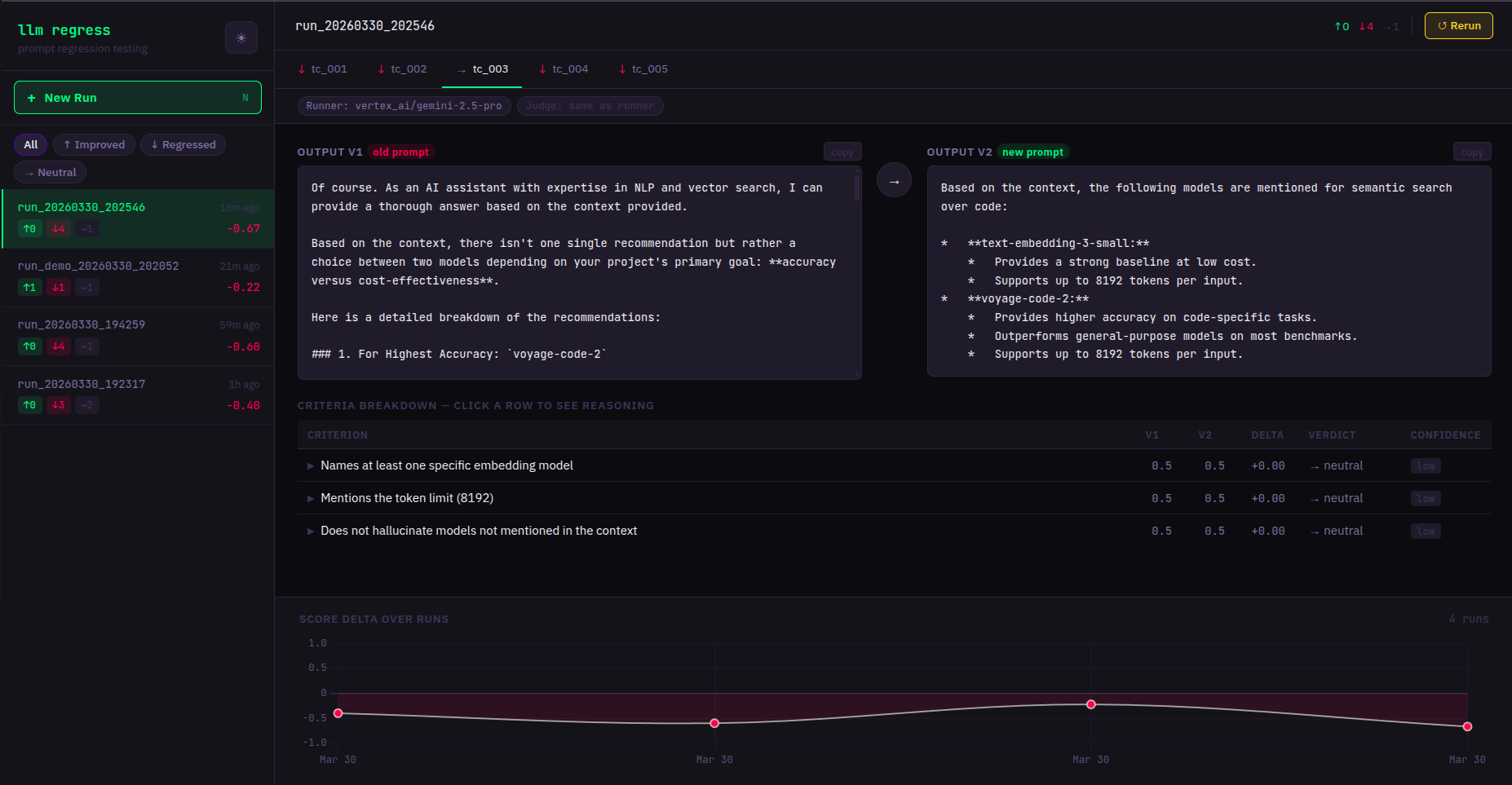
Opens at http://localhost:7331. Features:
- Side-by-side output comparison per test case
- Live streaming — results appear as they complete
- Run history with score trend chart
- Click any past run while a new test is running — views are independent
Environment variables
| Variable | Default | Description |
|---|---|---|
ANTHROPIC_API_KEY |
— | Anthropic API key |
OPENAI_API_KEY |
— | OpenAI API key |
GOOGLE_API_KEY |
— | Google Gemini API key |
LLMREGRESS_DB_PATH |
~/.llmregress/history.db |
SQLite database path |
LLMREGRESS_PORT |
7331 |
Web server port |
LLMREGRESS_HOST |
127.0.0.1 |
Web server bind address |
LLMREGRESS_YAML_DIR |
~/.llmregress/tests |
Allowed directory for YAML test files |
LLMREGRESS_JUDGE_VOTES |
3 |
Calls per criterion: 1=fast, 3=reliable majority vote |
Docker
docker-compose up
# Dashboard at http://localhost:7331
Mount your YAML test files into the container:
# docker-compose.yml — add a volume:
volumes:
  - ./my_tests:/workspace/tests
Contributing
- Fork the repo
- Create a branch:
git checkout -b feat/my-feature - Run tests:
pytest tests/ -v - Open a PR


Download files
Download the file for your platform. If you're not sure which to choose, learn more about installing packages.
Source Distribution
Built Distribution
Filter files by name, interpreter, ABI, and platform.
If you're not sure about the file name format, learn more about wheel file names.
Copy a direct link to the current filters
File details
Details for the file llmregress-0.1.6.tar.gz.
File metadata
- Download URL: llmregress-0.1.6.tar.gz
- Upload date:
- Size: 34.0 kB
- Tags: Source
- Uploaded using Trusted Publishing? No
- Uploaded via: twine/6.2.0 CPython/3.11.15
File hashes
| Algorithm | Hash digest | |
|---|---|---|
| SHA256 |
3f037a5aeba17601be8d61d1a554fc6b36b6081d11a5a363faf132f734130c15
|
|
| MD5 |
f04fca0a0f9dd3450eeea2847e52853c
|
|
| BLAKE2b-256 |
5e2ebe7deae35a76f9bca7e6ea9c0f85f121b0af7adf682d3b196138b7c85239
|
File details
Details for the file llmregress-0.1.6-py3-none-any.whl.
File metadata
- Download URL: llmregress-0.1.6-py3-none-any.whl
- Upload date:
- Size: 31.5 kB
- Tags: Python 3
- Uploaded using Trusted Publishing? No
- Uploaded via: twine/6.2.0 CPython/3.11.15
File hashes
| Algorithm | Hash digest | |
|---|---|---|
| SHA256 |
ac06b7da626c74359589e7b5d6b442cb66a88989bdf47b06ec781a23c6e7ecb4
|
|
| MD5 |
0a41504a12286bae3de4799c3f01b520
|
|
| BLAKE2b-256 |
ed5b94c62884623b3bf61c646182c071faa09f01fa943a58cc6ed417df40844f
|






