
A 3D orientation cube widget for PySide6 — renderer-agnostic, drop-in ready

Project description
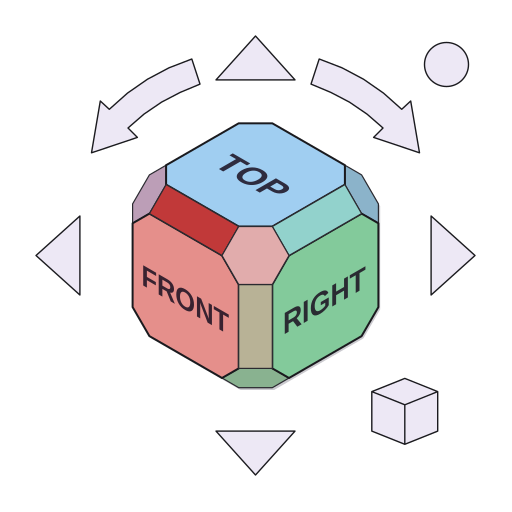
NavCube
A 3D orientation cube widget for PySide6 — works with OpenCASCADE, VTK, raw OpenGL, or anything else with a camera. The core widget has zero renderer dependencies.
Why does this exist?
NavCube grew out of a real problem in Osdag, an open-source structural steel design tool built on PythonOCC. Osdag lets users open multiple design tabs at once, and we wanted a NaviCube on each one.
OCC's built-in ViewCube lives inside the OpenGL context. That's fine for single-window apps, but once you start opening and closing tabs, you hit all kinds of lifecycle problems — OCC objects outliving their context, double-free crashes on tab close, the cube occasionally painting into the wrong viewport. The fundamental issue is that the cube and the renderer are too tightly coupled.
The fix was to pull the cube out of OCC entirely. NavCube is a plain PySide6 QWidget that draws itself with QPainter. No OpenGL, no OCC handles, no shared context. When a tab closes, the widget just disappears like any other Qt widget. The crashes went away.
The side effect: since the widget doesn't touch your renderer, it works equally well with VTK, custom OpenGL, or anything else. So we turned it into its own library.
Install
pip install navcube            # core widget only
pip install navcube[occ]       # + OpenCASCADE connector
pip install navcube[vtk]       # + VTK/PyVista connector
Quick start
from navcube import NavCubeOverlay

cube = NavCubeOverlay(parent=your_window)
cube.show()

# Push your camera state in whenever it changes
cube.push_camera(dx, dy, dz, ux, uy, uz)

# React when someone clicks a NaviCube face
cube.viewOrientationRequested.connect(your_camera_update_fn)
That's it for the basics. The full integration guide, connector docs, and style reference are all over at nishikantmandal007.github.io/navcube.
Try it now
Run this from a terminal or Jupyter cell to open a live window with a working NavCube:
import sys
from PySide6.QtWidgets import QApplication, QWidget, QVBoxLayout, QLabel
from PySide6.QtCore import Qt, QPoint
from navcube import NavCubeOverlay

app = QApplication(sys.argv)
win = QWidget()
win.setWindowTitle("My First NavCube")
win.resize(800, 600)
win.setStyleSheet("background: #2b2d3a;")

label = QLabel("Click a NaviCube face to change the view")
label.setStyleSheet("color: #aab0c4; font-size: 14px;")
label.setAlignment(Qt.AlignCenter)
QVBoxLayout(win).addWidget(label)
win.show()

cube = NavCubeOverlay(parent=win)
cube.viewOrientationRequested.connect(
    lambda dx, dy, dz, ux, uy, uz:
        label.setText(f"Dir ({dx:+.2f}, {dy:+.2f}, {dz:+.2f})  Up ({ux:+.2f}, {uy:+.2f}, {uz:+.2f})")
)
cube.show()

# NavCubeOverlay is a Qt.Tool floating window — position needs global
# screen coordinates, not parent-relative coordinates.
def place_cube():
    pos = win.mapToGlobal(QPoint(win.width() - cube.width() - 10, 10))
    cube.move(pos)

place_cube()

# Reposition when the window moves or resizes
_orig_resize = win.resizeEvent
_orig_move   = win.moveEvent
win.resizeEvent = lambda e: (_orig_resize(e), place_cube())
win.moveEvent   = lambda e: (_orig_move(e),   place_cube())

sys.exit(app.exec())
Click any face — the label updates with the orientation signal your real camera would receive.
What's in the docs
| Getting Started | Install, architecture overview, first integration |
| Connectors | OCC, VTK, and how to write your own |
| Style Reference | Every field in NavCubeStyle, with examples |
| Coordinate Systems | Z-up vs Y-up, sign conventions |
| API Reference | Classes, methods, signals |
| Changelog | What changed and when |
Requirements
- Python 3.10+
- PySide6
- NumPy
Optional: pythonocc-core (OCC connector), vtk (VTK connector).
Acknowledgements
NavCube is directly inspired by FreeCAD's NaviCube. The face layout, edge/corner regions, and click-to-snap behaviour all follow FreeCAD's lead. Huge thanks to the FreeCAD team for setting such a high bar.
License
MIT
Release history Release notifications | RSS feed


Download files
Download the file for your platform. If you're not sure which to choose, learn more about installing packages.
Source Distribution
Built Distribution
Filter files by name, interpreter, ABI, and platform.
If you're not sure about the file name format, learn more about wheel file names.
Copy a direct link to the current filters






