
Declarative parser for command line interfaces

Project description
☢️ Nuclear




Nuclear is a binding glue for CLI applications. It consists of tools for building CLI applications in Python, including:
- CLI parser for building nested CLI commands
- Sublog - contextual logger
- WAT - inspection tool
- Shell utilities
CLI Demo
from nuclear import CliBuilder

cli = CliBuilder()

@cli.add_command('hello')
def say_hello(name: str, decode: bool = False, repeat: int = 1):
    """
    Say hello
    :param decode: Decode name as base64
    """
    message = f"I'm a {b64decode(name).decode() if decode else name}!"
    print(' '.join([message] * repeat))

@cli.add_command('calculate', 'factorial')
def calculate_factorial(n: int):
    """Calculate factorial"""
    print(reduce(lambda x, y: x * y, range(1, n + 1)))

@cli.add_command('calculate', 'primes')
def calculate_primes(n: int):
    """List prime numbers using Sieve of Eratosthenes"""
    print(sorted(reduce((lambda r, x: r - set(range(x**2, n, x)) if (x in r) else r), range(2, n), set(range(2, n)))))

cli.run()
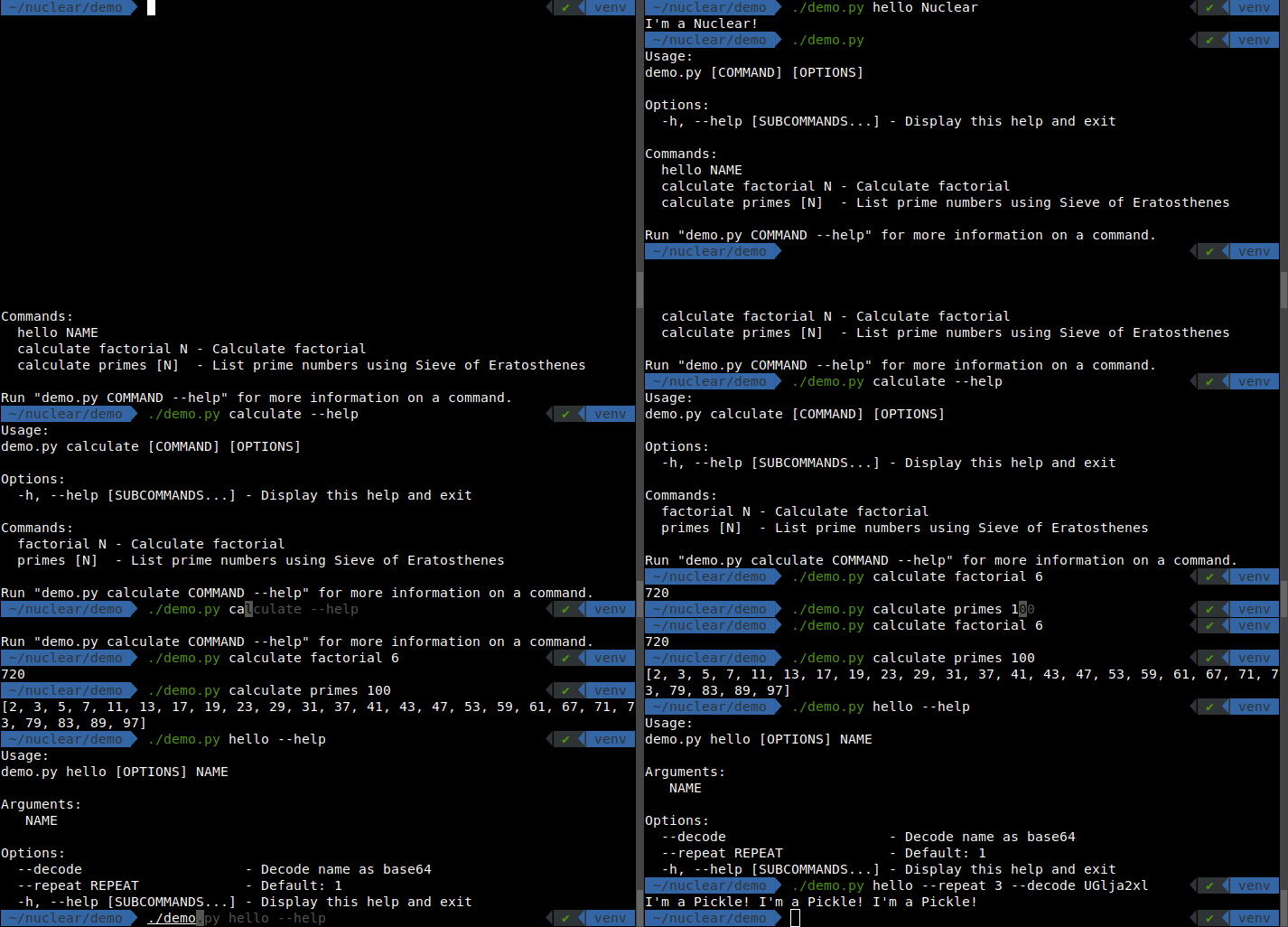
See demo.py for a complete example.
Installation
python3 -m pip install --upgrade nuclear
You need Python 3.8 or newer.
🙀 WAT Inspector
Nuclear comes with a powerful inspection tool that allows you to delve into and examine unknown objects at runtime.
"Wat" is a variant of the English word "what" that is often used to express confusion or disgust
If you find yourself deep within the Python console, feeling dazed and confused,
wondering "WAT? What's that thing?",
that's where the wat inspector comes in handy.
Start the Python Interpreter (or attach to your program) and execute wat(object) on any object
to investigate its
type, formatted value, variables, methods, parent types, signature,
documentation, and even its source code.
Import
Import inspection tools from nuclear package.
pip install nuclear
from nuclear import wat
Alternatively, use Insta-Load in the section below.
Insta-Load
If you want to debug something quickly,
you don't even need to install nuclear package to use wat inspector.
Load it on the fly by pasting this snippet to your Python interpreter:
import base64, zlib
code = 'eJzNWuluG0cS/q+naCg/OLTGjBTvATChd51YcQw4ycJRNjAkYTDkNKWJhzPEHJYVLoE8xD7DPtg+yVZVX9VzkJQ2AWLAItld9XXX0dXV1b0si5VI4jpeZHFVyUqkq3VR1q7pSDekebWWi1rElajqJNI/TW9h6UppvlX31dES4ev7dZrfGOQX+X0oXqaLOhRv0gr+fr+u0yKPs1Bc3K9lKF7XsoznGXz7MYeOo7+7udBf8VqN/VWRL9Ob6ZGAf9UtQE/FvCgy+p00eSJL1pAXSbGoWENW5Dfs56JIpP45NN6Lui7TeVNLNWQer4Cjqkv69SHOGvgJwtFPEBl+oTwKPc4yFGnXDNdl+iGuOUmV3uRx3ZTQZnR0CeNdK/5i0W5O5NKYKSCaYv4zTSmkX0/CtqrETHwdZ5UMOzPye7jy/B6nRb/dqdNvBz20m8dKncfHx/R5/jFepbkU9a3E+YMsI3DKfFmUqxiFDUXVLG7RDdO6Ij2HQnXWMlFmCOGjTFHfVShWsr4tkio0SmtWMq8JSRSlqIqmXEia7oQopuu4jFdKc2p4URdGq5xCq/HuFvBliURgwLxW7aJo6nVTi7sUBofP2LhOJYJcpsRh5wjqLc00x3wIpdzOCHmRP43n81J+SGMrcyXiPPHl41DGth0w1cEmyLmUFbsiOqWJYilisWzyhbKNEgM1qxYQAzNOxOBuU0DwbQKmtHBKJh2YOBR5EcNJ80XWABS0c1fx/IqmHmhDRopGrRK9UkJluhn9DbViZlo/MCsAD8kkM/xjW5RYM/URklJmSjNEQCOMx3xteoP/sZboWDx9jiFtqikwwEKvF3CDYTV1tGHVxRSjXFwtkCltARS9YJhLFdngV0Q+DU1aV+p3AMpS3KVcaxqKwECILa4/XTISMZshEfWiVfyeCLrSdbQosqIM7NA6KLmZTuL1WuZJsBxtfrh49+Y8+vLt61ffXERfvvnxfKtmsnl7/sP5xVZsLMp2pKYjQbkPAkQTDMMdCIJyOhTev904HWw1hcbGwTCoMt3jz4D+oAa5+XYOT1ugJwS2mHFgIcOar9gwqoWIKs+SmvRBCjQ8dnzdYIYH2LSC9VjH+YLkCkWQUTaSUGYC0w3F/L7GHQQ/4rKMIW2pmzXmJZUEEkhtfpE5fS3j/EaOH+Yzmczd7Hw3hy6lajZbk0FQhxsIkxDQ4Y2sMYIrQUZRhM1RNILv//31P8xrbEaBegemyMBGtidA3lBYAxzqsTZXcSY3TUYMiAlmXPiqJksR4qJspJUUqTDu50WtI9BEhRO1G/TrQfFNFkUDQX50lY/GuLZPHcEOMV69ffFuC9vEBhDo01sQ3fXLoOTHGqEuO1igekADJxkxwGtnTSUX7RMoVcBS6kla0ZZn45UnMpNZb8Nao+pXhJCBZzwYTvUdpAzPpm6fN1a9yjeqlbkmM5TauOw4LO2BEAxdMgmiFNL7yPUoN1D841C8l/ezLF7Nk5i4p/R3gj7ZcUet/AgWdqIhq6iSlDoEbgALbicMB5MJKBxgQNdAeB+Mp0J8ImDy6S8FZCKZmMelHQ7mCxlpnEV3aVLfgiRFNUGN2/Yq/UUGY7Bm1qzyqj1NMKss6+A0FFrDoFpxAivz37+OxJM2+okgRQ+tvQdD1KAlmDIuicnPRZpDlIPkGrMs+pLmJlUFvaiWigz6XZFLz8J9SmMqolG8vRTbzG4NUSAnIsqD+lxAJUHaVFM/46CsxJwKL9unsWs1DXAc9LIkZWkAigntKCV2u/nqrG6GzSBVXNYVpuoBhE6IHLgisQMUzpq9WKOzZj9M6ezMW2bQVad5I22jPub1ja2HRkQFZZlsOoR+ZxXnsiJaN26GNqoDi40eKq950FYAoKEae8z3oIgCIrmI06gf2/U5jKK71g5+3wtzn8os6Ry4A0+lGAxmODWvlUacqXG9DkwoZpS+KEn8XjOZmZ2V3+/nt16XtuRMf/qdVokz+60FXCxmuEXYRnVGGLKwXh8gNmW8tCSgRTlbXd47r9OrzUsJrHfIjwu5roXV7HlZ4jmlErIDIN18BrKEqUqTzOxoTl5Fomd2Efc7zMr5zufgXaapZxz8EzVB01V1Ivo6HgA+DiDvGR/bgD+wu07ZqpTL9CNyqpLPsc7bu8xFCSEQAqU5pA4CxdV9vhCow0GwvRg7udVZ+3G88ybNQIpDmW/jqi+/3MvK0yZHccx3BZd5YMqxUVRbPxt59fb8/LvtBkfd2kSLmpzV7TnGuW0rJTrcSfXUuMoAT8G53cV45vc/tN0yhAiWmJJG21E1OIU9O1WdD+tV7o7sQ9NV4bY1QQ3iZdKwneNI/cM7JEyeafMOLDdNos0GdD2m1Z0RpX8ypzQgvwmAWAc1lqJFpu4VqPyuHet35QC2MkFhMVInf3N2osF1wKSkcWgPUvYGW7UAaI8gTvw29p1U+Cfo6N35mzff/7Td2PTUOKbumIqNGWILY2zsjI2DcpXoldyvEF9ynY3RsO7M1bYEzddNjaLhyPBTO5aPeUZjGvccoTr4bv0JfgT6RHfjkcouTAPSPU7tgJ3CkcM/W0GDxb7K2flq2DP7gLUderzH1fI7S3GnBzLu3avIMnMfa68eSzT2JtqdYkqxZiqwNAsG6/gLK3ToJYGgXR0de6F1tNE1J61du5mqXHQorthw/u2LV+ffXbzYIpVnIA6BB/9hCC/6I+kgDpUv9wK9PX+5Jco2TldDASgTTu9ZEdfjHlUZYETc+GW0YUysLHWxjF2xlxvX2HWmPk7O+gpXJsSl1Q5k7D0Aud8NsHCnXXprPYH7I5s3fJ3qmz3mk74/4hmz6i37pm7LxAMrNuHhVjXz41xo7J6jSidwmFxV/DAKJL0Lk1gVnDsG7VnHXQYSgJVN2LS3Gz00Rn8X8ENXKlHSuzPYChLrSCFgYoRtxyBzoJqenrlhV2mSQAJOAJ3zfDUe9FCzT21cAYdDUUGHzaK1i223h8TW9lDbVi7W9cNsqu9+H+En6AXWAbLpb2TJlr+JE5Trj2XDy0eZ8PrhFry87rWfvQeI1M22b7BVkTQZnr2IYhJFqiGKjN40gd44sLBpWOggCBx09Io4L5Xl6KzyFIxdm+v0Xd5nhldHFN9/h3jUcNvJILPN071LirYubInK5ens7ETUdHpalYV/eEKXRuN9DMU8rqS6gAGBZd6sALLWap9o1rGfPOGWgMw96Rr+61SgNI8bCfjUVfeBzKpI47mFBfOTlfadjjuCWb/RNsG7CrUY+vWsKgIavZUpYWHRVUUs8jItq5rWSChA8aWscIEi8QTg65RO3pToGlMhCbOK5Qc29uNE3arYeCDzwPWOxXNxdnq6F+VyClTXHpbxTj4SOWDnwNBX5taxslMdPaim6hx23cyzdKFGwZiLX8g/6Qv4JKvp87OIKWuaAqbK0KlqpsK2JjgYmaPqFy+NU8ChAN4MlGhw/uxn90Tnspnyly/IMI4n6TCQlmcQx5N3x3zUtPUDkoMk2yHVTpi2YMNC7YJpy9WDgre+zFrA7EvplpeKRbqk5BpsFqsvvP9B7MxDpt6xxgThlsJw8Glf6BusZ9jLJn625qLg+hiSpVeenmntYBwqK7jLdO69qFff7g9XrFn3h2qWjf9bqJaLQ7odkme/cvdz7tWudxGkXmQxZ3+wcl+2H2ft1i0LKL+Banl4YpI8XLH7GYf1qqrxP8W1fSSodzHKmNQpGF+ASf1qsMnf58VdrvOZih7gmSd5a0ylirIyL8JoV4WkOa2jKKhktgzFkyfv7+LypuK37NAxiejdGYYz1c/46SWN4vfTD8aMT8+iW5mZ6ir+M3nPiGHhI5khKEP/Rd4sMhmXqBThlKEEfs7Q2KiE2LmtXaIiLsp74WfDd3EdKLSx9rawSyE+1SOa1x4whQ7RBPLqdJlKcKA2uXtTCb7V4vQoJ62XS98aSIMUq/KnV7RQ7xDYWPTQkD/CdI8v0bXZ40sfB6t3DObB7y99NLUQOnh9TzB9RrzB6LA96BWmj6fe07T1c/hDTB8Ndm7PrP1vMb/Chq6njXs8wqfKCsgNKkdoTTc5Agf2bi105Nr7XIEtgoEnC/hPvRh1bToLjxd1RBf2KmQU+AjVnWv8oqh5jU1EGF54NGGodMPqohCGGF3cNRHJjUCP4i9HsPzhzITDXfuFfCT2JM3lnYtffALgV+t7pjqfeNKsEzx66ojYV6834tGEca6Omz+egllpIfpAQJDAxt39dwRmzAjLAkmkvCNSMSMYc53WZSOT9INVK7PU1F7xkTqYUYloLD4RnzKkOEkeiXLCULLqNl3WjwICpC++4JvO/wX1/DmDKsrHwvyLy/Z4uRiKfrNgoejZ1z6fR5/DHWmmPam7xExYwLeSkI9sRrQ9YMWhGm27awV3Ls1/qUmx/IgXEL5Tq8eXMzHCbWK0B4ho9uConWAfkqbag4X7wj4kotmDo/aKfUiaag8WBLl9QEiyV9u45EePjg5dxJusmB8KqWl7MTshK04r2Xps007otAaOnAubIldrY+qpcGmIUk6qZh6Uo6uPZ/Ory6vkJPgc/oz/tkIfh/9qDyPUXr0otEIXbwOj4VDoRDAcQwq4HeutYlmqR8f89cGiKbFgR12azHtRgdlEhIuPnkoHn6kHl/N48R43ftz9IAMi7naZUo3GXiV2i5RmQvQ5WUYIe3Q4RPdayQApPXRvmMy/yryxChmAVhI+yMyYBhKZMQG15QpulLZnta1ivPR3NcsfSf1a4N9V/5RUitno6vTZs8vT1eiInzbokgY7zmzHy9ff2tbPbOvb85e29fTzZ2ctHK//jPdTCs1ZP2uz+hRnnEIlyJz7WZu7RXLmkeArYsb8pzazR3DGCfTlPuf+s+386t0LT6S/2J6fvnl94Q35V6aIF++cYqnnfx14cnE='
exec(zlib.decompress(base64.b64decode(code.encode())).decode(), globals())
Now you can use wat.
Usage & modifiers
Nuclear comes with the wat object that can quickly inspect things
by using the division operator (to avoid typing parentheses).
A short, no-parentheses syntax wat / object is equivalent to wat(object).
You can call wat.modifiers / object (or wat.modifiers(object))
with the following modifiers:
.shortto hide attributes (variables and methods).longto show non-abbreviated values and documentation.dunderto display dunder attributes.codeto reveal the source code of a function, method, or class.nodocsto hide documentation for functions and classes.allto include all available information
You can chain modifiers, e.g. wat.long.dunder.nodocs / object.
Call wat() to inspect locals() variables.
Type wat in the interpreter to learn more about this object itself.
Use Cases Examples
Determine type
In a dynamic typing language like Python, it's often hard to determine the type of an object. WAT Inspector can help you with that by showing the name of the type with the module it comes from.
>>> wat.short({None})
value: {None}
type: set
len: 1
>>> wat.short / user
str: admin
repr: <User: admin>
type: django.contrib.auth.models.User
parents: django.contrib.auth.models.AbstractUser, django.contrib.auth.base_user.AbstractBaseUser, django.contrib.auth.models.PermissionsMixin, django.db.models.base.Model, django.db.models.utils.AltersData
Now that you've identified the actual type, you can put the type annotations in your code to reduce the confusion.
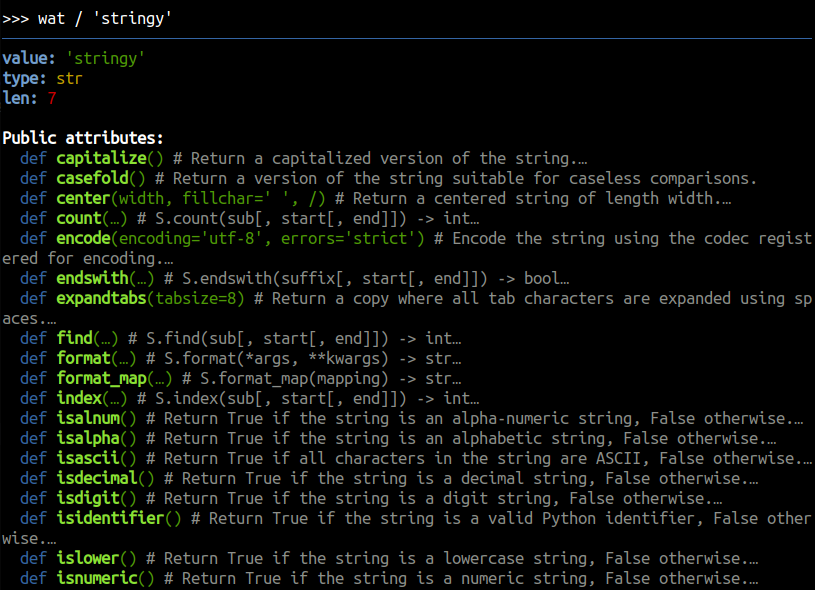
Look up methods
Listing methods, functions and looking up their signature is extremely beneficial to see how to use them. Plus, you can read their docstrings.
wat / 'stringy'
Discover function's signature
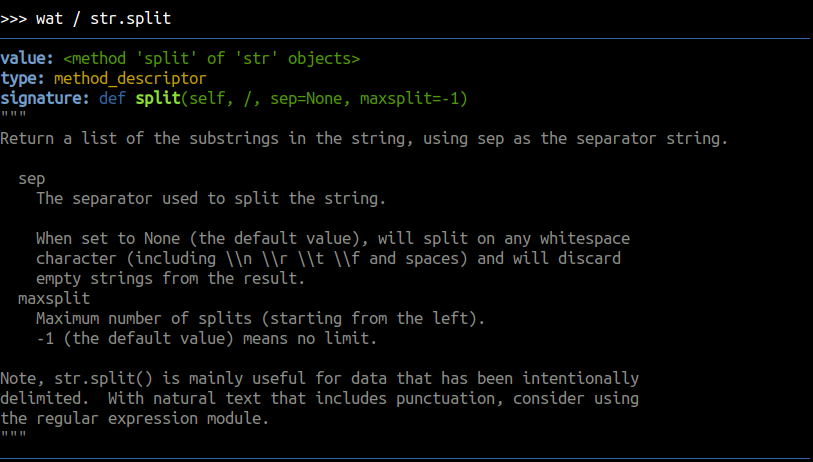
See the docstrings and the signature of a function or a method to see how to use it.
wat / str.split
Look up attributes
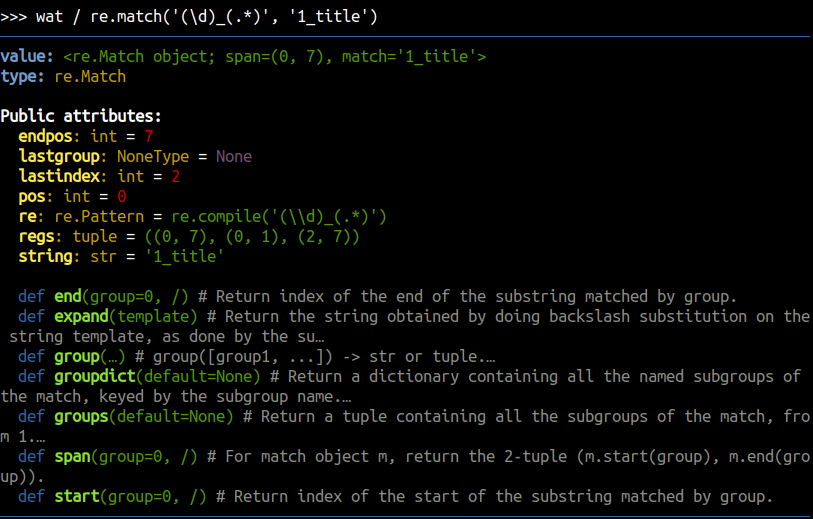
List the attribues and their types to see what's really inside the inspected object.
wat / re.match('(\d)_(.*)', '1_title')
Explore modules
One of the use cases is to explore modules. For instance you can list functions, classes and the sub-modules of a selected module.
import pathlib
wat / pathlib
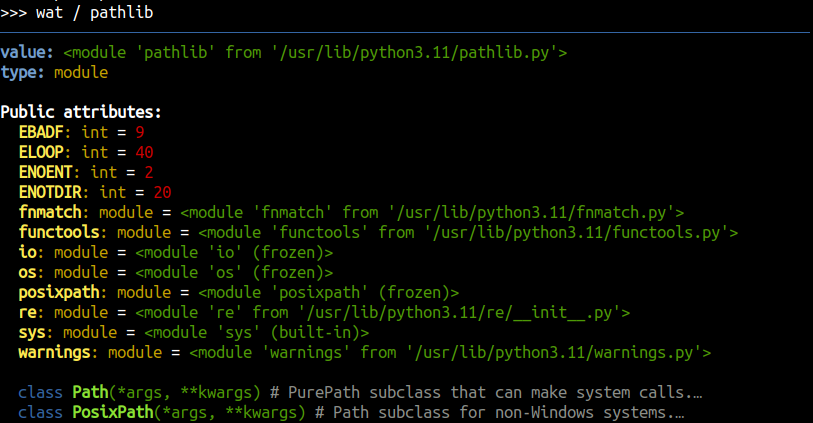
Then, you can navigate further, e.g. wat / pathlib.fnmatch.
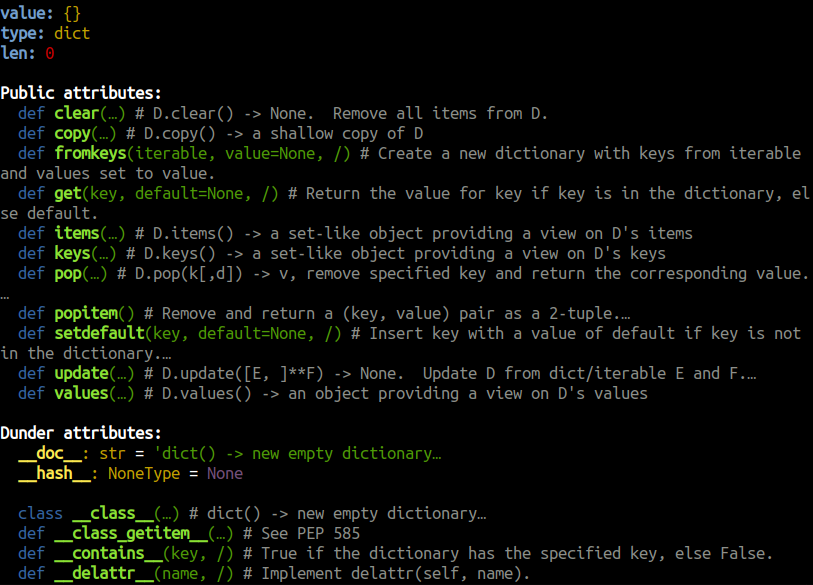
Explore dunder attributes
wat.dunder / {}
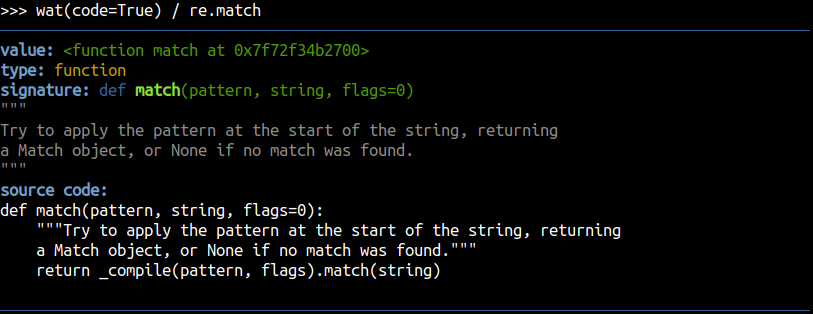
Review the code
Look up the source code of a function to see how it really works.
import re
wat.code / re.match
Debug with breakpoint
You can use Python's breakpoint() keyword to launch an interactive debugger in your program:
logger.debug('init')
x = {'what is it?'}
breakpoint()
logger.debug('done')
(Pdb) from nuclear import wat  # or paste insta-load snippet
(Pdb) wat / x  # inspect local variable
...
(Pdb) c  # continue execution
Explore Python built-ins
wat / __builtins__
Look up local variables
wat()
# or
wat.locals
Look up global variables
wat.globals
📜 Sublog
Sublog is a nuclear's contextual logging system that allows you to:
- display variables besides log messages:
logger.debug('message', airspeed=20), - wrap errors with context:
with add_context('ignition'), - catch errors and show traceback in a concise, pretty format:
with error_handler().
from nuclear.sublog import logger, error_handler, add_context

with error_handler():
    logger.debug('checking engine', temperature=85.0, pressure='12kPa')
    with add_context('ignition', request=42):
        logger.info('ignition ready', speed='zero')
        with add_context('liftoff'):
            raise RuntimeError('explosion')

Context logger
Use nuclear.sublog.logger to log message with a pretty format out of the box.
Pass additional context variables as keyword arguments to display them in the log message.
from nuclear.sublog import logger

logger.info('info log')
logger.debug('debug log', var1=1, var2='two')
logger.info('not great not terrible', radioactivity=3.6)
logger.error('this is bad')
logger.exception(RuntimeError('this is worse'))
Error handler
Use nuclear.sublog.error_handler to catch errors and show traceback in a concise, pretty format.
from nuclear.sublog import error_handler

with error_handler():
    raise RuntimeError('explosion')
Wrapping context
Use nuclear.sublog.add_context to wrap code with additional context information.
This will be included in in the log message, if an error occurs.
from nuclear.sublog import add_context

with add_context('reloading plugins'):
    with add_context('loading config'):
        raise RuntimeError('file is missing')
This will produce an error with the following message:
reloading plugins: loading config: file is missing
Note that while each individual part of the message may not provide a comprehensive explanation of the error, when combined, the whole message becomes highly informative. This is the core principle behind enriching errors with context.
🐌 Shell utilities
Nuclear provides utilities for running system shell commands.
Basic usage:
from nuclear import shell

window_id: str = shell('xdotool getactivewindow')
shell function captures the stdout & stderr output of the shell command and returns it as a string.
It may also print live stdout in real time (line by line) and capture output in case of errors.
It has a lot of possibilities thanks to its parameters:
cmd: str- shell command to runworkdir: Optional[Path] = None- working directory for the commandprint_stdout: bool = False- whether to print live stdout in real time (line by line) from a subprocessprint_log: bool = False- whether to print a log message about running the commandraw_output: bool = False- whether to let subprocess manage stdout/stderr on its own instead of capturing itindependent: bool = False- whether to start an independent process that can outlive the caller processoutput_file: Optional[Path] = None- optional file to write the output in real time
It returns the stdout of the command combined with stderr.
In case of non-zero command exit code, shell raises CommandError exception.
Release history Release notifications | RSS feed


Download files
Download the file for your platform. If you're not sure which to choose, learn more about installing packages.
Source Distribution
Built Distribution
Filter files by name, interpreter, ABI, and platform.
If you're not sure about the file name format, learn more about wheel file names.
Copy a direct link to the current filters
File details
Details for the file nuclear-2.2.4.tar.gz.
File metadata
- Download URL: nuclear-2.2.4.tar.gz
- Upload date:
- Size: 52.2 kB
- Tags: Source
- Uploaded using Trusted Publishing? No
- Uploaded via: twine/4.0.0 CPython/3.12.3
File hashes
| Algorithm | Hash digest | |
|---|---|---|
| SHA256 |
95a822b99c7bd711a30611c23210d6e9346427b2105b1a0eda09ba8c2bf30d8e
|
|
| MD5 |
4da009f02d6c2924ec8348895c931b0a
|
|
| BLAKE2b-256 |
97308b1ddd7dea59c6be22f41c2b0cebee3e3f0c7fa579ec062270f86cace377
|
File details
Details for the file nuclear-2.2.4-py3-none-any.whl.
File metadata
- Download URL: nuclear-2.2.4-py3-none-any.whl
- Upload date:
- Size: 54.7 kB
- Tags: Python 3
- Uploaded using Trusted Publishing? No
- Uploaded via: twine/4.0.0 CPython/3.12.3
File hashes
| Algorithm | Hash digest | |
|---|---|---|
| SHA256 |
06fb76ad7c560c0754e33f1b071dfb31e883435cfc0503dab655da2f7f88e1da
|
|
| MD5 |
19e4def85511deeaddb662dfd368fe90
|
|
| BLAKE2b-256 |
5045126f96c4fb0b1cdc53a327e32e9569a92370c4090e23cbd3e2569f7af511
|






