
Python API for Photoshop.
Verified details
These details have been verified by PyPIProject links
GitHub Statistics
Maintainers

Project description




















Python API for Photoshop.
⚠️ Only for Windows platform !
The example above was created with Photoshop Python API. Check it out at https://loonghao.github.io/photoshop-python-api/examples.
Has been tested and used Photoshop version:
| Photoshop Version | Supported |
|---|---|
| 2025 | ✅ |
| 2024 | ✅ |
| 2023 | ✅ |
| 2022 | ✅ |
| 2021 | ✅ |
| 2020 | ✅ |
| cc2019 | ✅ |
| cc2018 | ✅ |
| cc2017 | ✅ |
Installing
You can install via pip.
pip install photoshop_python_api
Since it uses COM (Component Object Model) connect Photoshop, it can be used in any DCC software with a python interpreter.
Hello World
import photoshop.api as ps
app = ps.Application()
doc = app.documents.add()
new_doc = doc.artLayers.add()
text_color = ps.SolidColor()
text_color.rgb.red = 0
text_color.rgb.green = 255
text_color.rgb.blue = 0
new_text_layer = new_doc
new_text_layer.kind = ps.LayerKind.TextLayer
new_text_layer.textItem.contents = 'Hello, World!'
new_text_layer.textItem.position = [160, 167]
new_text_layer.textItem.size = 40
new_text_layer.textItem.color = text_color
options = ps.JPEGSaveOptions(quality=5)
# # save to jpg
jpg = 'd:/hello_world.jpg'
doc.saveAs(jpg, options, asCopy=True)
app.doJavaScript(f'alert("save to jpg: {jpg}")')
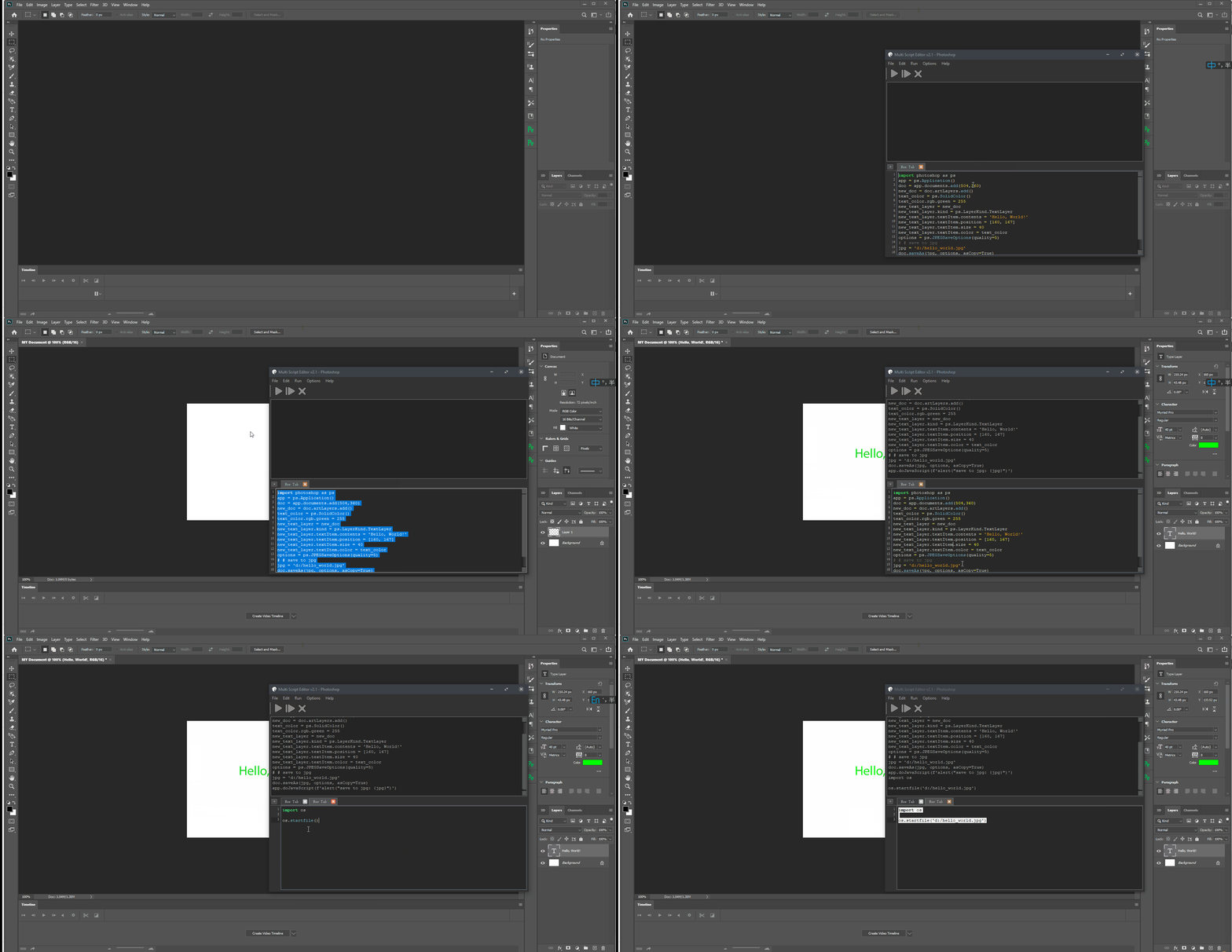
Photoshop Session
Use it as context.
from photoshop import Session


with Session(action="new_document") as ps:
    doc = ps.active_document
    text_color = ps.SolidColor()
    text_color.rgb.green = 255
    new_text_layer = doc.artLayers.add()
    new_text_layer.kind = ps.LayerKind.TextLayer
    new_text_layer.textItem.contents = 'Hello, World!'
    new_text_layer.textItem.position = [160, 167]
    new_text_layer.textItem.size = 40
    new_text_layer.textItem.color = text_color
    options = ps.JPEGSaveOptions(quality=5)
    jpg = 'd:/hello_world.jpg'
    doc.saveAs(jpg, options, asCopy=True)
    ps.app.doJavaScript(f'alert("save to jpg: {jpg}")')
Contributors ✨
Thanks goes to these wonderful people (emoji key):














This project follows the all-contributors specification. Contributions of any kind are welcome!
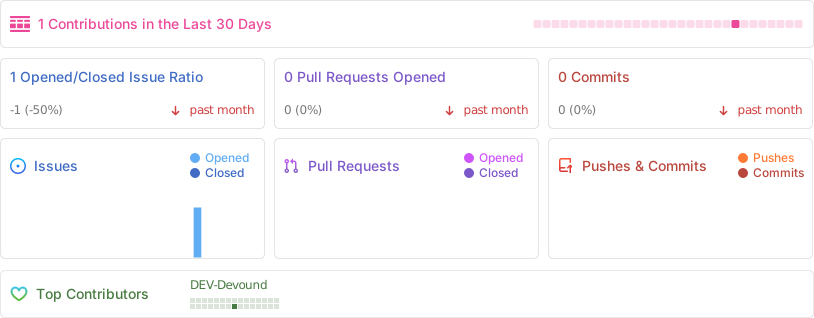
Repobeats analytics
how to get Photoshop program ID
Get-ChildItem "HKLM:\SOFTWARE\Classes" |
  ?{ ($_.PSChildName -match "^[a-z]+\.[a-z]+(\.\d+)?$") -and ($_.GetSubKeyNames() -contains "CLSID") } |
  ?{ $_.PSChildName -match "Photoshop.Application" } | ft PSChildName

How to get a list of COM objects from the registry
Useful links
- https://theiviaxx.github.io/photoshop-docs/Photoshop/
- http://wwwimages.adobe.com/www.adobe.com/content/dam/acom/en/devnet/photoshop/pdfs/photoshop-cc-javascript-ref-2015.pdf
- https://github.com/lohriialo/photoshop-scripting-python
- https://www.adobe.com/devnet/photoshop/scripting.html
- https://www.youtube.com/playlist?list=PLUEniN8BpU8-Qmjyv3zyWaNvDYwJOJZ4m
- http://yearbook.github.io/esdocs/#/Photoshop/Application
- http://www.shining-lucy.com/wiki/page.php?id=appwiki:photoshop:ps_script
- http://www.tonton-pixel.com/wp-content/uploads/DecisionTable.pdf
- http://jongware.mit.edu/pscs5js_html/psjscs5/pc_Application.html
- https://indd.adobe.com/view/a0207571-ff5b-4bbf-a540-07079bd21d75
- http://shining-lucy.com/wiki/page.php?id=appwiki:photoshop:ps_script
- http://web.archive.org/web/20140121053819/http://www.pcpix.com/Photoshop/char.html
- http://www.tonton-pixel.com/scripts/utility-scripts/get-equivalent-id-code/index.html
- https://github.com/Adobe-CEP/Samples/tree/master/PhotoshopEvents
- https://evanmccall.wordpress.com/2015/03/09/how-to-develop-photoshop-tools-in-python
🛠️ Development Guide
Welcome to the development guide for the Photoshop Python API project! This section outlines our development practices and standards to ensure code quality and consistency.
📋 Quick Start for Contributors
# Clone the repository
git clone https://github.com/loonghao/photoshop-python-api.git
cd photoshop-python-api

# Install dependencies with Poetry
poetry install

# Install pre-commit hooks
pre-commit install

# Run tests
pytest
🎨 Code Style & Quality
We maintain high code quality standards through automated tools and consistent style guidelines:
-
Style Guide: We follow the Google Python Style Guide with project-specific adjustments:
- Line length: 120 characters max
- Docstrings: Google style format
- Quotes: Double quotes preferred
-
Quality Tools:
- Black - Code formatting
- isort - Import organization
- flake8 - Style enforcement
- pre-commit - Automated checks before commits
🔄 Git Workflow
We use a structured workflow to maintain a clean and organized repository:
-
Commit Messages: Follow Conventional Commits format
<type>(<scope>): <description>

[optional body]

[optional footer(s)]
Common types:
feat,fix,docs,style,refactor,test,chore -
Branching Strategy:
- Main branch:
main- Always stable and deployable - Feature branches:
feature/<feature-name> - Bug fixes:
fix/<bug-description> - Documentation:
docs/<doc-description>
- Main branch:
🧪 Testing
We value thorough testing to ensure reliability:
- Framework: We use
pytestfor all tests - Coverage: Aim for high test coverage on new features
- Run Tests:
pytestorpoetry run pytest
📦 Development Environment
- Python Versions: We support Python 3.8+ (see
pyproject.tomlfor specifics) - Dependency Management: Poetry for consistent environments
- Virtual Environment: Poetry automatically creates and manages virtual environments
🤝 Contributing Process
- Fork & Clone: Fork the repository and clone your fork
- Branch: Create a feature branch with a descriptive name
- Develop: Make your changes following our code style guidelines
- Test: Ensure all tests pass and add new tests for new features
- Commit: Use conventional commit format for clear history
- Push & PR: Push your branch and create a Pull Request
- Review: Address any feedback from code reviews
- Merge: Once approved, your PR will be merged
Thank you for contributing to the Photoshop Python API project! 🎉
Project details
Verified details
These details have been verified by PyPIProject links
GitHub Statistics
Maintainers
Release history Release notifications | RSS feed


Download files
Download the file for your platform. If you're not sure which to choose, learn more about installing packages.
Source Distribution
Built Distribution
Filter files by name, interpreter, ABI, and platform.
If you're not sure about the file name format, learn more about wheel file names.
Copy a direct link to the current filters
File details
Details for the file photoshop_python_api-0.24.2.tar.gz.
File metadata
- Download URL: photoshop_python_api-0.24.2.tar.gz
- Upload date:
- Size: 56.2 kB
- Tags: Source
- Uploaded using Trusted Publishing? Yes
- Uploaded via: twine/6.1.0 CPython/3.13.7
File hashes
| Algorithm | Hash digest | |
|---|---|---|
| SHA256 |
c8a68fa7dcf746602db143a789fc5821cac36b6dd3be12d202708987691b6c4b
|
|
| MD5 |
b5b185b9487e6aecdc49cbc79e06527f
|
|
| BLAKE2b-256 |
50e3cdd00c76667b814e44d563f9ee78bd06a91d669baba4cd8e758324263dfd
|
Provenance
The following attestation bundles were made for photoshop_python_api-0.24.2.tar.gz:
Publisher:
python-publish.yml on loonghao/photoshop-python-api
-
Statement:
-
Statement type:
https://in-toto.io/Statement/v1 -
Predicate type:
https://docs.pypi.org/attestations/publish/v1 -
Subject name:
photoshop_python_api-0.24.2.tar.gz -
Subject digest:
c8a68fa7dcf746602db143a789fc5821cac36b6dd3be12d202708987691b6c4b - Sigstore transparency entry: 1182632237
- Sigstore integration time:
-
Permalink:
loonghao/photoshop-python-api@408582363d89ea0446c76c755cc2b734345bb090 -
Branch / Tag:
refs/tags/v0.24.2 - Owner: https://github.com/loonghao
-
Access:
public
-
Token Issuer:
https://token.actions.githubusercontent.com -
Runner Environment:
github-hosted -
Publication workflow:
python-publish.yml@408582363d89ea0446c76c755cc2b734345bb090 -
Trigger Event:
push
-
Statement type:
File details
Details for the file photoshop_python_api-0.24.2-py3-none-any.whl.
File metadata
- Download URL: photoshop_python_api-0.24.2-py3-none-any.whl
- Upload date:
- Size: 71.7 kB
- Tags: Python 3
- Uploaded using Trusted Publishing? Yes
- Uploaded via: twine/6.1.0 CPython/3.13.7
File hashes
| Algorithm | Hash digest | |
|---|---|---|
| SHA256 |
8d3d37010b033fa8ccc185cf40262ff900899488d4fc5a5bdce6de8d3e077570
|
|
| MD5 |
4a90c4aaf09d12f3ffc3e3291c2c2173
|
|
| BLAKE2b-256 |
dbdbe27ad528af125c0c686961d22734256172475602431872769611c9496bd3
|
Provenance
The following attestation bundles were made for photoshop_python_api-0.24.2-py3-none-any.whl:
Publisher:
python-publish.yml on loonghao/photoshop-python-api
-
Statement:
-
Statement type:
https://in-toto.io/Statement/v1 -
Predicate type:
https://docs.pypi.org/attestations/publish/v1 -
Subject name:
photoshop_python_api-0.24.2-py3-none-any.whl -
Subject digest:
8d3d37010b033fa8ccc185cf40262ff900899488d4fc5a5bdce6de8d3e077570 - Sigstore transparency entry: 1182632755
- Sigstore integration time:
-
Permalink:
loonghao/photoshop-python-api@408582363d89ea0446c76c755cc2b734345bb090 -
Branch / Tag:
refs/tags/v0.24.2 - Owner: https://github.com/loonghao
-
Access:
public
-
Token Issuer:
https://token.actions.githubusercontent.com -
Runner Environment:
github-hosted -
Publication workflow:
python-publish.yml@408582363d89ea0446c76c755cc2b734345bb090 -
Trigger Event:
push
-
Statement type:






