
poetry-plugin-dotenv - is the plugin that automatically loads environment variables from a dotenv file into the environment before poetry commands are run.

Project description
















Overview
poetry-plugin-dotenv - is the plugin that automatically loads environment variables from a dotenv file into the environment before poetry commands are run.
poetry-plugin-dotenv introduces new commands to extend the functionality of poetry such as:
poetry activate- loads environment variables from a dotenv file and activates the virtual environment
Features
- Fully type-safe
- No external dependencies required
- Brings back beloved
activatecommand with extended functionality - Supports templates and variable interpolation using POSIX variable expansions
- Supports
--directory, which allows setting the working directory for thepoetrycommand - Supports multiple configuration sources
- Provides configuration auto-completion and validation in IDEs like Visual Studio Code or PyCharm (via JSON Schema Store)
- Supports both
poetry v1.5+andpoetry v2+
Installation
poetry self add poetry-plugin-dotenv@latest
[!TIP] New releases support only Python 3.9+. If you want to use
poetry-plugin-dotenvwith Python 3.8, please install version2.4.0usingpoetry self add poetry-plugin-dotenv@2.4.0
Usage and Configuration
By default, the plugin will load the .env file from the current working directory or any higher-level directories.
ignore
Type: str
Default: false
Allowed values (as True): y / yes / t / on / 1 / true
Allowed values (as False): n / no / f / off / 0 / false
Prevents poetry from loading the dotenv file.
location
Type: str
Default: .env
If your dotenv file is located elsewhere or has a different name, you can set this parameter.
Configuration via TOML file
The plugin can read project-specific default values for its options from a pyproject.toml file.
By default, poetry-plugin-dotenv looks for a pyproject.toml file that includes either a [tool.dotenv] or [tool.poetry.plugins.dotenv] section.
Example pyproject.toml:
[tool.dotenv]
ignore = "false"
location = ".env.dev"

[tool.poetry.plugins.dotenv]
ignore = "false"
location = ".env.dev"
[!WARNING] In upcoming poetry releases, the
[tool.poetry.plugins]section will be deprecated. Please migrate to[tool.dotenv].
[!IMPORTANT] Due to
poetry's default parser, all options in the plugin sections must be specified as strings.
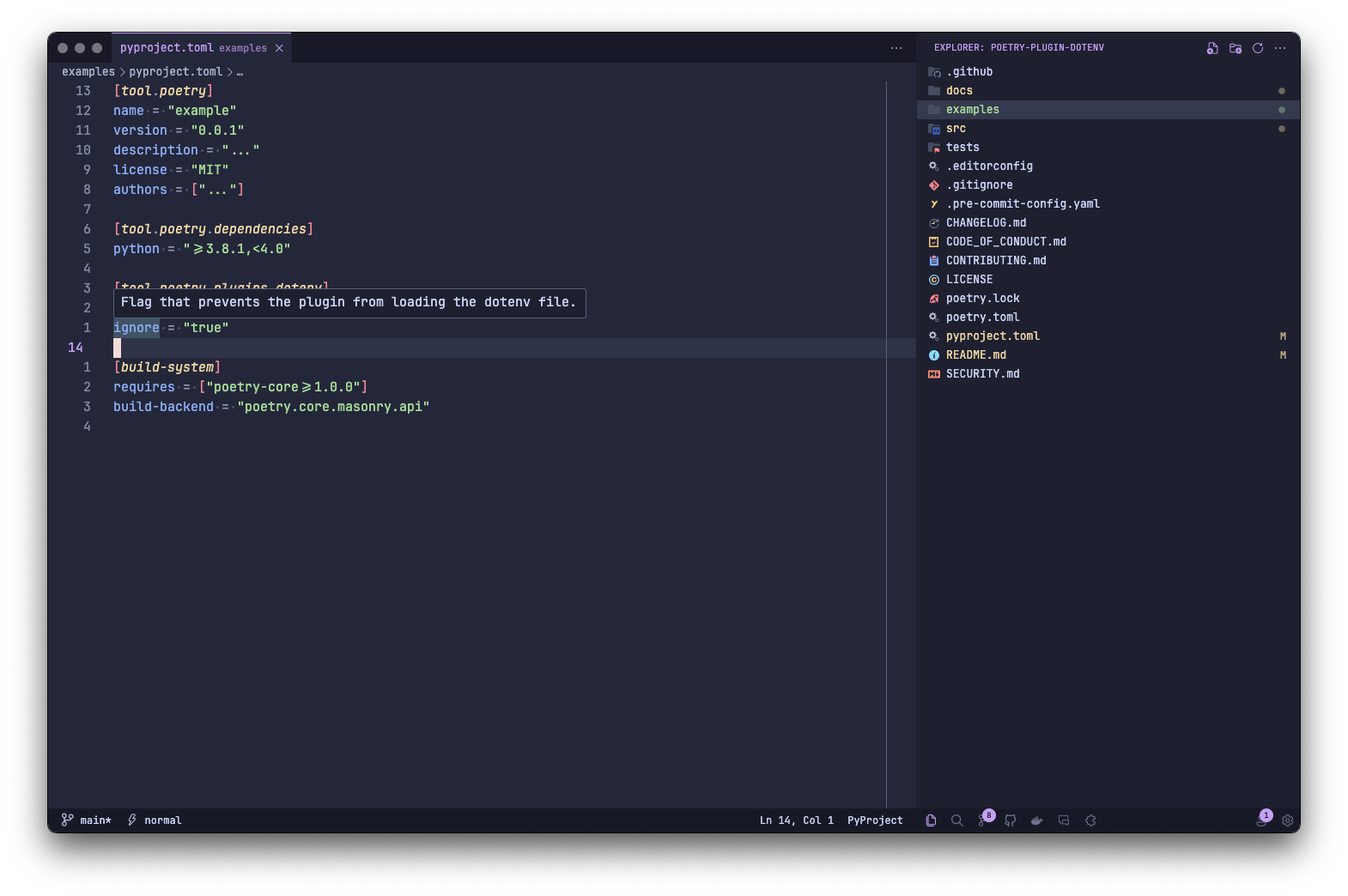
As mentioned in the Features list, the schema for the plugin configuration is part of the JSON Schema Store, which enables auto-completion and validation in IDEs like Visual Studio Code and PyCharm.
Configuration via environment variables
poetry-plugin-dotenv supports the following configuration options via environment variables:
POETRY_PLUGIN_DOTENV_LOCATIONPOETRY_PLUGIN_DOTENV_IGNORE
[!IMPORTANT] As environment variables are always strings, options should always be set as strings.
Lookup hierarchy
A pyproject.toml file can override default values. Options provided via environment variables override both.
Examples
Example of using activate command:
# .env
DB__HOST=localhost
DB__DBNAME=local_lakehouse
DB__USER=volodymyr
DB__PASSWORD=super_secret_password
DB__ENGINE=postgresql://${DB__USER}:${DB__PASSWORD}@${DB__HOST}/${DB__DBNAME}
poetry activate -v
# Using virtualenv: ...
# Loading environment variables: .../.env

# Reloads shell within the environment with loaded environment variables
Example of using run command:
# .env
DB__HOST=localhost
DB__DBNAME=local_lakehouse
DB__USER=volodymyr
DB__PASSWORD=super_secret_password
DB__ENGINE=postgresql://${DB__USER}:${DB__PASSWORD}@${DB__HOST}/${DB__DBNAME}
# .env.dev
DB__HOST=dev.host
DB__DBNAME=dev_lakehouse
DB__USER=svc_team
DB__PASSWORD=super_secret_password
DB__ENGINE=postgresql://${DB__USER}:${DB__PASSWORD}@${DB__HOST}/${DB__DBNAME}
# pyproject.toml
[tool.dotenv]
location = ".env.dev"
# main.py
from __future__ import annotations

import os


if __name__ == "__main__":
    try:
        print(f"Host: {os.environ['DB__HOST']!r}")
        print(f"Name: {os.environ['DB__DBNAME']!r}")
        print(f"Username: {os.environ['DB__USER']!r}")
        print(f"Password: {os.environ['DB__PASSWORD']!r}")
        print(f"Engine: {os.environ['DB__ENGINE']!r}")

    except KeyError:
        print("Environment variables not set!")
poetry run -vvv python main.py
# Loading environment variables: .env
# Host: 'localhost'
# Name: 'local_lakehouse'
# Username: 'volodymyr'
# Password: 'super_secret_password'
# Engine: 'postgresql://volodymyr:super_secret_password@localhost/local_lakehouse'

# Set location section in pyproject.toml
poetry run -vvv python main.py
# Loading environment variables: .env.dev
# Host: 'dev.host'
# Name: 'dev_lakehouse'
# Username: 'svc_team'
# Password: 'super_secret_password'
# Engine: 'postgresql://svc_team:super_secret_password@dev.host/dev_lakehouse'

# Set ignore = "true" in pyproject.toml
poetry run -vvv python main.py
# Not loading environment variables. Ignored by configuration
# Environment variables not set!

export POETRY_PLUGIN_DOTENV_LOCATION=.env.dev && poetry run -vvv python main.py
# Loading environment variables: .env.dev
# Host: 'dev.host'
# Name: 'dev_lakehouse'
# Username: 'svc_team'
# Password: 'super_secret_password'
# Engine: 'postgresql://svc_team:super_secret_password@dev.host/dev_lakehouse'

export POETRY_PLUGIN_DOTENV_IGNORE=true && poetry run -vvv python main.py
# Not loading environment variables. Ignored by configuration
# Environment variables not set!
Release history Release notifications | RSS feed


Download files
Download the file for your platform. If you're not sure which to choose, learn more about installing packages.
Source Distribution
Built Distribution
Filter files by name, interpreter, ABI, and platform.
If you're not sure about the file name format, learn more about wheel file names.
Copy a direct link to the current filters
File details
Details for the file poetry_plugin_dotenv-3.3.0.tar.gz.
File metadata
- Download URL: poetry_plugin_dotenv-3.3.0.tar.gz
- Upload date:
- Size: 15.8 kB
- Tags: Source
- Uploaded using Trusted Publishing? No
- Uploaded via: twine/6.2.0 CPython/3.13.12
File hashes
| Algorithm | Hash digest | |
|---|---|---|
| SHA256 |
6b567ca1aa8ca656408e00e360c662427efe3627c6004c1c164f3443eabd45ab
|
|
| MD5 |
5caf14d7e1c7327e02c703428e33d6ae
|
|
| BLAKE2b-256 |
ba84a2965ee53453ed7110e62801d1f6aa59b3d9b1feb58e7acb59dcdb879301
|
File details
Details for the file poetry_plugin_dotenv-3.3.0-py3-none-any.whl.
File metadata
- Download URL: poetry_plugin_dotenv-3.3.0-py3-none-any.whl
- Upload date:
- Size: 16.9 kB
- Tags: Python 3
- Uploaded using Trusted Publishing? No
- Uploaded via: twine/6.2.0 CPython/3.13.12
File hashes
| Algorithm | Hash digest | |
|---|---|---|
| SHA256 |
9f9b7d4bb0de0a2de1f615eacc62c0dcfa3eacf4fa840672d936d4f74604280c
|
|
| MD5 |
4c915849e7120f6b43225143f411ff14
|
|
| BLAKE2b-256 |
4140750242c7139add56d81f79b63fb890d22a141b8877d0d11217ae75667058
|






