
A fast quantile estimator for streamed data. Produces a quantile estimate without storing any data points.

Project description
PyQuantile
PyQuantile is a modified implementation of the P² algorithm. It uses an N-Dependent Hybrid approach, that smoothly transitions the quantile marker adjustment from the stable linear estimate (when the sample count N is small, stabilizing initial convergence) to the highly accurate Parabolic P² Interpolation (when N exceeds a specified threshold, maximizing long-term accuracy). The rationale for blending interpolations is to leverage the stability of linear interpolation for small datasets, while transitioning to the higher asymptotic accuracy of parabolic interpolation as the sample size grows larger.
PyQuantile's main goals:
- Handle smaller datasets, remaining more stable compared with the traditional P² algorithm.
- Provide extremely fast estimation for streaming data, suitable for real-time analytics and large-scale applications.
- Low overhead regardless of the size of the data stream, with minimal CPU usage per update.
- Achieve strong accuracy for most quantiles and distributions, with error rates that are acceptable for real-world use cases.
- Incoming datapoints in the stream cannot be stored, making the estimator ideal for environments with strict memory or privacy constraints.
PyQuantile demonstrates typical P² performance characteristics for streaming quantile estimation. Memory usage remains constant (O(1)) regardless of data volume, using very small MiB of base memory with no growth even after processing millions of values. Processing speed is impressive at 1.2-2.0 million values per second with consistent sub-millisecond latency (0.001-0.002ms per operation).
- Initial memory allocation < 2.0 MiB, which is a one-time cost
- Different quantile values uses the same memory
- Processing 100 values: No additional memory
- Processing 1,000 values: No additional memory
- Processing 10,000 values: No additional memory
- Processing 100,000 values: No additional memory
- Processing 1,000,000 values: Only ~0.13 MiB increase
Performance Comparison: PyQuantile vs Traditional P²
Very Early Stage (N ≤ 100)
| Distribution | PyQuantile | Traditional P² | Winner |
|---|---|---|---|
| Normal (0.95) | 13.17% | 14.30% | PyQuantile (8% better) |
| Normal (0.99) | 33.35% | 34.77% | PyQuantile (4% better) |
| Exponential (0.95) | 8.54% | 16.15% | PyQuantile (47% better) |
| Log-Normal (0.99) | 45.84% | 59.88% | PyQuantile (23% better) |
PyQuantile is more stable and consistent in early stages, especially dramatic on skewed distributions. Traditional P² can be unstable with limited samples.
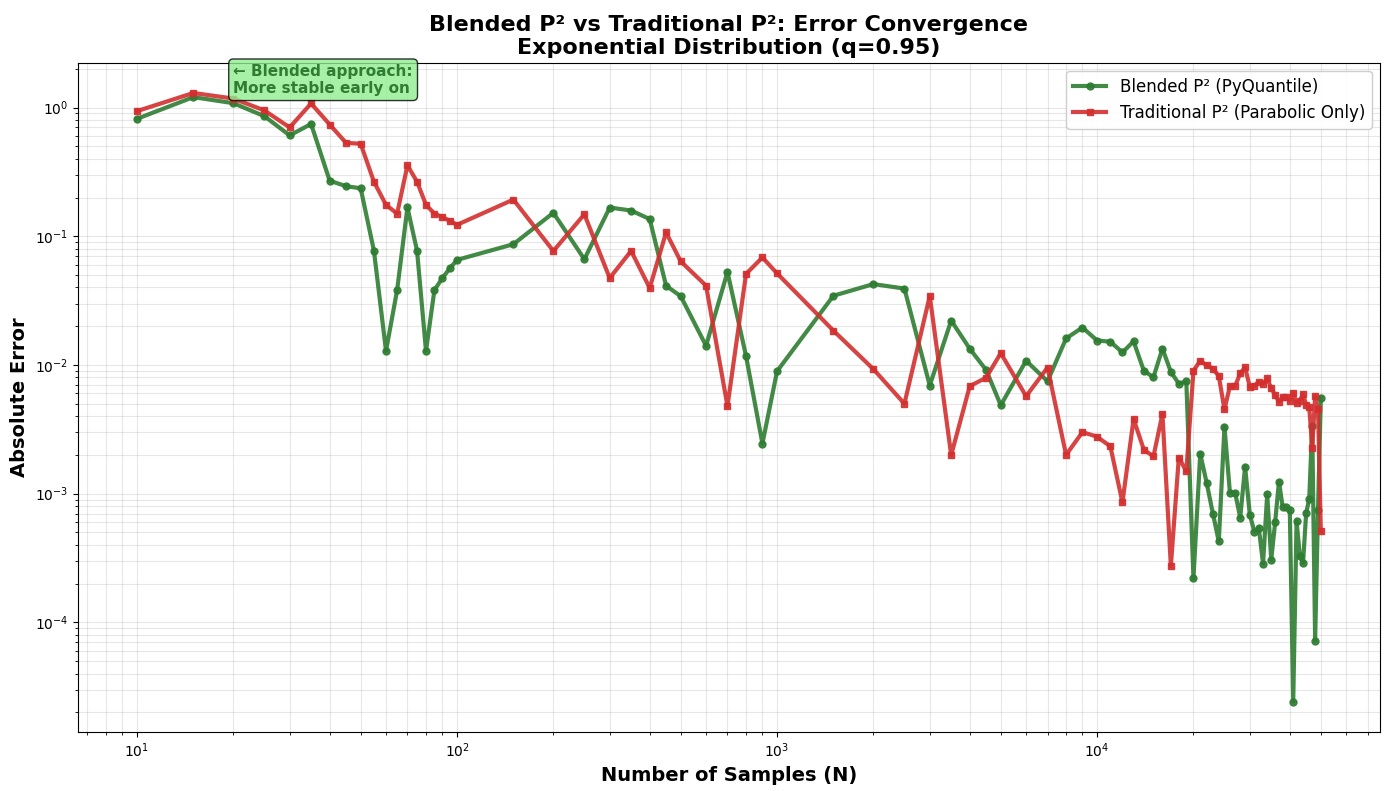
Early Stage (100 < N ≤ 1000)
Results are mixed - both approaches have converged significantly, with differences becoming less pronounced.
Late Stage (N > 10,000)
Both approaches achieve excellent accuracy (<1%), proving both converge well.
Final Accuracy (N = 50,000)
Virtually identical - both achieve 0.03-0.37% error.
PyQuantile vs Other Streaming Algorithms
Running PyQuantile against t-digest and DDSketch, both of which use historical data, PyQuantile only maintains 5 markers at 40bytes and remains competitive with accuracy, but much faster.
Performance Results (100,000 samples, q=0.95, Exponential Distribution)
| Algorithm | Speed (samples/sec) | Final Error | Trade-off |
|---|---|---|---|
| PyQuantile | 1,241K/sec | 0.11% | Best balance |
| t-digest | 37K/sec | 0.01% | Slow but most accurate |
| DDSketch | 684K/sec | 0.10% | Good balance, but slower than PyQuantile |
- PyQuantile stores no historical data, only 5 markers (40 bytes)
- PyQuantile Achieves <0.2% error without historical data
- t-digest keeps centroids, DDSketch keeps buckets
- PyQuantile is 2x faster than DDSketch, 34x faster than t-digest
- PyQuantile is O(1) space complexity vs O(log n) or O(√n) for others
Installation
You can install PyQuantile via pip:
pip install pyquantile
Usage
Using PyQuantile is simple. Here is an example of how to import it and add samples to an estimator:
import pyquantile as pq
estimator = pq.QuantileEstimator(0.75)
Samples are added to an estimator like this:
estimator.add(10)
estimator.add(20)
estimator.add(30)
We can add samples via a loop, and .quantile() can be called at any time to get the latest estimate. The following code will simulate a stream of data for 60 seconds and plot accuracy of quantile estimates over time:
duration_seconds = 60
quantile = 0.75
stream = []
estimator = pq.QuantileEstimator(quantile)
accuracies = []
estimates = []
true_quantiles = []
timestamps = []

start = time.time()
while time.time() - start < duration_seconds:
    x = np.random.normal(loc=0, scale=1)
    stream.append(x)
    estimator.add(x)
    current_estimate = estimator.quantile()
    current_true = np.quantile(stream, quantile)
    accuracy = abs(current_estimate - current_true)
    estimates.append(current_estimate)
    true_quantiles.append(current_true)
    accuracies.append(accuracy)
    timestamps.append(time.time() - start)
    time.sleep(0.01)

plt.figure(figsize=(10, 6))
plt.plot(timestamps, estimates, label=f'Estimated {quantile} Quantile')
plt.plot(timestamps, true_quantiles, label=f'True {quantile} Quantile')
plt.plot(timestamps, accuracies, label='Absolute Error', color='green')
plt.xlabel('Time (s)')
plt.ylabel('Value')
plt.title('Quantile Estimation Accuracy Over Time')
plt.legend()
plt.show()
Kafka Integration Example
You can use PyQuantile in real-time streaming scenarios. For example, to process data from a Kafka topic:
from pyquantile import QuantileEstimator
from kafka import KafkaConsumer
import json

estimator = QuantileEstimator(0.75)
consumer = KafkaConsumer('my_topic', bootstrap_servers='localhost:9092')

for message in consumer:
	data_point = float(json.loads(message.value))
	estimator.add(data_point)
	print("Current estimate:", estimator.quantile())
You can adapt this pattern for other streaming services (RabbitMQ, AWS Kinesis, etc.) by feeding each incoming data point to estimator.add().
Development
To build and install the library locally, clone the repository and run: git clone https://github.com/richardsmythe/pyquantile.git cd pyquantile pip install .
Demo
A python file named test_pyquantile.py is included. This file demonstrates PyQuantile in action and plots the results against the exact quantile. Run it with python .\test_pyquantile.py. This simple script will show how PyQuantile performs against an exact quantile. With more data the absolute errors begin to even out the estimator becomes more accurate.
Contributing
Contributions are welcome! If you would like to contribute, please fork the repository and submit a pull request.
License
This project is licensed under the MIT License. See the LICENSE file for details.
Release history Release notifications | RSS feed


Download files
Download the file for your platform. If you're not sure which to choose, learn more about installing packages.
Source Distribution
Built Distribution
Filter files by name, interpreter, ABI, and platform.
If you're not sure about the file name format, learn more about wheel file names.
Copy a direct link to the current filters
File details
Details for the file pyquantile-0.2.2.tar.gz.
File metadata
- Download URL: pyquantile-0.2.2.tar.gz
- Upload date:
- Size: 8.1 kB
- Tags: Source
- Uploaded using Trusted Publishing? No
- Uploaded via: twine/6.1.0 CPython/3.11.9
File hashes
| Algorithm | Hash digest | |
|---|---|---|
| SHA256 |
b779d6a2935a6271397b8d9c1060ebbf8b6c6d7dc2f589d53afc9d475f2c263b
|
|
| MD5 |
ee9a3666f6798749431dce8fbc4363ff
|
|
| BLAKE2b-256 |
8d5824617cda07ba72fb5e42286e53c851e1bd7a1c55c41b6c35db694e95a6be
|
File details
Details for the file pyquantile-0.2.2-cp311-cp311-win_amd64.whl.
File metadata
- Download URL: pyquantile-0.2.2-cp311-cp311-win_amd64.whl
- Upload date:
- Size: 84.7 kB
- Tags: CPython 3.11, Windows x86-64
- Uploaded using Trusted Publishing? No
- Uploaded via: twine/6.1.0 CPython/3.11.9
File hashes
| Algorithm | Hash digest | |
|---|---|---|
| SHA256 |
16cb3de767245a611960f97300900e942aec1ff7ae53cddc6ed42380f89e5e2b
|
|
| MD5 |
0251d09aa1ca59b0bd572e8e28fffa9c
|
|
| BLAKE2b-256 |
a2331360928b02e2dc99bd32cfdb703086f0d5e8b0893951d9890734ab0aa8b2
|






