
A Vim-style LaTeX TUI editor.

Project description

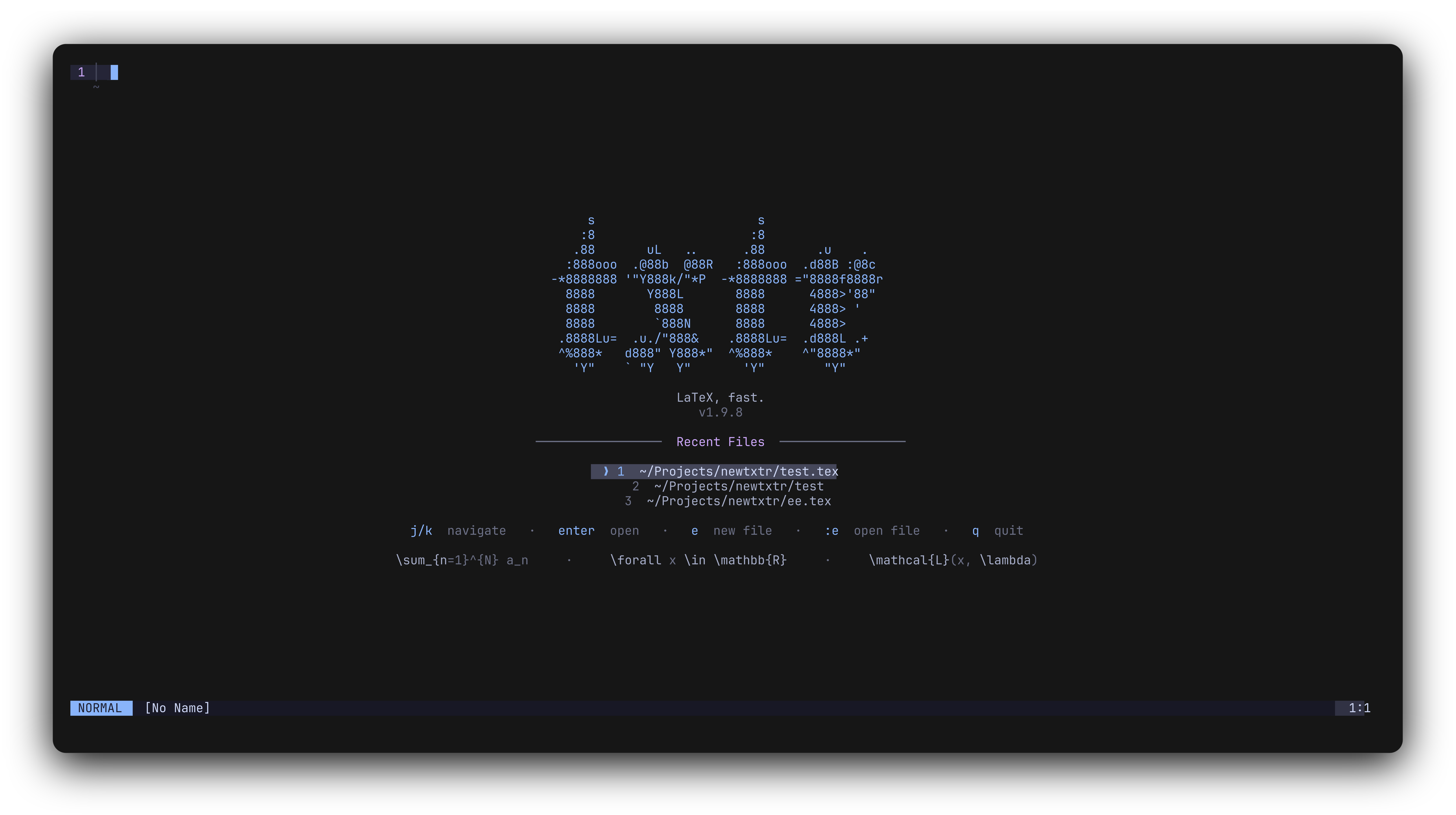
txtr (aka texitor) is a terminal LaTeX editor built for speed. It mixes Vim-style modal editing with snippets, autocomplete, citations, compiler tooling, and plugins in one clean TUI.
Under active development. Expect bugs :)
Docs
The full docs are here: txtr.benji.mom
If you only read one extra thing after this README, make it one of these:
Installation
pip install texitor
If your system complains about installing packages globally, use pipx, uv, or a virtual environment instead.
pipx install texitor
uv tool install texitor
python -m venv txtr-env
source txtr-env/bin/activate
pip install texitor
Requires Python 3.11 or later. More install details live in the docs: txtr.benji.mom/installation
What even is LaTeX?
LaTeX is a typesetting system used a lot for maths, science, essays, notes, and papers. It is great once you know it, but it can be pretty slow and bracket-heavy to write by hand.
That is the whole point of txtr: make writing LaTeX in the terminal feel fast instead of annoying.
Quick start
txtr file.tex
If the file does not exist, txtr creates it. On first run txtr seeds config, snippets, commands, and keybind overrides into ~/.config/txtr/.
Never used a Vim-style editor before? This is the tiny version:
ienters Insert mode so you can type (this is how you can actually get text into the editor)Esctakes you back to Normal mode:wsaves:qquits:wqsaves and quits?opens the help menu
Once you are inside txtr:
:opens command mode:snippetsjumps straight to snippet help:config showopens the config panel:plugin listshows installed plugins- typing
\fraopens LaTeX autocomplete Up/Downmoves through autocomplete andEnterorCtrl+Spaceaccepts it- typing a snippet trigger like
//ordocexpands it fast (docstill needsTab)
txtr also remembers where you were in a file when you reopen it by default, so hopping back into longer docs feels way nicer.
If you want the fuller walkthrough, go straight to the quick start docs.
What ships with txtr
- Vim-style modal editing for
.texfiles - LaTeX snippets and completions
- citation autocomplete from
.bibfiles - compiler commands, buildwatch, and PDF build workflows
- file explorer, recents, and multi-buffer workflow
- restore cursor position when reopening files
- built-in plugins:
wordcount- latex-aware word countfreeze- screenshot/export via the freeze CLIzathura- external PDF open + SyncTeX forward search
- installable user plugins on top of the built-ins
- a full docs site with config, snippets, themes, and plugin guides
Built-in plugins ship with txtr, but they are still configured and enabled like normal plugins.
Docs, again because they matter
The README is only the short version. The proper setup/config/snippet/plugin guides live at:
Notes
- requires Python 3.11+
- compiler features expect tools like
latexmkorpdflatexto be installed - system clipboard features rely on platform clipboard tools
- some plugins rely on external tools too, for example
freezeandzathura
Compatibility
- Linux - fully supported and tested
- MacOS - supported but not thoroughly tested
- Windows - not currently supported, but WSL should work fine - txtr will run but do expect errors
If you would like to port txtr to Windows, please open an issue or PR on GitHub. I don't have access to a Windows machine but would be happy to review and merge contributions that add support.
Contributing
txtr is early-stage. If you find a bug or want to add something, open an issue or PR on GitHub.
tl;dr - just make a pr ...
Release history Release notifications | RSS feed


Download files
Download the file for your platform. If you're not sure which to choose, learn more about installing packages.
Source Distribution
Built Distribution
Filter files by name, interpreter, ABI, and platform.
If you're not sure about the file name format, learn more about wheel file names.
Copy a direct link to the current filters
File details
Details for the file texitor-3.0.0.tar.gz.
File metadata
- Download URL: texitor-3.0.0.tar.gz
- Upload date:
- Size: 85.1 kB
- Tags: Source
- Uploaded using Trusted Publishing? No
- Uploaded via: twine/6.2.0 CPython/3.13.12
File hashes
| Algorithm | Hash digest | |
|---|---|---|
| SHA256 |
5fb7faed349d662d2366648de8802c322d648faa178c6730298fbdc7d0ac2388
|
|
| MD5 |
baa40b354a7455a225a0db72ba23d43c
|
|
| BLAKE2b-256 |
d58f5d84286a638cd296958477ac67ae0672efbfc9b373c46b183bba0062c184
|
File details
Details for the file texitor-3.0.0-py3-none-any.whl.
File metadata
- Download URL: texitor-3.0.0-py3-none-any.whl
- Upload date:
- Size: 103.9 kB
- Tags: Python 3
- Uploaded using Trusted Publishing? No
- Uploaded via: twine/6.2.0 CPython/3.13.12
File hashes
| Algorithm | Hash digest | |
|---|---|---|
| SHA256 |
e3f1266197722bc66bfecaa84c64a68ee382b070bab8bb0940c8a6ca64394561
|
|
| MD5 |
a162d4a996a5925125bde5dab3930541
|
|
| BLAKE2b-256 |
5fd0a57d05085f8f4d3355d1be7a5bf7c8ac85f6bfcf695dba6b07bfcdf63fe3
|






