
An extremely fast Python package and project manager, written in Rust.
Verified details
These details have been verified by PyPIProject links
GitHub Statistics
Maintainers


Project description
uv






An extremely fast Python package and project manager, written in Rust.
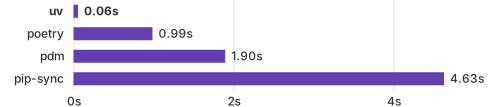
Installing Trio's dependencies with a warm cache.
Highlights
- 🚀 A single tool to replace
pip,pip-tools,pipx,poetry,pyenv,twine,virtualenv, and more. - ⚡️ 10-100x faster than
pip. - 🐍 Installs and manages Python versions.
- 🛠️ Runs and installs Python applications.
- ❇️ Runs single-file scripts, with support for inline dependency metadata.
- 🗂️ Provides comprehensive project management, with a universal lockfile.
- 🔩 Includes a pip-compatible interface for a performance boost with a familiar CLI.
- 🏢 Supports Cargo-style workspaces for scalable projects.
- 💾 Disk-space efficient, with a global cache for dependency deduplication.
- ⏬ Installable without Rust or Python via
curlorpip. - 🖥️ Supports macOS, Linux, and Windows.
uv is backed by Astral, the creators of Ruff.
Installation
Install uv with our standalone installers:
# On macOS and Linux.
curl -LsSf https://astral.sh/uv/install.sh | sh
# On Windows.
powershell -ExecutionPolicy ByPass -c "irm https://astral.sh/uv/install.ps1 | iex"
Or, from PyPI:
# With pip.
pip install uv
# Or pipx.
pipx install uv
If installed via the standalone installer, uv can update itself to the latest version:
uv self update
See the installation documentation for details and alternative installation methods.
Documentation
uv's documentation is available at docs.astral.sh/uv.
Additionally, the command line reference documentation can be viewed with uv help.
Features
Project management
uv manages project dependencies and environments, with support for lockfiles, workspaces, and more,
similar to rye or poetry:
$ uv init example
Initialized project `example` at `/home/user/example`

$ cd example

$ uv add ruff
Creating virtual environment at: .venv
Resolved 2 packages in 170ms
   Built example @ file:///home/user/example
Prepared 2 packages in 627ms
Installed 2 packages in 1ms
 + example==0.1.0 (from file:///home/user/example)
 + ruff==0.5.6

$ uv run ruff check
All checks passed!
See the project documentation to get started.
uv also supports building and publishing projects, even if they're not managed with uv. See the publish guide to learn more.
Tool management
uv executes and installs command-line tools provided by Python packages, similar to pipx.
Run a tool in an ephemeral environment using uvx (an alias for uv tool run):
$ uvx pycowsay 'hello world!'
Resolved 1 package in 167ms
Installed 1 package in 9ms
 + pycowsay==0.0.0.2
  """

  ------------
< hello world! >
  ------------
   \   ^__^
    \  (oo)\_______
       (__)\       )\/\
           ||----w |
           ||     ||
Install a tool with uv tool install:
$ uv tool install ruff
Resolved 1 package in 6ms
Installed 1 package in 2ms
 + ruff==0.5.6
Installed 1 executable: ruff

$ ruff --version
ruff 0.5.6
See the tools documentation to get started.
Python management
uv installs Python and allows quickly switching between versions.
Install multiple Python versions:
$ uv python install 3.10 3.11 3.12
Searching for Python versions matching: Python 3.10
Searching for Python versions matching: Python 3.11
Searching for Python versions matching: Python 3.12
Installed 3 versions in 3.42s
 + cpython-3.10.14-macos-aarch64-none
 + cpython-3.11.9-macos-aarch64-none
 + cpython-3.12.4-macos-aarch64-none
Download Python versions as needed:
$ uv venv --python 3.12.0
Using Python 3.12.0
Creating virtual environment at: .venv
Activate with: source .venv/bin/activate

$ uv run --python pypy@3.8 -- python --version
Python 3.8.16 (a9dbdca6fc3286b0addd2240f11d97d8e8de187a, Dec 29 2022, 11:45:30)
[PyPy 7.3.11 with GCC Apple LLVM 13.1.6 (clang-1316.0.21.2.5)] on darwin
Type "help", "copyright", "credits" or "license" for more information.
>>>>
Use a specific Python version in the current directory:
$ uv python pin pypy@3.11
Pinned `.python-version` to `pypy@3.11`
See the Python installation documentation to get started.
Script support
uv manages dependencies and environments for single-file scripts.
Create a new script and add inline metadata declaring its dependencies:
$ echo 'import requests; print(requests.get("https://astral.sh"))' > example.py

$ uv add --script example.py requests
Updated `example.py`
Then, run the script in an isolated virtual environment:
$ uv run example.py
Reading inline script metadata from: example.py
Installed 5 packages in 12ms
<Response [200]>
See the scripts documentation to get started.
A pip-compatible interface
uv provides a drop-in replacement for common pip, pip-tools, and virtualenv commands.
uv extends their interfaces with advanced features, such as dependency version overrides, platform-independent resolutions, reproducible resolutions, alternative resolution strategies, and more.
Migrate to uv without changing your existing workflows — and experience a 10-100x speedup — with the
uv pip interface.
Compile requirements into a platform-independent requirements file:
$ uv pip compile docs/requirements.in \
   --universal \
   --output-file docs/requirements.txt
Resolved 43 packages in 12ms
Create a virtual environment:
$ uv venv
Using Python 3.12.3
Creating virtual environment at: .venv
Activate with: source .venv/bin/activate
Install the locked requirements:
$ uv pip sync docs/requirements.txt
Resolved 43 packages in 11ms
Installed 43 packages in 208ms
 + babel==2.15.0
 + black==24.4.2
 + certifi==2024.7.4
 ...
See the pip interface documentation to get started.
Platform support
See uv's platform support document.
Versioning policy
See uv's versioning policy document.
Contributing
We are passionate about supporting contributors of all levels of experience and would love to see you get involved in the project. See the contributing guide to get started.
Acknowledgements
uv's dependency resolver uses PubGrub under the hood. We're grateful to the PubGrub maintainers, especially Jacob Finkelman, for their support.
uv's Git implementation is based on Cargo.
Some of uv's optimizations are inspired by the great work we've seen in pnpm, Orogene, and Bun. We've also learned a lot from Nathaniel J. Smith's Posy and adapted its trampoline for Windows support.
License
uv is licensed under either of
- Apache License, Version 2.0, (LICENSE-APACHE or https://www.apache.org/licenses/LICENSE-2.0)
- MIT license (LICENSE-MIT or https://opensource.org/licenses/MIT)
at your option.
Unless you explicitly state otherwise, any contribution intentionally submitted for inclusion in uv by you, as defined in the Apache-2.0 license, shall be dually licensed as above, without any additional terms or conditions.

Project details
Verified details
These details have been verified by PyPIProject links
GitHub Statistics
Maintainers
Release history Release notifications | RSS feed


Download files
Download the file for your platform. If you're not sure which to choose, learn more about installing packages.
Source Distribution
Built Distributions
Filter files by name, interpreter, ABI, and platform.
If you're not sure about the file name format, learn more about wheel file names.
Copy a direct link to the current filters
File details
Details for the file uv-0.5.6.tar.gz.
File metadata
- Download URL: uv-0.5.6.tar.gz
- Upload date:
- Size: 2.3 MB
- Tags: Source
- Uploaded using Trusted Publishing? Yes
- Uploaded via: uv/0.5.5
File hashes
| Algorithm | Hash digest | |
|---|---|---|
| SHA256 |
9297f084ca2004044a9353525777c9cb1151a0d768de87cc3920574597674f88
|
|
| MD5 |
1d8bb423aeb061b56f331a88b127a96a
|
|
| BLAKE2b-256 |
d7232c12f9941de6fd984259e778dc8660172fc6498a3c5a77bd1df81a6daf93
|
File details
Details for the file uv-0.5.6-py3-none-win_amd64.whl.
File metadata
- Download URL: uv-0.5.6-py3-none-win_amd64.whl
- Upload date:
- Size: 15.9 MB
- Tags: Python 3, Windows x86-64
- Uploaded using Trusted Publishing? Yes
- Uploaded via: uv/0.5.5
File hashes
| Algorithm | Hash digest | |
|---|---|---|
| SHA256 |
c1a3b180e90734812034cc1594256f519bff6c2715f3f1ceb9ac7bc578005f5d
|
|
| MD5 |
58f0edb21f5bfc65c6db7ae9055fb88f
|
|
| BLAKE2b-256 |
831c19f79f9df067694a20239c68f280efa4bfb25d4ab39442a96fae874ed839
|
File details
Details for the file uv-0.5.6-py3-none-win32.whl.
File metadata
- Download URL: uv-0.5.6-py3-none-win32.whl
- Upload date:
- Size: 14.1 MB
- Tags: Python 3, Windows x86
- Uploaded using Trusted Publishing? Yes
- Uploaded via: uv/0.5.5
File hashes
| Algorithm | Hash digest | |
|---|---|---|
| SHA256 |
8bc30ef6996c3352a45d75ebc9aeb2e7ae5ebb7b2118b6f036ddd02d4f689daa
|
|
| MD5 |
000b7378244740107226181de5304fe0
|
|
| BLAKE2b-256 |
13dbfdfa81cbeedea64cb7a376451a93d34c996d5656650d7a4578eff6464df6
|
File details
Details for the file uv-0.5.6-py3-none-musllinux_1_1_x86_64.whl.
File metadata
- Download URL: uv-0.5.6-py3-none-musllinux_1_1_x86_64.whl
- Upload date:
- Size: 14.8 MB
- Tags: Python 3, musllinux: musl 1.1+ x86-64
- Uploaded using Trusted Publishing? Yes
- Uploaded via: uv/0.5.5
File hashes
| Algorithm | Hash digest | |
|---|---|---|
| SHA256 |
2b1dc05b9b242989d4a6dc99916a0fd6dc98ea5146f757505da69ac20825067d
|
|
| MD5 |
cfb857be3da15d7ebeea99c1eab9b50d
|
|
| BLAKE2b-256 |
6a08477da5f4a6eac1da2a9a94a8a6e6e16c44d4a1d44c65cb0dfefa6165ccd4
|
File details
Details for the file uv-0.5.6-py3-none-musllinux_1_1_ppc64le.whl.
File metadata
- Download URL: uv-0.5.6-py3-none-musllinux_1_1_ppc64le.whl
- Upload date:
- Size: 16.0 MB
- Tags: Python 3, musllinux: musl 1.1+ ppc64le
- Uploaded using Trusted Publishing? Yes
- Uploaded via: uv/0.5.5
File hashes
| Algorithm | Hash digest | |
|---|---|---|
| SHA256 |
f2e6a13da16b8a3a43d50a1be5910c4e55b04889bcacfb8c9a22dcff817fa326
|
|
| MD5 |
135f1e520af11c9aacba9c568e214b3a
|
|
| BLAKE2b-256 |
f599dc2113b4fd8232aacd75aa492f61f6a15fc55191967b31c46b3184aa6a99
|
File details
Details for the file uv-0.5.6-py3-none-musllinux_1_1_i686.whl.
File metadata
- Download URL: uv-0.5.6-py3-none-musllinux_1_1_i686.whl
- Upload date:
- Size: 14.2 MB
- Tags: Python 3, musllinux: musl 1.1+ i686
- Uploaded using Trusted Publishing? Yes
- Uploaded via: uv/0.5.5
File hashes
| Algorithm | Hash digest | |
|---|---|---|
| SHA256 |
eae7301bd35891545a4e139b0f1bd5aa7981afba43654233297be463d6d6ba8b
|
|
| MD5 |
84dcb506e67dbb4c14e5416c08565c2d
|
|
| BLAKE2b-256 |
9f8d81962b96c17c7c77bc54d5f74ecf55b4699da35988149b86dbf77f9b9795
|
File details
Details for the file uv-0.5.6-py3-none-musllinux_1_1_armv7l.whl.
File metadata
- Download URL: uv-0.5.6-py3-none-musllinux_1_1_armv7l.whl
- Upload date:
- Size: 13.9 MB
- Tags: Python 3, musllinux: musl 1.1+ ARMv7l
- Uploaded using Trusted Publishing? Yes
- Uploaded via: uv/0.5.5
File hashes
| Algorithm | Hash digest | |
|---|---|---|
| SHA256 |
87b0b77ebf036363b8b0ed55c0f4a4a687b20500e3f9aa45574dfe05f9761057
|
|
| MD5 |
654f7f5369fc4da2bac31813dad194b1
|
|
| BLAKE2b-256 |
69b39a5accd6da604564c9e448c515aca749a9e1f42a756d3b6c8091c7a8021f
|
File details
Details for the file uv-0.5.6-py3-none-manylinux_2_28_aarch64.whl.
File metadata
- Download URL: uv-0.5.6-py3-none-manylinux_2_28_aarch64.whl
- Upload date:
- Size: 13.6 MB
- Tags: Python 3, manylinux: glibc 2.28+ ARM64
- Uploaded using Trusted Publishing? Yes
- Uploaded via: uv/0.5.5
File hashes
| Algorithm | Hash digest | |
|---|---|---|
| SHA256 |
152466b8854bc30661620671cd1e5e854123e734fb4f380bc83eab5e3c4450a9
|
|
| MD5 |
6454bcb219e25ba2150071e36bd09548
|
|
| BLAKE2b-256 |
f16510ed431541d2bce7589715951371c2218deb3ad8fb8922d38a1283c9116b
|
File details
Details for the file uv-0.5.6-py3-none-manylinux_2_17_x86_64.manylinux2014_x86_64.whl.
File metadata
- Download URL: uv-0.5.6-py3-none-manylinux_2_17_x86_64.manylinux2014_x86_64.whl
- Upload date:
- Size: 14.6 MB
- Tags: Python 3, manylinux: glibc 2.17+ x86-64
- Uploaded using Trusted Publishing? Yes
- Uploaded via: uv/0.5.5
File hashes
| Algorithm | Hash digest | |
|---|---|---|
| SHA256 |
920dd926d235f826454e7b68cb1890ded6e67510e6195c346eef41caabc9d9b7
|
|
| MD5 |
28a580b4daa601be8d8780165ad75477
|
|
| BLAKE2b-256 |
5952d7c8baab385fcfd8da93065e42993a4d0d57a97e600ab3c7b3de83f63e57
|
File details
Details for the file uv-0.5.6-py3-none-manylinux_2_17_s390x.manylinux2014_s390x.whl.
File metadata
- Download URL: uv-0.5.6-py3-none-manylinux_2_17_s390x.manylinux2014_s390x.whl
- Upload date:
- Size: 19.3 MB
- Tags: Python 3, manylinux: glibc 2.17+ s390x
- Uploaded using Trusted Publishing? Yes
- Uploaded via: uv/0.5.5
File hashes
| Algorithm | Hash digest | |
|---|---|---|
| SHA256 |
6e14da824a775abe4f28f03c4a672df99697fdd42c5e99df40d99a7d5c90e5c8
|
|
| MD5 |
9d90929aa09f57207cab2d17d2664396
|
|
| BLAKE2b-256 |
d348b6cb8a56b1c0e49271d24dba7af3f6e9281617a44f7b2a900ca0f3a8bce0
|
File details
Details for the file uv-0.5.6-py3-none-manylinux_2_17_ppc64le.manylinux2014_ppc64le.whl.
File metadata
- Download URL: uv-0.5.6-py3-none-manylinux_2_17_ppc64le.manylinux2014_ppc64le.whl
- Upload date:
- Size: 15.0 MB
- Tags: Python 3, manylinux: glibc 2.17+ ppc64le
- Uploaded using Trusted Publishing? Yes
- Uploaded via: uv/0.5.5
File hashes
| Algorithm | Hash digest | |
|---|---|---|
| SHA256 |
848b12fe47ee8dd871ae5cfb1fefc2bac7cdb90bd34ff1f08bf78dd751f6950a
|
|
| MD5 |
a743bb0559b2247ee9c22350ab27a7a7
|
|
| BLAKE2b-256 |
f45de276d8bce24823f89db9faa03f325a0f67309e3ed4eac64e193a06f8cdf1
|
File details
Details for the file uv-0.5.6-py3-none-manylinux_2_17_ppc64.manylinux2014_ppc64.whl.
File metadata
- Download URL: uv-0.5.6-py3-none-manylinux_2_17_ppc64.manylinux2014_ppc64.whl
- Upload date:
- Size: 15.2 MB
- Tags: Python 3, manylinux: glibc 2.17+ ppc64
- Uploaded using Trusted Publishing? Yes
- Uploaded via: uv/0.5.5
File hashes
| Algorithm | Hash digest | |
|---|---|---|
| SHA256 |
9c1ebf58ef3906e05e0060cda4a801a45e93334169821a89effa6ba9607dfa07
|
|
| MD5 |
df4f750b4076c27e3f712c6532bfaf19
|
|
| BLAKE2b-256 |
4f884f7bb77c137f52af36ebf20d67ed629a23ab35d7f47c5162707cfa1c4cdf
|
File details
Details for the file uv-0.5.6-py3-none-manylinux_2_17_i686.manylinux2014_i686.whl.
File metadata
- Download URL: uv-0.5.6-py3-none-manylinux_2_17_i686.manylinux2014_i686.whl
- Upload date:
- Size: 14.5 MB
- Tags: Python 3, manylinux: glibc 2.17+ i686
- Uploaded using Trusted Publishing? Yes
- Uploaded via: uv/0.5.5
File hashes
| Algorithm | Hash digest | |
|---|---|---|
| SHA256 |
5b49db3c842dcdaccdaf8ea26770c2b18632528f68e7f3211415ae25796de71a
|
|
| MD5 |
789877941b0dc86e6a76b3f0d1f2480e
|
|
| BLAKE2b-256 |
5ce19142086ad917d20bd3cca4421ab68a5d894ea33199cb121f86a6aeac611f
|
File details
Details for the file uv-0.5.6-py3-none-manylinux_2_17_armv7l.manylinux2014_armv7l.whl.
File metadata
- Download URL: uv-0.5.6-py3-none-manylinux_2_17_armv7l.manylinux2014_armv7l.whl
- Upload date:
- Size: 13.9 MB
- Tags: Python 3, manylinux: glibc 2.17+ ARMv7l
- Uploaded using Trusted Publishing? Yes
- Uploaded via: uv/0.5.5
File hashes
| Algorithm | Hash digest | |
|---|---|---|
| SHA256 |
6c7afc715f48a6ddc61257ed62c74595b5762eb67a6f23696fae6e609698a990
|
|
| MD5 |
7071f0e9ab7f2987ad5d223f7534bc38
|
|
| BLAKE2b-256 |
3cc5f120169cab520992124718463bd24fbd4061380b909001fded2736376595
|
File details
Details for the file uv-0.5.6-py3-none-manylinux_2_17_aarch64.manylinux2014_aarch64.musllinux_1_1_aarch64.whl.
File metadata
- Download URL: uv-0.5.6-py3-none-manylinux_2_17_aarch64.manylinux2014_aarch64.musllinux_1_1_aarch64.whl
- Upload date:
- Size: 13.4 MB
- Tags: Python 3, manylinux: glibc 2.17+ ARM64, musllinux: musl 1.1+ ARM64
- Uploaded using Trusted Publishing? Yes
- Uploaded via: uv/0.5.5
File hashes
| Algorithm | Hash digest | |
|---|---|---|
| SHA256 |
a15ac68584b346e592ca4c5167ffd4c4ba9906706b423b696e7b37d03dea753b
|
|
| MD5 |
36149c563bdc3a7b4b03085d3bc1a012
|
|
| BLAKE2b-256 |
1eb31fae9b18fbadf8ddf4817ccf10b8f5e69b9a3312f7609ebbc6aec9ca6998
|
File details
Details for the file uv-0.5.6-py3-none-macosx_11_0_arm64.whl.
File metadata
- Download URL: uv-0.5.6-py3-none-macosx_11_0_arm64.whl
- Upload date:
- Size: 13.1 MB
- Tags: Python 3, macOS 11.0+ ARM64
- Uploaded using Trusted Publishing? Yes
- Uploaded via: uv/0.5.5
File hashes
| Algorithm | Hash digest | |
|---|---|---|
| SHA256 |
4ca83b575d316030503d81d3cc85a53be45d8bab56892f845f7e545006e5df59
|
|
| MD5 |
bcb291eec55e4c27713d2092dc34c3e7
|
|
| BLAKE2b-256 |
874f5263768d16f2366e70b8b56c5066fde76f41ca66f7c088aaeb715b5b684d
|
File details
Details for the file uv-0.5.6-py3-none-macosx_10_12_x86_64.whl.
File metadata
- Download URL: uv-0.5.6-py3-none-macosx_10_12_x86_64.whl
- Upload date:
- Size: 14.1 MB
- Tags: Python 3, macOS 10.12+ x86-64
- Uploaded using Trusted Publishing? Yes
- Uploaded via: uv/0.5.5
File hashes
| Algorithm | Hash digest | |
|---|---|---|
| SHA256 |
6e13c1bb1f00b596a50711afffc407570edf9825fea4cfbc1d80cfb59816e501
|
|
| MD5 |
d5ea00808ca0c7f6ea296a79cb3d32be
|
|
| BLAKE2b-256 |
0ffca6cd710c5c90eb03d7b9f3de1b88a8064685a266e65f3cb21653282e59b4
|
File details
Details for the file uv-0.5.6-py3-none-linux_armv6l.whl.
File metadata
- Download URL: uv-0.5.6-py3-none-linux_armv6l.whl
- Upload date:
- Size: 14.1 MB
- Tags: Python 3
- Uploaded using Trusted Publishing? Yes
- Uploaded via: uv/0.5.5
File hashes
| Algorithm | Hash digest | |
|---|---|---|
| SHA256 |
485decff72ba2ba6c8b82de0f8ecc877bd4080dc4e27604f3ebd9da98e00c53f
|
|
| MD5 |
4e7e7495de2951b557c44d32d1aacce8
|
|
| BLAKE2b-256 |
d9e48a8e06c2e720ab2677d9457031e58c613005158bef61aa34d72c297c3476
|






